
Before you begin, try the 2D game below. I created it entirely from a text prompt with SoonLab's 2D game maker, without writing any code. If you think the result is worth exploring, take a few minutes to read this guide and learn how to create a 2D playable game of your own.
Making your first 2D game does not require a complex game engine. Start with one simple idea: decide what the player does, what they need to achieve, and what makes the game challenging.
This guide will take you from that first idea to a playable, editable, and shareable browser game.
How to Make a 2D Game in 5 Steps
To make a simple 2D game, choose a small gameplay loop, define the controls and rules, generate a playable version, test it, and improve one part at a time.
- Choose a simple gameplay loop.
- Define the controls, rules, and level.
- Write a prompt and generate the first version.
- Playtest and edit one problem at a time.
- Publish and share your game.
Your first project does not need many levels, characters, or features. One short game with a clear objective is enough.
Step 1: Choose a Simple Gameplay Loop
The gameplay loop is the action the player repeats. For example, the player might run and jump, explore a maze, shoot targets, match objects, or complete tasks before time runs out.
Write the idea in one sentence:
The player moves across platforms, collects five stars, avoids hazards, and reaches the exit.
A clear loop makes the game easier to create and easier to understand. If you are unsure which type of game to choose, review these video game genres and pick one with a simple first-level goal.
Avoid starting with an open-world game, complex multiplayer, or a large role-playing game. Begin with one short level or one repeatable challenge.
Step 2: Define the Controls, Rules, and Level
Next, explain how your 2D game works.
| Element | Question | Example |
|---|---|---|
| Controls | How does the player move? | Arrow keys and spacebar |
| Objective | What must the player complete? | Collect five stars |
| Obstacles | What blocks the player? | Spikes and moving enemies |
| Progression | How does the game get harder? | Faster enemies and longer jumps |
| Win condition | How does the player win? | Collect the stars and reach the exit |
| Lose condition | How does the player fail? | Lose three health points |
Keep the first level compact. Add a safe starting area, two simple obstacles, one moving enemy, several collectibles, one checkpoint, and a visible exit. Teach the easiest action first. Add harder challenges after the player understands the controls.
Step 3: Write a Prompt and Generate the First Version
A useful 2D game prompt should describe the gameplay before the art style.
Use this formula:
Create a [2D game type] where the player [main action]. The goal is to [objective]. Add [obstacles], [rewards], and [progression]. Use [controls]. The player wins when [win condition] and loses when [lose condition]. Use a [visual style].
Example:
Create a short side-scrolling 2D platformer where the player runs and jumps through one level. The goal is to collect five energy stars and reach the exit. Add moving platforms, spike hazards, one patrolling enemy, a checkpoint, and a collectible counter. Use keyboard and touch controls. The player loses after taking three hits. Add clear win, game-over, and restart screens. Use a bright pixel-art style.
Enter the prompt into SoonLab and generate the first playable build. Do not describe every possible feature at once. Generate a small version first, then improve it after playing.
For more copy-and-use structures, explore these AI game prompts.
Turn your idea into aplayable game
Describe the game you want to make, and SoonLab will help you start building it.
Step 4: Playtest and Edit One Problem at a Time
A generated game should be played, not judged only by its screenshot. Test the full loop from the start screen to the win or game-over state.
Check whether:
- The controls respond correctly.
- The objective is easy to understand.
- Platforms and walls have clear collision.
- Important items are easy to see.
- The score or counter updates correctly.
- The win, lose, and restart states work.
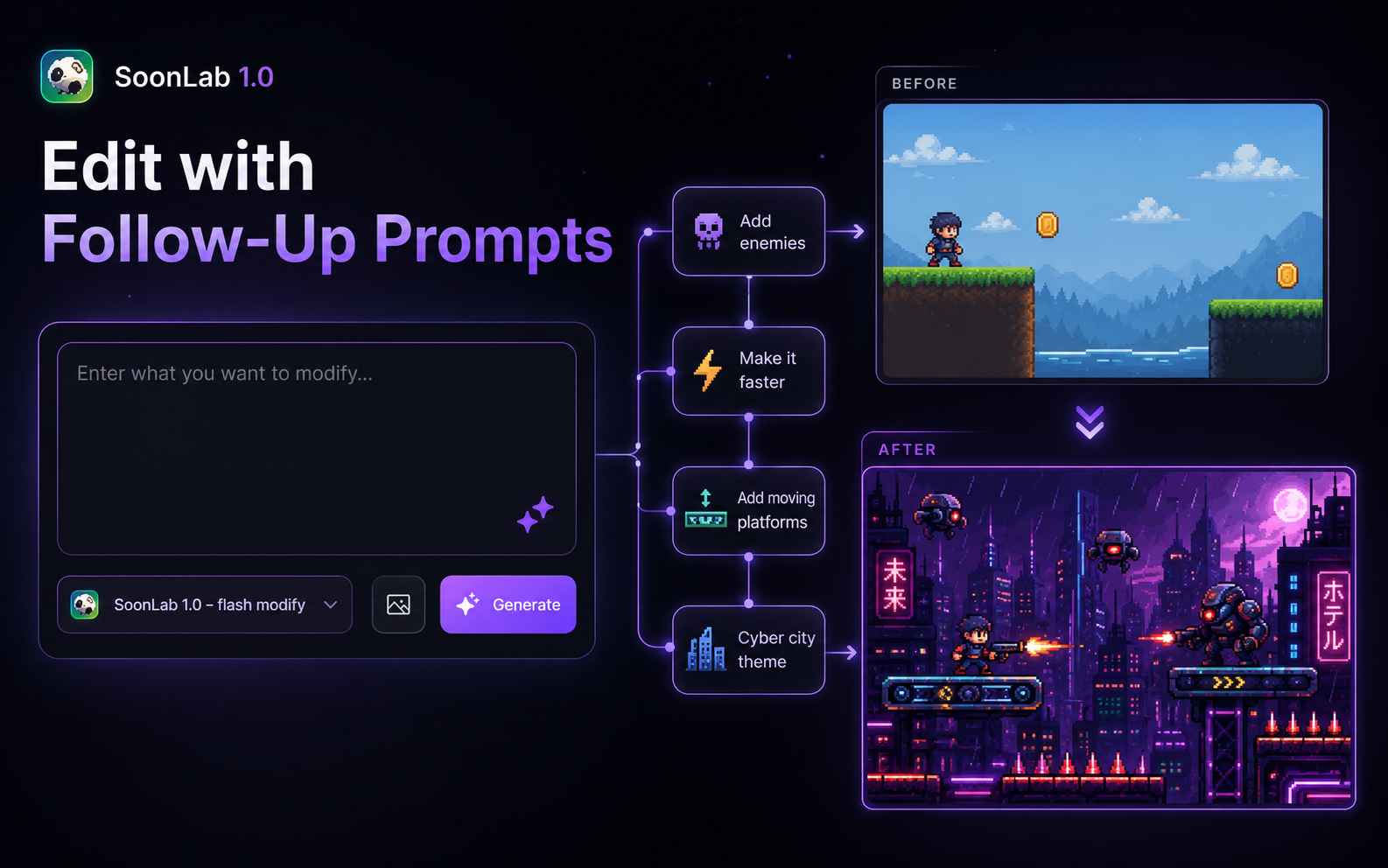
Then request one focused change, such as a higher jump, a slower first enemy, a closer checkpoint, clearer collectibles, or a larger restart button. Change one system at a time so you can see what improved the game.
This is the same idea used in video game prototyping: test the smallest playable version before adding more content.
Step 5: Publish and Share Your 2D Game
Once the core loop works, add the final details: a clear start screen, short instructions, sound and visual feedback, a win or final-score screen, a restart button, and touch controls when needed.
You can improve the presentation with readable game sprites, suitable free game assets, and a short loop created with this video game music guide. Keep these additions simple until the gameplay works.
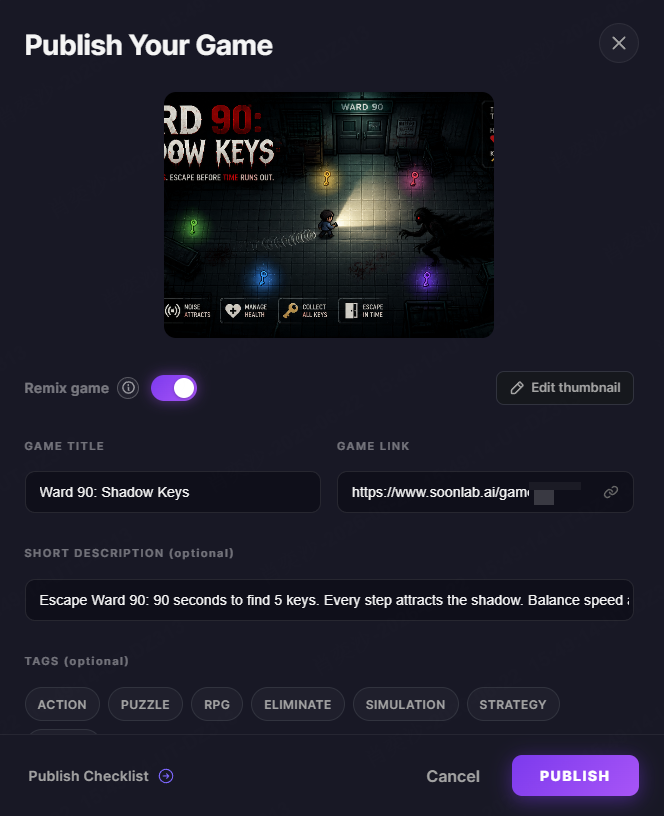
Publish the game and share its playable link. Player feedback may reveal unclear controls, unfair obstacles, or slow sections. Use that feedback for the next edit instead of adding many new features.
Easy 2D Game Ideas for Beginners
2D Platformer
Let the player run, jump, collect items, and reach an exit. Start with one short level.
Top-Down Maze Game
Ask the player to find keys or rescue characters while avoiding simple enemy paths.
2D Arcade Shooter
Let the player move, shoot targets, earn points, and survive several short waves.
2D Fighting Game
Create a one-on-one battle with movement, attacks, health bars, and a clear win condition. Learn the best 2D fighting games with a small arena and a limited set of moves.
2D Puzzle Game
Use switches, matching objects, codes, movable blocks, or a limited number of moves.
2D Survival Game
Add a timer, health bar, limited power, or several tasks that must be completed before time runs out.
Each idea has one clear loop and can become playable without a large world.
No-Code 2D Game Makers vs. Traditional Game Engines
Both methods can create 2D games, but they serve different goals.
| Method | Coding | Best for |
|---|---|---|
| AI game maker | Not required | Fast ideas and playable prototypes |
| Visual game editor | Little or none | Manual control without much coding |
| Traditional game engine | Often required | Larger and more customized projects |
| Code framework | Required | Full technical control |
Use a no-code or AI tool when you want to test an idea quickly. You can compare different 2D game engines to find an option that matches your experience, preferred workflow, and project size.
Use a traditional engine when you want to learn programming or control detailed systems yourself. This guide explains more ways to create a game without coding.
Common Mistakes When Making a 2D Game
Starting with a Project That Is Too Large
Do not begin with many levels, crafting, multiplayer, and a long story. Finish one complete level before expanding the project.
Describing Only the Art Style
"Create a beautiful pixel game" does not explain the gameplay. Include actions, rules, controls, goals, and endings.
Adding Too Many Mechanics
A first platformer does not also need combat, vehicles, dialogue, and base building. Choose one main mechanic and one supporting mechanic.
Skipping Playtesting
A game may look good but still have unclear controls, broken collision, or an unfair difficulty curve. Play from start to finish before polishing the art.
Forgetting the Restart Flow
Explain what happens after the player loses. A short game should let players try again quickly.
2D Game Development FAQs
Can I Make a 2D Game for Free?
Yes. You can start with a free game-making option and create a small prototype without paying for custom development.
Can I Make a 2D Game Without Coding?
Yes. AI game makers and visual editors can create game systems without traditional programming. You still need to describe the rules clearly.
What Is the Easiest 2D Game to Make?
A short platformer, maze, collector, clicker, puzzle, or arcade shooter is a good first project.
What Should I Include in a 2D Game Prompt?
Include the game type, main action, goal, controls, obstacles, progression, visual style, and win or lose conditions.
How Long Does It Take to Make a 2D Game?
A small prototype may be created quickly. A polished game with custom levels, art, and audio takes longer. The size of the project has the greatest effect on production time.
Can I Make a 2D Game for Mobile?
Yes. Request touch controls, large buttons, readable text, and a layout that works on smaller screens.
Can I Share the 2D Game I Create?
Yes. SoonLab lets you publish a browser game and share its playable link with other people.
Start Making Your First 2D Game
The best way to learn how to make a 2D game is to complete one small project. Choose one action, add a clear goal, generate a playable version, and test it before expanding the idea.
Use SoonLab's free 2D game maker to start without coding.