
Learning how to make video game music can feel intimidating at first, especially if you do not have music theory or composing experience. The good news is that beginner game music does not need to sound like a full studio soundtrack. It needs to support the game.
A useful game track helps the player feel the right mood, follow the pace, and stay immersed without becoming distracted. For a browser game, prototype, school project, game jam entry, or small indie game, your first goal is simple: create or choose a short loop that fits the player experience.
This guide explains how to make video game music as a beginner, how to create simple loops, how to choose music for different genres, where to find free game music, and how AI game tools such as SoonLab can help you create playable browser games with suitable BGM.
How Do You Make Video Game Music?
To make video game music, start with the game instead of the song. Decide what the player should feel, choose a tempo and style that match the genre, create a short loop, then test the music while actually playing the game.
A simple beginner workflow looks like this:
- Choose the mood and gameplay purpose.
- Pick a tempo and musical style that match the genre.
- Create a short 15 to 45 second loop.
- Use simple rhythm, chords, melody, and texture.
- Test the music inside the game, not only in your music tool.
- Adjust volume, repetition, energy, and file size based on gameplay.
 Expert Tip
Do not start with a full soundtrack. Start with one useful loop that makes one scene, level, or menu feel better.
What Makes Video Game Music Different?
Normal songs are usually written to be listened to from beginning to end. Game music is different because it must work inside an interactive experience. Like other game assets, music should support what the player sees, hears, and does in the game.
A player may stay in one level for 30 seconds or 10 minutes. They may pause, fail, retry, enter a battle, solve a puzzle, open a menu, or leave the game running in the background. That means game music often needs to loop smoothly, avoid distraction, and leave room for sound effects.
Good video game music usually does three things:
- Supports mood: calm, tense, playful, mysterious, heroic, lonely, cozy, or scary.
- Supports pacing: slow exploration, fast action, puzzle thinking, battle pressure, or relaxed idle play.
- Survives repetition: the track should still feel comfortable after looping many times.
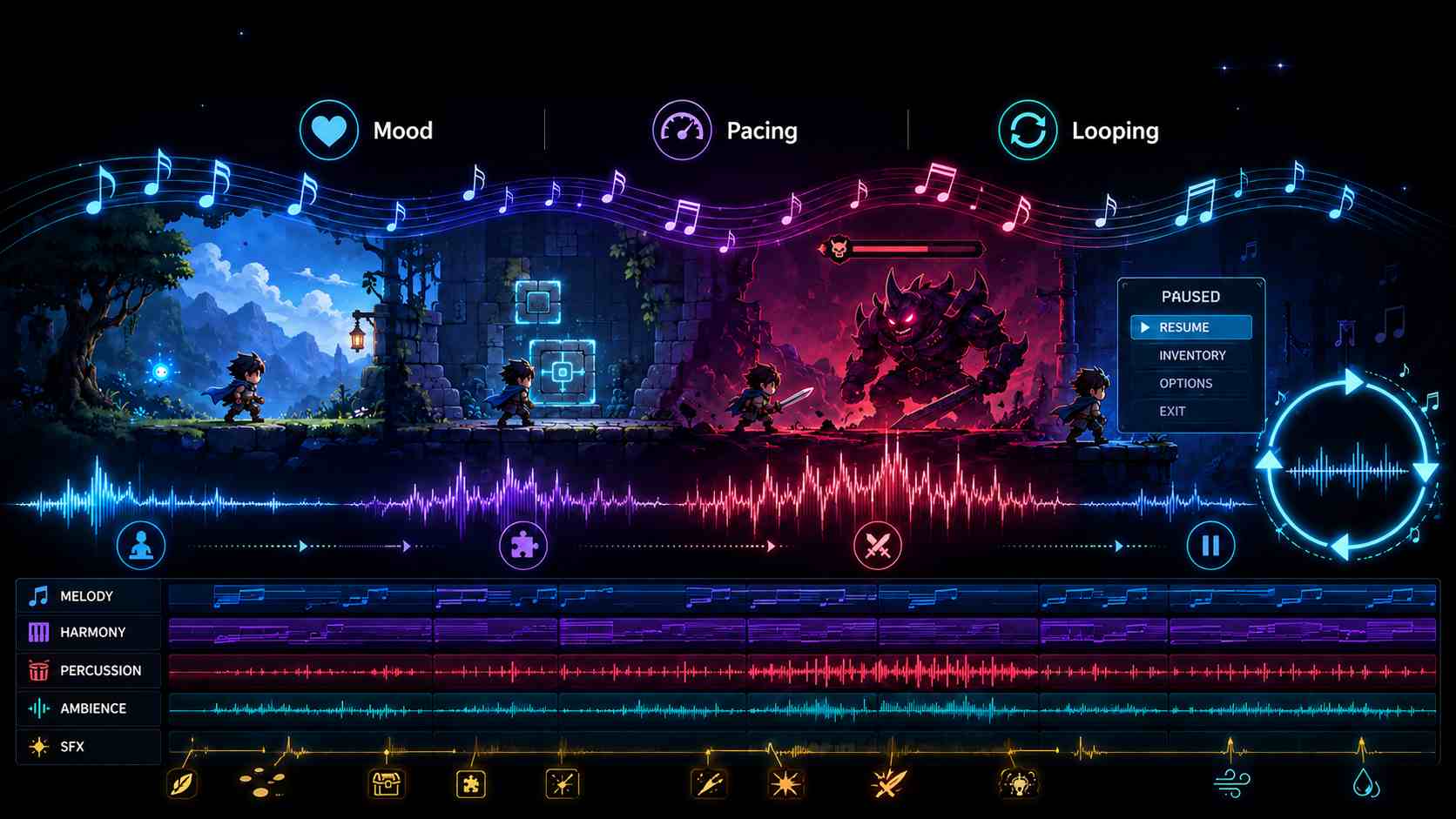
This is why making music for video games is less about writing an impressive standalone song and more about creating audio that works with player behavior, sound effects, level design, and visual elements such as characters, backgrounds, and behavior, sound effects, level design, and visual elements such as characters, backgrounds, and game sprites.
How to Compose Video Game Music?
Step 1: Decide What the Music Should Do
Before choosing instruments, plugins, samples, or AI music tools, write one sentence:
This track should make the player feel [emotion] while they [main action].
For example:
- This track should make the player feel excited while they jump across platforms.
- This track should make the player feel nervous while they move through a dark maze.
That one sentence will guide the tempo, instrument palette, rhythm, density, and overall style. If the sentence is unclear, the music will usually feel unclear too.
Step 2: Match Music to Your Game Genre
Different video game genres need different musical energy. Use this table as a starting point, then adjust based on your own game's mood and pace.
| Game Genre | Music Direction | Beginner Tip |
|---|---|---|
| RPG Game | Piano, strings, soft pads, flutes, orchestral textures | Create different moods for towns, battles, forests, dungeons, and emotional scenes. |
| Platformer Game | Bright melody, bouncy rhythm, chiptune, synth, light drums | Keep the beat steady so movement feels energetic and readable. |
| Puzzle Game | Soft arpeggios, gentle pads, minimal percussion | Avoid busy melodies because players need space to think. |
| Horror Game | Low drones, sparse piano, noise, dark ambience | Use silence and space. Constant loud music can reduce fear. |
| Arcade Game | Fast drums, retro synths, short hooks, strong rhythm | Make the loop exciting but not exhausting. |
| Rhythm Game | Strong beat, syncopated bass, clear downbeats, energetic tempo | Align audio cues with visual feedback so players can feel the beat. |
| Idle Game | Soft loops, relaxing chords, gentle ambience | The music should stay pleasant if the game runs in the background. |
| Casual Browser Game | Friendly melody, simple harmony, lightweight loop | Keep the file size small and avoid complex arrangements. |
Step 3: Create a Short Loop First
Most beginner game music should start as a loop. A loop is a short piece of music that repeats while the player stays in a scene, menu, or level.
A good first loop can be 15 to 45 seconds long. It does not need many sections. It just needs to repeat smoothly and support the game without becoming annoying.
You can build a simple game music loop with four layers:
- Beat: a drum pattern, pulse, or rhythmic texture.
- Harmony: two to four chords or a repeating bass pattern.
- Melody: a short phrase, hook, or motif.
- Texture: pads, ambience, small effects, noise, or background movement.
For your first track, keep the arrangement small. Too many instruments can make the music fight with sound effects, UI sounds, and gameplay feedback.
Step 4: Choose Tempo and Instruments
Tempo controls the speed of the music. Instruments control the color and mood. You can make a track feel very different without changing the melody simply by changing tempo, rhythm, or instruments.
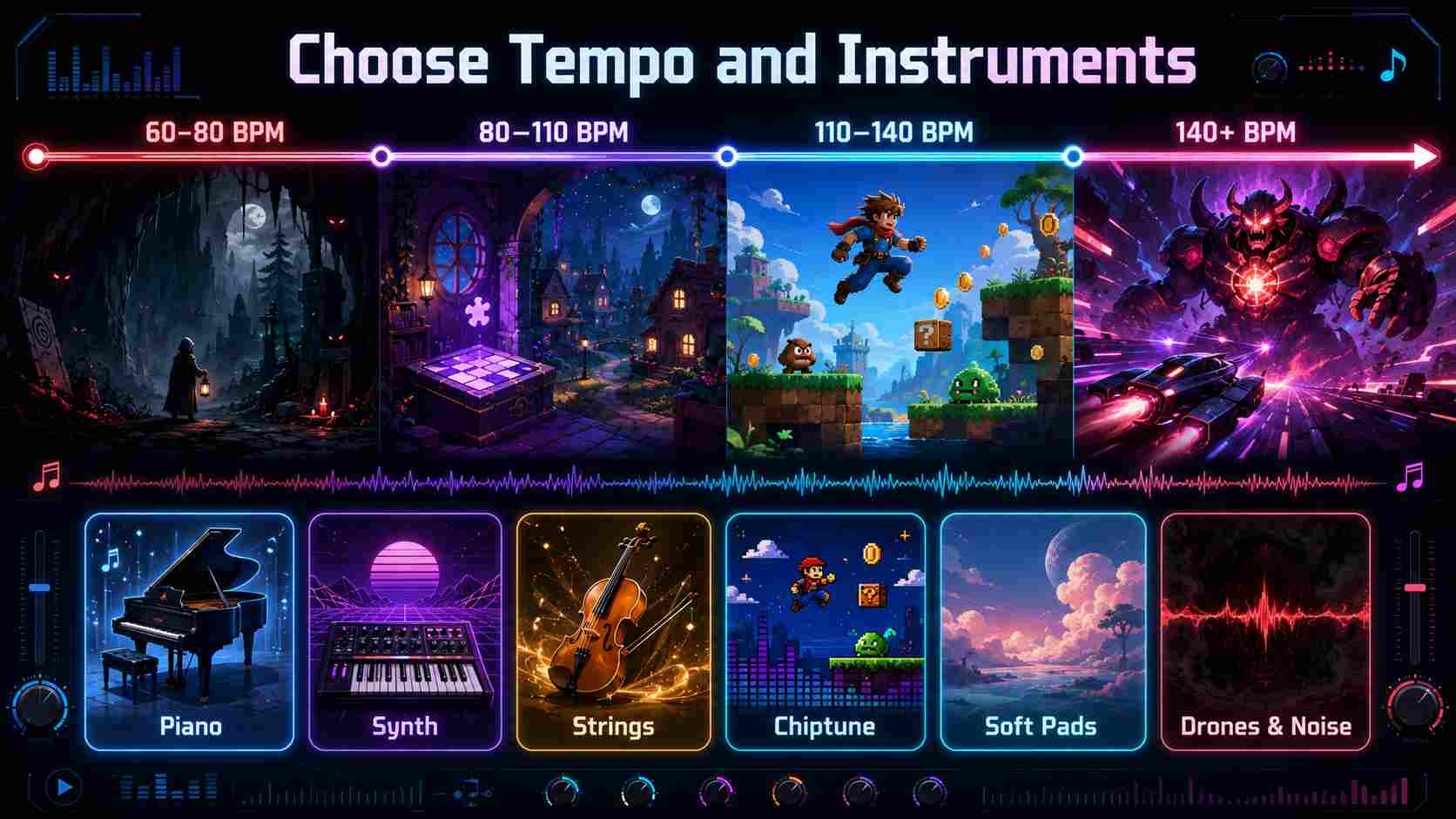
- 60-80 BPM: horror, mystery, sad RPG scenes, slow exploration.
- 80-110 BPM: puzzle games, idle games, cozy games, menu music.
- 110-140 BPM: platformers, casual action games, adventure games.
- 140+ BPM: arcade games, boss fights, racing, high-pressure challenges.
For instruments, use a small palette:
- Piano: emotional, calm, thoughtful, mysterious.
- Synth: retro, sci-fi, arcade, futuristic.
- Strings: fantasy, RPG, drama, tension.
- Chiptune: pixel art, retro platformers, arcade games.
- Soft pads: puzzle, idle, cozy, ambient games.
- Drones and noise: horror, suspense, danger.
Step 5: Test the Music Inside the Game
A track can sound good alone but feel wrong during gameplay. Always test the music while playing, even if the game is only a small prototype.
Ask these questions:
- Does the loop become annoying after one or two minutes?
- Can the player still hear important sound effects?
- Does the music match the speed of the gameplay?
- Does the mood fit the level, menu, scene, or challenge?
- Does the loop restart smoothly?
- Does the file load quickly in a browser game?
If the music feels wrong, change one layer first. Lower the drums, simplify the melody, reduce the volume, shorten the intro, or remove one instrument. Small changes often fix a loop faster than rewriting the entire track.
How SoonLab Helps You Create a Game With Suitable BGM
After you understand the basics of game music, you can use SoonLab to make the process easier.
SoonLab is an AI game maker that helps users create playable browser games from prompts. When writing your prompt, you can describe the game idea, genre, mood, pace, and music style. SoonLab can then generate the game and add suitable BGM based on your description.
This is especially helpful for beginners. You do not need to compose music before testing your game idea. You can create a playable prototype first, listen to the automatically added BGM, and then decide whether to keep, adjust, or replace it later.
This kind of playable game can be created in SoonLab by describing the game idea, mood, genre, and BGM style in your prompt. Play this browser game with sound on. Notice how the background music supports the mood, pacing, and gameplay feedback instead of acting like a normal standalone song.
Turn your idea into aplayable game
Describe the game you want to make, and SoonLab will help you start building it.
SoonLab prompt examples:
Where to Find or Compose Free Music for Games
If you do not want to make music from scratch, free music libraries and beginner-friendly tools can help you quickly add background music to prototypes, game jams, school projects, and small browser games. You can either download ready-made tracks or create simple loops yourself.
Free Music Libraries for Game Projects
These sites are useful when you need ready-to-use background music, sound effects, ambience, or short loops:
- OpenGameArt: A popular source for free game assets, including music and sound effects. It works well for RPGs, pixel games, platformers, and game jam projects.
- Free Music Archive: Offers music under different licenses. It can be useful for menu music, atmospheric tracks, story scenes, and background loops.
- itch.io Music Asset Packs: A good place to find free and paid music packs made for specific game styles, such as fantasy RPGs, horror games, visual novels, retro platformers, and arcade games.
- Incompetech: A well-known royalty-free music site. Many tracks can be used with attribution, making it useful for prototypes, videos, and small games.
- Pixabay Music and Mixkit: Both provide free music and sound effects that can work for casual games, trailers, menu music, and social media clips.
- Freesound: Better for sound effects and audio samples than full soundtracks. It is useful for UI clicks, ambience, footsteps, impacts, horror textures, and short loops.
NoteFree to download does not always mean free to use in a public or commercial game. Before adding any track to your project, check:
- Commercial use: Can you use the track if your game makes money or includes ads?
- Attribution: Do you need to credit the artist in the game, credits page, or store page?
- Modification: Can you edit, loop, fade, remix, or cut the track?
- Redistribution: Can the audio file be included inside a downloadable or browser-playable game?
- Platform use: Can you use it on itch.io, Steam, YouTube, TikTok, or your own game page?
- Proof: Can you save a copy of the license page, permission, or receipt?
Free Tools to Compose Simple Game Music
If you want more control over the sound of your game, you can create your own music with beginner-friendly tools:
- BeepBox: A free browser-based tool for making simple chiptune, retro loops, arcade music, and platformer tracks.
- Online Sequencer: A simple browser tool with a piano-roll interface. It is useful for melodies, MIDI sketches, and short loops.
- LMMS: A free, open-source music production tool with synths, drums, samples, and effects. It gives you more control but takes longer to learn.
- BandLab: A free online music studio for recording, editing, arranging loops, and adding effects. It is a good option if you want a more complete music workflow without paid software.
- AI music generators: Useful for quickly testing mood, tempo, style, and instrumentation from text prompts. Before using AI-generated music in a public or commercial game, always check the license terms.
Common Mistakes When Making Game Music
1. Writing a full song too early
Do not spend too much time on a long soundtrack before the game is playable. Start with a short loop and test it first.
2. Making the music too busy
Vocals, loud drums, and complex melodies can distract from gameplay. This is especially true for puzzle games, educational games, and casual browser games.
3. Ignoring licenses
Always check whether a free track can be used in games, whether commercial use is allowed, whether editing is allowed, and whether attribution is required.
4. Not testing with sound effects
Music and sound effects share the same space. If the player cannot hear important actions, lower the music volume or simplify the track.
5. Using one mood for every scene
A menu, level, boss fight, victory screen, and failure screen do not all need the same energy. Even small games benefit from a few mood changes.
FAQs About How to Make Video Game Music
How do I make video game music as a beginner?
Start with a short loop. Choose the mood, tempo, instruments, and genre direction. Then test the loop inside the game and adjust it based on the player experience.
How long should beginner game music be?
A 15 to 45 second loop is enough for a first game prototype. It should repeat smoothly and stay comfortable after several loops.
Do I need music theory to make game music?
No. Music theory helps, but beginners can start with loops, simple melodies, free tools, music libraries, or AI music generators.
Where can I find free music for games?
Good places to start include OpenGameArt, Free Music Archive, itch.io music packs, Incompetech, Pixabay Music, Mixkit, and Freesound. Always read the license for the specific track you want to use.
Can I use AI-generated music in my game?
Often, yes, but it depends on the tool. Check whether the generator allows game use, commercial use, editing, and redistribution. Keep a record of the prompt, export date, and license terms.
Can SoonLab add background music to my game?
Yes. SoonLab can create a playable browser game from your prompt and add suitable BGM based on the game genre, mood, and pacing you describe.
Conclusion
Making video game music is not about writing a perfect soundtrack on your first try. It is about supporting the player.
Start with the game mood, create a short loop, keep the arrangement simple, and test the music inside the game. If you want to move faster, you can use free music libraries, beginner-friendly tools, AI music generators, or SoonLab's AI game creation workflow.
A small game with the right background music can feel much more complete. Start simple, test often, and improve the soundtrack as your game grows.