
If you want to learn how to make a puzzle game, start smaller than you think. A good first puzzle game does not need a huge story, dozens of levels, or advanced art. It needs one clear rule, one goal, one obstacle, and a satisfying moment when the player understands the solution.
AI can make this process faster, especially for beginners. Instead of opening a blank game engine and wondering where to start, you can describe the puzzle rules, map, objects, win condition, and player controls in plain language. An AI game maker like SoonLab can help turn that idea into a playable browser prototype that you can test, edit, and share.
This guide walks through the full workflow: choose a puzzle concept, pick a mechanic, write a strong prompt, build a prototype, test the design, and compare SoonLab with other puzzle game creation tools.
Turn your idea into aplayable game
Describe the game you want to make, and SoonLab will help you start building it.
What Makes a Good Puzzle Game?
A puzzle game is built around a problem the player can solve by understanding rules. The fun comes from the gap between confusion and clarity. At first, the player does not know what to do. Then they observe, experiment, notice a pattern, and finally solve it.
Most beginner puzzle games need five parts:
- Goal: what the player is trying to achieve.
- Mechanic: what the player can do.
- Constraint: what makes the goal difficult.
- Feedback: how the game shows progress or failure.
- Solution: the intended path, trick, or insight.
For example, in a key-and-door puzzle, the goal is to open a door, the mechanic is collecting keys, the constraint is a maze or locked route, feedback is the door opening or staying closed, and the solution is choosing the right path.
How to Make a Puzzle Game With AI in 6 Steps
Making a puzzle game with AI works best when you treat the AI game prompt like a small game design plan: start with one clear mechanic, define the rules, generate a playable prototype, then test and improve the puzzle step by step. If you want to study how strong puzzle ideas work in real games, you can first explore our guide to the best puzzle adventure games.
Step 1: Choose a Simple Puzzle Mechanic
Do not begin with a full game world. Begin with a mechanic that can create multiple puzzles. The best beginner mechanics are easy to explain in one sentence.
| Mechanic | How It Works | Beginner Game Idea |
|---|---|---|
| Key and door | Find or activate something to unlock the exit | Escape a tiny dungeon by collecting colored keys |
| Push blocks | Move objects into correct positions | Push crates onto glowing floor switches |
| Sliding tiles | Rearrange pieces to complete a pattern or path | Slide rooms to connect a path to the exit |
| Light beams | Redirect a beam using mirrors or lenses | Rotate mirrors to power a locked gate |
| Color matching | Match objects by color, symbol, or type | Open doors by placing gems on matching altars |
| Rule switching | Change how objects behave | Toggle gravity, water, or bridges to reach the goal |
| Pattern deduction | Infer rules from clues | Use symbols on walls to solve a code lock |
If color matching is your chosen mechanic, you can use SoonLab's matching game maker to create a playable card, image, word, or symbol-matching game from a prompt. Start with a few clear pairs, then test the difficulty and improve the rules with follow-up prompts.
If this is your first project, choose one mechanic. Combining too many mechanics too early makes the prompt harder, the prototype harder to debug, and the puzzle harder to test.
Step 2: Turn the Mechanic Into Clear Rules
Once you have a mechanic, write the rules before you write the story. Puzzle games work best when the player can understand what is possible, what is blocked, and what changes after each action.
A simple puzzle concept can be described with this structure:
- Player role: who the player controls.
- Game view: top-down, side-view, grid-based, room-based, or first-person.
- Objective: reach the exit, repair a machine, open a gate, reveal a pattern, or collect clues.
- Interactive objects: keys, doors, switches, blocks, mirrors, portals, tiles, symbols, NPC clues, or moving platforms.
- Rules: what each object does and when it changes state.
- Failure state: what happens if the player gets stuck, runs out of moves, or triggers the wrong object.
- Win condition: the exact moment the level ends.
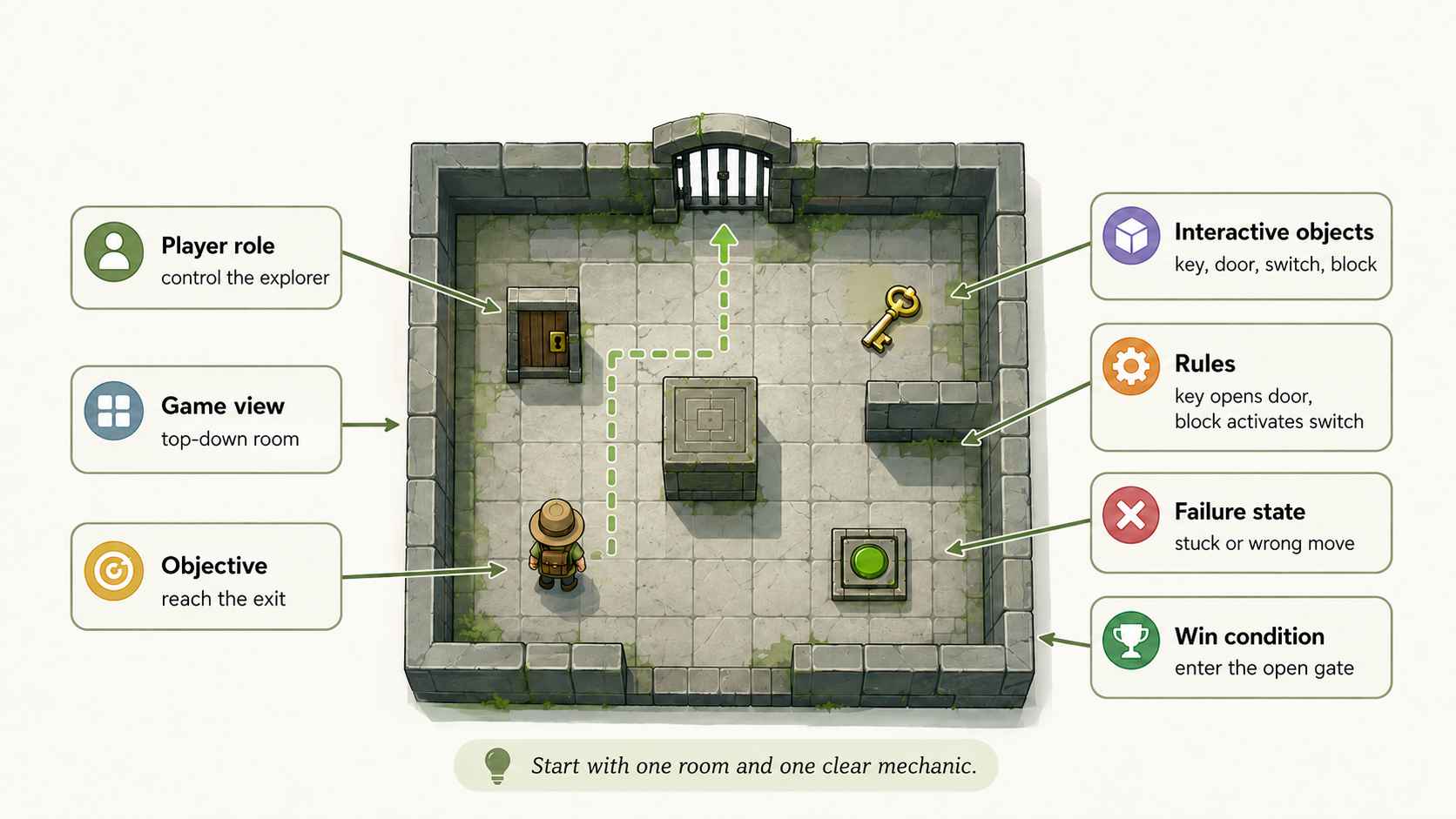
For a beginner project, keep the first playable version to one room or one small map. A one-room puzzle is easier to test because every object has a purpose. If the prototype is fun, you can later add more levels, harder layouts, new visual themes, and optional clues.
Step 3: Write a Prompt That AI Can Turn Into a Game
The fastest way to make a puzzle game with AI is to write a prompt like a tiny design document. Vague prompts such as "make a fun puzzle game" usually produce generic results. Strong prompts describe the rules, controls, objects, feedback, and end condition.
Use this starter prompt structure:
Create a simple browser puzzle game.
Game view: [top-down / side-view / grid-based].
Player: [who the player controls].
Goal: [what the player must do].
Controls: [keyboard, mouse, drag, click, or tap].
Objects: [keys, doors, switches, blocks, mirrors, tiles, clues].
Rules: [how each object behaves].
Level: [describe one small test level].
Win condition: [exact moment the player wins].
Quality details: include simple instructions, clear feedback, a restart button, and readable visuals.
Here is a more complete example you could adapt in SoonLab:
Create a top-down browser puzzle game called Key Garden.
The player controls a small explorer with arrow keys or WASD.
The goal is to reach the golden gate on the right side of the map.
There are three colored keys: red, blue, and green. Each key opens only the matching door.
The player must collect the keys in the correct order because some paths close after a door opens.
Add one movable stone block that can be pushed onto a floor switch to unlock a bridge.
Make one compact level with walls, paths, labels, and clear visual feedback.
The player wins when they walk through the golden gate.
Include a restart button, short instructions, and a success message.
This prompt gives the AI enough structure to build something testable. It also leaves room for visual interpretation, which is useful when you want a quick browser prototype rather than a fully polished production game.
Step 4: Generate a Playable Browser Prototype With SoonLab
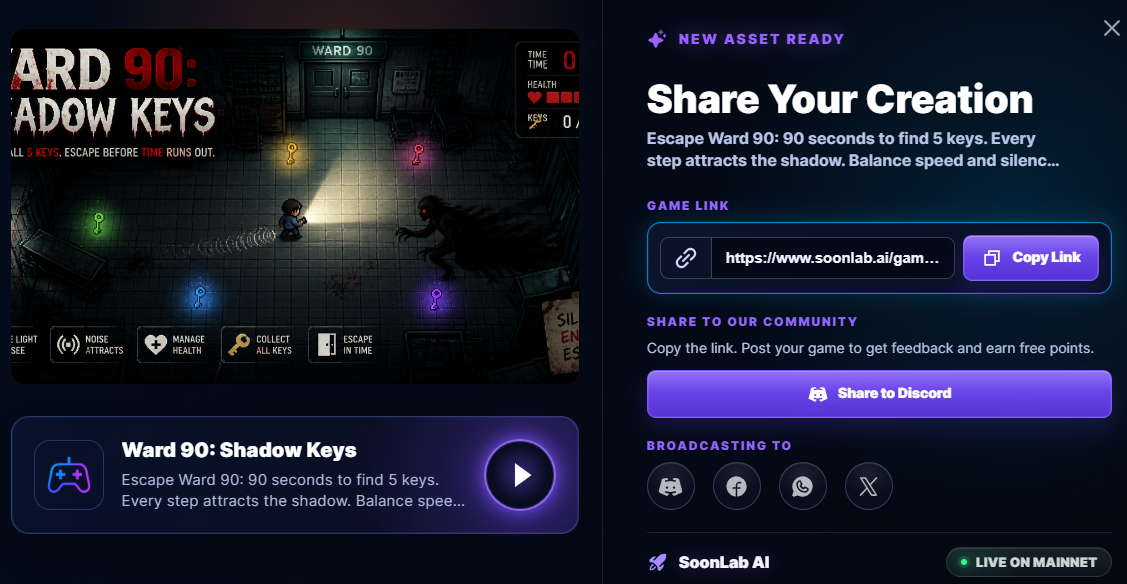
After your prompt is clear, you can use SoonLab as an AI game maker to move from idea to playable browser prototype. This is especially useful for beginners because the first goal is not to ship a perfect puzzle game. The first goal is to see whether the puzzle works when someone actually plays it.
Turn your idea into aplayable game
Describe the game you want to make, and SoonLab will help you start building it.
A practical SoonLab workflow looks like this:
- Start with one level. Ask for a small playable puzzle with one room, one main mechanic, and a clear win condition.
- Describe the controls. Tell the AI whether the game should use keyboard movement, click controls, drag-and-drop pieces, or simple buttons.
- Name every interactive object. If keys, doors, switches, blocks, tiles, or clues matter, include them in the prompt.
- Ask for visible feedback. Doors should open, switches should change color, wrong moves should be understandable, and the win state should be obvious.
- Play the prototype immediately. The best puzzle design feedback comes from testing the actual game, not rereading the prompt.
SoonLab fits best when you want to explore a puzzle concept quickly: a room layout, a mechanic test, a character concept, or a browser game idea you can show to another person.
Step 5: Test Whether the Puzzle Is Actually Fun
A puzzle can look clever in your head and still feel confusing in play. Testing is where you find out whether the rules are readable, whether the solution is fair, and whether players feel smart instead of stuck.
Use this quick puzzle test checklist:
- Goal clarity: can a new player understand what they are trying to do within 10 seconds?
- Rule clarity: does each object behave consistently?
- Fairness: can the puzzle be solved by observation and logic instead of guessing?
- Feedback: does the game clearly show when an action worked?
- Recoverability: can the player restart quickly if they make a mistake?
- Difficulty: does the first level teach the idea before asking for a harder solution?
- Readability: are important objects visually distinct from decoration?
If a tester gets stuck, do not immediately explain the solution. Watch where they click, where they look, and what they misunderstand. That moment usually tells you what to change in the level design, visual feedback, or instructions.
Step 6: Edit, Expand, and Share the Game
Once the first version works, improve one thing at a time. Beginners often try to add more mechanics, more levels, more art, and more story all at once. A better approach is to make one playable loop stronger before expanding.
Here are useful next edits:
- Add a tutorial sign: explain one rule in a short sentence inside the level.
- Create a second level: reuse the same mechanic but change the layout.
- Add a twist: introduce one new object, such as a locked bridge or moving hazard.
- Improve visual contrast: make keys, doors, switches, and clues easy to notice.
- Reduce dead ends: avoid states where the player is stuck without knowing why.
- Share with one tester: ask them to play without instructions and describe their thought process.
When the prototype is understandable and fun, you can use it as a base for a longer puzzle game, a portfolio piece, a classroom project, or a more polished browser game concept.
SoonLab vs Other Ways to Make a Puzzle Game
There are many ways to make puzzle games. The best tool depends on whether you want speed, control, visual scripting, text-based design, or full production power.
| Tool | Best For | Strengths | Tradeoffs |
|---|---|---|---|
| SoonLab | Beginners who want prompt-led browser prototypes | Fast concept testing, natural-language prompts, playable browser game direction | Best used for early prototypes and iteration unless advanced production needs are confirmed |
| Unity | Creators who need full engine control | Powerful 2D and 3D workflows, large ecosystem, production-ready flexibility | Higher learning curve, often requires coding or deeper engine knowledge |
| GDevelop | No-code creators who like visual event logic | Event-based workflow, approachable for non-programmers, good for 2D games | More manual setup than a prompt-first prototype workflow |
| Buildbox | Template-driven no-code game projects | Beginner-friendly visual creation, useful for simple arcade-style ideas | May feel limiting for complex custom puzzle logic |
| PuzzleScript | Grid-based logic puzzles | Excellent for Sokoban-style mechanics and compact rule experiments | Minimal presentation and a narrower game format |
| Twine | Text puzzles and branching stories | Great for narrative clues, choices, and deduction-based puzzles | Less suited to visual movement puzzles without extra work |
For a first puzzle game, SoonLab is useful because it keeps the early workflow focused on the idea: what the player does, how the puzzle responds, and whether the concept is playable. If the prototype proves promising, you can keep iterating in SoonLab or later rebuild the idea in a more technical engine.
FAQs About How to Make a Puzzle Game
How do you make a puzzle game?
Start with one clear mechanic, such as keys and doors, push blocks, sliding tiles, light beams, or pattern deduction. Define the goal, rules, obstacles, feedback, and win condition. Then build a small playable level, test it with real players, and improve the parts that feel unclear or unfair.
Can AI make a puzzle game?
Yes. AI can help generate a playable puzzle game prototype from a clear prompt. You still need to guide the concept, define the rules, test the result, and refine the design. AI is most useful when you treat it as a fast prototyping partner rather than a replacement for playtesting.
What is the easiest puzzle game to make?
A key-and-door puzzle or a one-room switch puzzle is usually easiest for beginners. Both are simple to explain, easy to test, and flexible enough to create multiple levels.
Can SoonLab help beginners make puzzle games?
Yes. SoonLab can help beginners turn puzzle ideas, mechanics, and prompts into playable browser game prototypes. It is especially useful for quickly testing whether a puzzle concept works before investing time in a larger game.
Conclusion
Learning how to make a puzzle game is mostly about learning how to think in rules. Start with one mechanic, give the player a clear goal, create a small obstacle, and make the solution feel earned. A strong first prototype does not need to be large. It needs to be understandable, testable, and satisfying.
With AI game maker SoonLab, beginners can move from a written idea to a playable browser prototype much faster. Write a clear prompt, test the result, adjust the rules, and keep improving the puzzle until another person can solve it without your explanation. That is where a simple idea starts becoming a real game.