
Let me be real with you. When I first started in game development, I spent weeks paralyzed trying to choose between Unity and Unreal Engine. I read countless articles, watched hours of YouTube videos, and still felt stuck.
Here's the thing those articles rarely tell you: there is no wrong choice. But there is a better choice for your specific project and goals.
After researching what actually works for beginners and indie developers in 2026, I want to share what I've learned. This isn't another tech spec comparison. This is a practical guide about Unity vs Unreal to help you decide.
Unity vs Unreal Engine: Quick Comparison
Before we dive deep, let me give you the quick version. Here's how these two giants stack up:
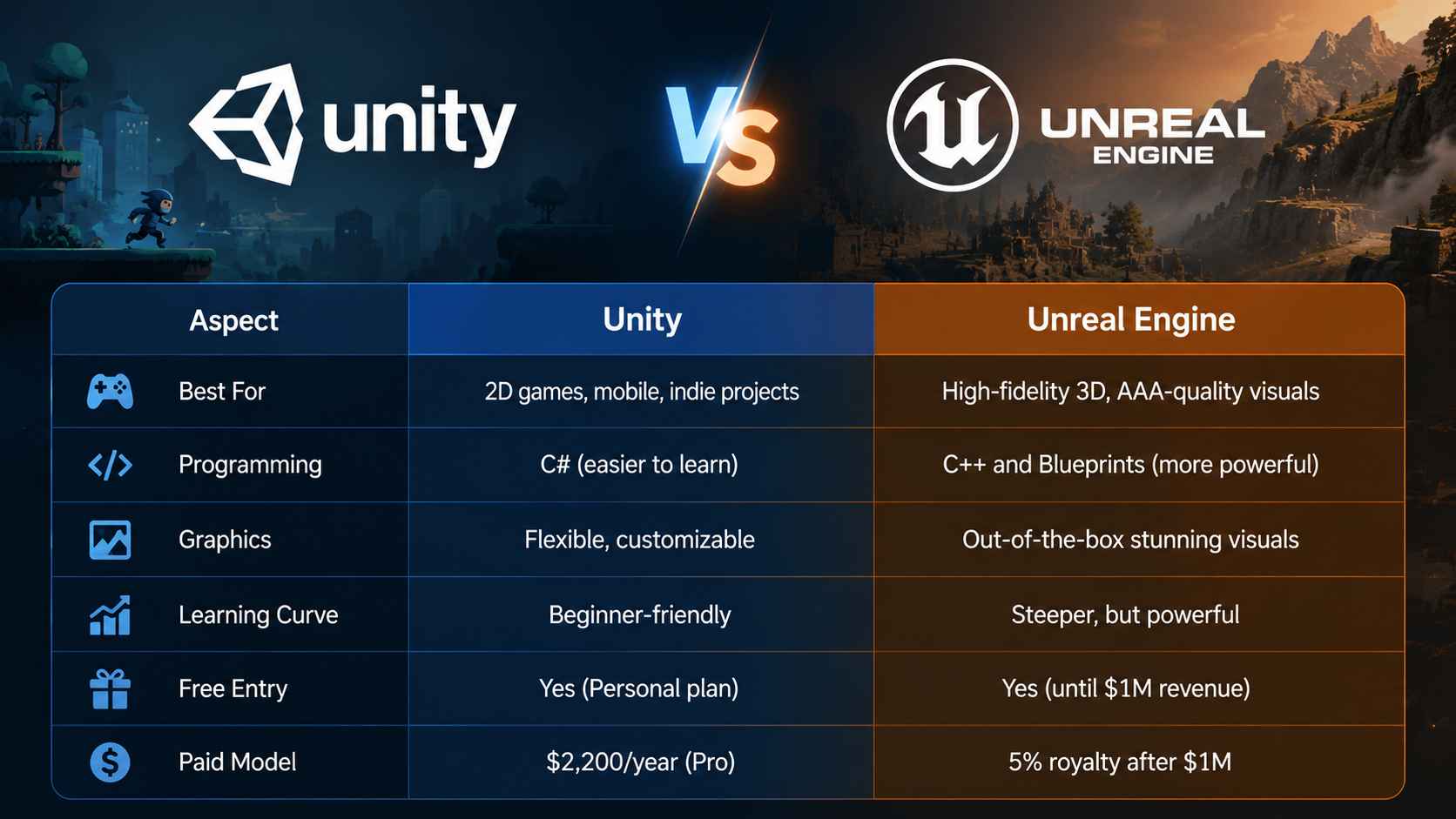
Unity is lighter, easier to learn, and great for mobile and 2D. Unreal gives you jaw-dropping graphics but requires more powerful hardware and a bigger learning investment.
Unity vs Unreal for Beginners
Here's the honest truth most articles won't tell you: both game engines are learnable. The difference is in how and how long it takes.
Why Unity Is Often Easier for Beginners:
When I talk to developers who started with Unity, the most common feedback is about the simplicity. Unity uses C#, which reads like plain English compared to C++. The editor feels less overwhelming, and you can start building something playable in days rather than weeks.
C# in Unity is forgiving. It handles memory for you, has clear error messages, and a massive community ready to help when you get stuck. If you've ever written any code before, you'll find C# intuitive.
Why Unreal Can Actually Work for Beginners Too:
Here's where I might surprise you. Unreal's Blueprint system lets you build games without writing code. You drag and connect nodes to create game logic. It's visual, it's powerful, and many successful indie games were built entirely with Blueprints.
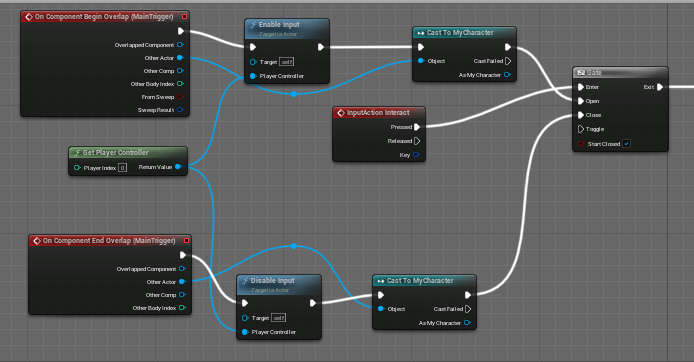
The catch? Unreal still requires more hardware muscle. You'll need a decent GPU to run it smoothly. And while Blueprints make coding easier, understanding game design principles still takes time.
If you have no coding experience and a limited budget for hardware, start with Unity. If you're willing to invest in learning hardware requirements and want AAA-quality results faster, Unreal with Blueprints is a valid path.
If you're exploring even lighter or fully open-source alternatives, Godot vs Unity is worth considering, especially for indie 2D developers.
Unreal Engine 5 vs Unity Graphics Comparison
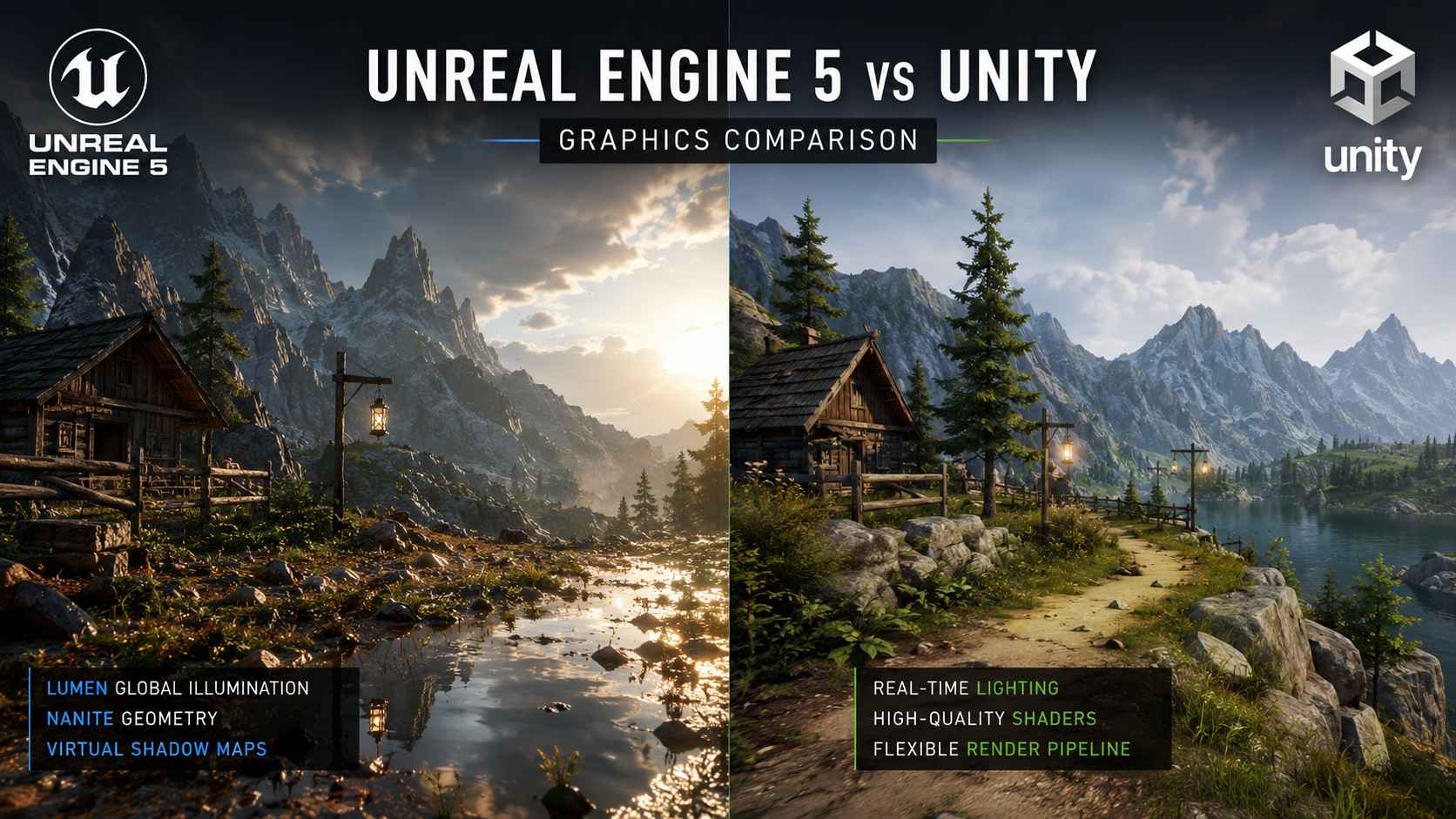
Let me cut through the marketing noise here. When you see game trailers showing incredible graphics, those are usually Unreal Engine 5. Why? Because Unreal simply has better default graphics out of the box.
What Unreal Brings to the Table:
Unreal Engine 5 introduced technologies that changed the game:

For absolute graphics quality, Unreal wins hands down. But here's what matters more for beginners: Unreal gives you this quality without needing expert knowledge.
What Unity Offers:
Unity has improved dramatically with its rendering pipelines:
The catch? Unity requires more manual setup to reach the same visual fidelity as Unreal. You'll spend more time configuring and optimizing.
 Expert Tip
Unreal Engine 5 has superior default graphics. Technologies like Nanite and Lumen provide photorealistic results with less effort. Unity can achieve excellent graphics but requires more technical expertise and manual optimization. For graphics-first projects, Unreal is the clear choice.
Unity vs Unreal for Different Game Types
Your game type matters more than you think when choosing an engine. Let me break it down by what actually works in 2026.
2D Game Development
If you're making a 2D platformer, puzzle game, or side-scroller, Unity is the practical choice. You might also consider 2D AI game maker tools for quick prototyping without coding.
Unity's 2D toolset is mature and purpose-built. The sprite system, 2D physics, and tilemap tools work seamlessly. You'll find tutorials, assets, and plugins specifically designed for 2D workflows.
Unreal can handle 2D, but it's not optimized for it. Many features assume 3D development first. You'd be fighting the engine rather than working with it.
My recommendation: For 2D games, choose Unity without hesitation.
3D Game Development
This is where the choice gets interesting.
For stylized 3D (think low-poly, cartoonish, or art-heavy games), Unity often makes more sense. You have fine control over visuals, and many artists prefer Unity's workflow.
For realistic 3D (photorealistic environments, cinematic games), Unreal dominates. The gap between engines is most visible here. Games like Fortnite showcase what Unreal can achieve.
For 2D games, Unity is better. For realistic 3D, Unreal is superior. For stylized 3D, both work well, but Unity offers more flexibility.
Unity vs Unreal for VR Development
Both engines handle VR, but they approach it differently.
 Unity VR Strengths Unreal Engine VR Strengths
If you're building for Meta Quest or mobile VR, Unity is the practical choice. The standalone performance matters more than visuals.
If you're targeting high-end PC VR with visual fidelity as your selling point, Unreal wins.
Pricing and Hardware Requirements: Unity vs Unreal
Performance and cost are often the deciding factors when choosing between Unity and Unreal Engine — especially for beginners, indie developers, and small teams.
Hardware Requirements
Unity is generally easier to run on modest hardware. A mid-range laptop with 8GB–16GB RAM can usually handle small to medium Unity projects without major issues. This makes Unity a popular choice for students, solo developers, and mobile game creators.
Unreal Engine is significantly more demanding. For smooth Unreal Engine 5 development, most developers recommend at least 16GB RAM, a modern multi-core CPU, SSD storage, and a dedicated GPU such as an RTX 3060 or better. Large UE5 projects can take longer to compile and consume more system resources.
This difference becomes especially noticeable when working with advanced UE5 features like Nanite and Lumen, which require stronger hardware for real-time rendering.
Pricing Models Explained Simply
Both Unity and Unreal are technically free to start with, but their long-term pricing models work differently.
Unity Pricing:
Unity currently uses a seat-based subscription model.
- Unity Personal: Free for individuals and smaller creators under the revenue limit
- Unity Pro: Paid annual subscription with additional professional features
- Runtime fee: Removed after community backlash
Unity's pricing is now more predictable than it was during the runtime fee controversy, which caused concern across the game development industry in 2023–2024.
Unreal Engine Pricing:
Unreal Engine is free to use until a game earns more than $1 million USD in lifetime gross revenue.
After that threshold:
- Developers pay a 5% royalty on revenue above $1 million
- Some Epic Games Store releases may qualify for reduced royalty rates
- Non-game commercial use may require seat-based licensing
Epic's royalty model is attractive for smaller indie projects because there are no upfront subscription costs.
Which One Is More Budget-Friendly?
For beginners and hobby developers, both engines are effectively free. However, the better option depends on your situation:
- Unity is often easier for long-term budgeting because of its predictable subscription pricing
- Unreal can become more expensive if a commercial game becomes highly successful
- Unity usually requires less powerful hardware, which can reduce development costs overall
- Unreal may require additional investment in GPUs and storage for larger projects
For indie developers working on smaller 2D or mobile games, Unity is often the more accessible option. For teams targeting high-end AAA visuals, Unreal Engine may justify the higher hardware requirements and royalty costs.
If pricing is making you question the engine itself, it is worth looking beyond these two proprietary tools. Our proprietary vs open-source game engines guide explains how source access, licensing, support, and long-term control can change the decision.
Which Engine Is Better for Indie Developers?
This is where I can share some real talk based on community discussions and industry patterns.
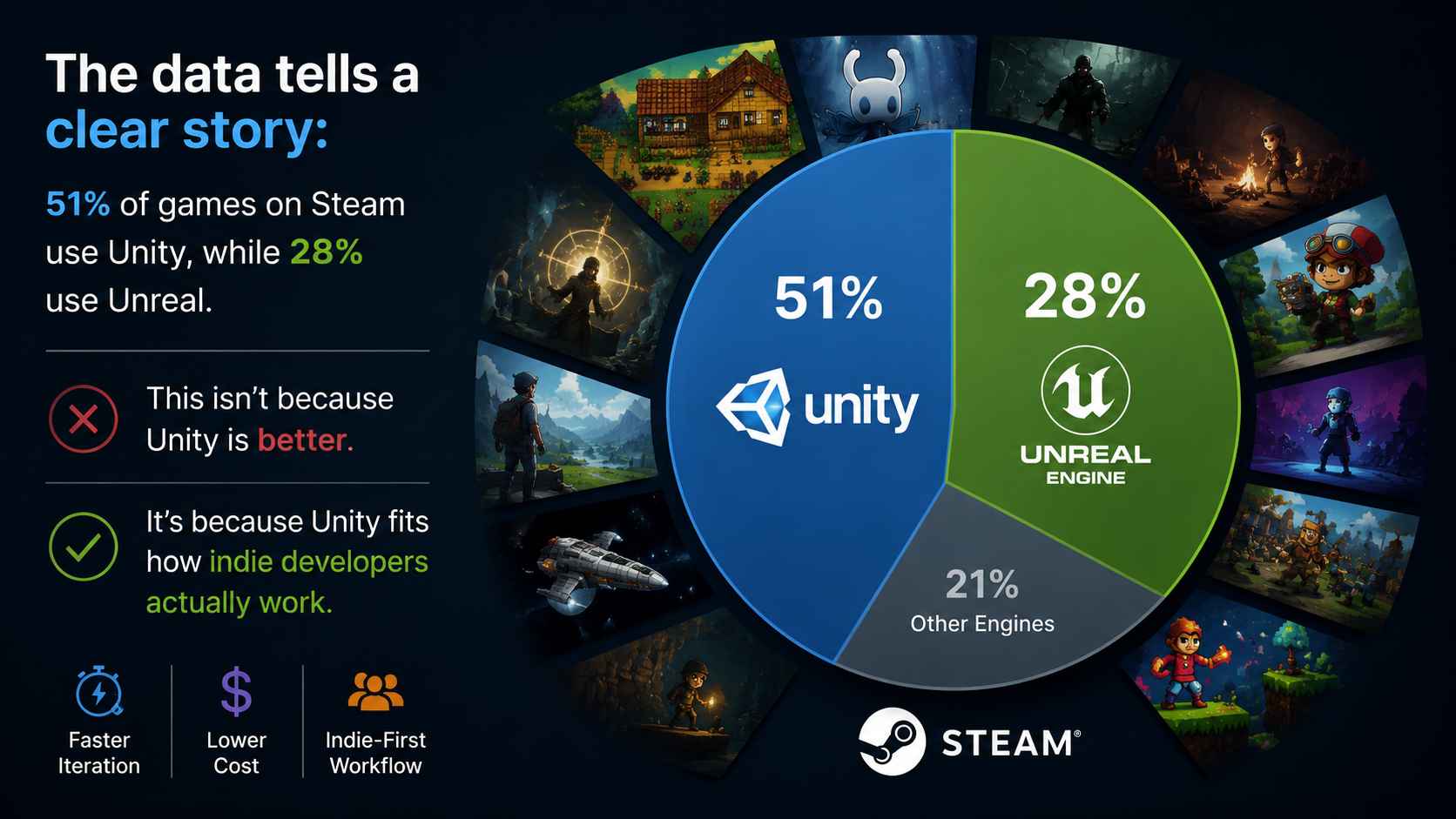
The data tells a clear story: 51% of games on Steam use Unity, while 28% use Unreal. This isn't because Unity is better. It's because Unity fits how indie developers actually work.
Here's what makes Unity popular for indie teams:
1. Smaller team friendly: Solo developers and small teams can manage Unity projects without dedicated technical artists or engineers.
2. Faster iteration: The engine is lighter, so making changes and testing is quicker. This matters when you're wearing every hat.
3. Cross-platform without headache: Unity handles mobile, web, and console deployment with less friction.
4. Flexibility: You can make anything in Unity. RPGs, platformers, simulations, visual novels, and coloring games. The engine doesn't push you toward a specific style.
Unreal's indie advantages:
1. Built-in visual quality: Your game looks impressive even with basic assets. This matters for marketing.
2. Professional tools: Features you'd pay thousands for in Unity are built into Unreal.
3. Source access: You can modify the engine itself if needed.
Recommended Engine by Team Size and Project Type:
- Unity is generally a better choice for solo developers and small teams because it is easier to learn, lighter to run, and faster for prototyping.
- Unreal Engine is often more suitable for larger teams focused on high-end graphics, cinematic experiences, and AAA-style production quality.
- For mobile games and browser-based projects, Unity remains the more common choice due to its optimization and broader platform support.
Do Beginners Still Need Traditional Game Engines?
Unity and Unreal Engine are still the industry standard for building professional games. However, for many beginners, the biggest barrier is not creativity—it's the complexity of learning a full game engine.
Today, a new category of AI game creation tools is emerging to solve this problem.
Instead of starting with complex interfaces and coding systems, platforms like SoonLab let you turn a simple idea into a playable game prototype in minutes using natural language.
No engine setup. No coding. Just ideas → playable results.
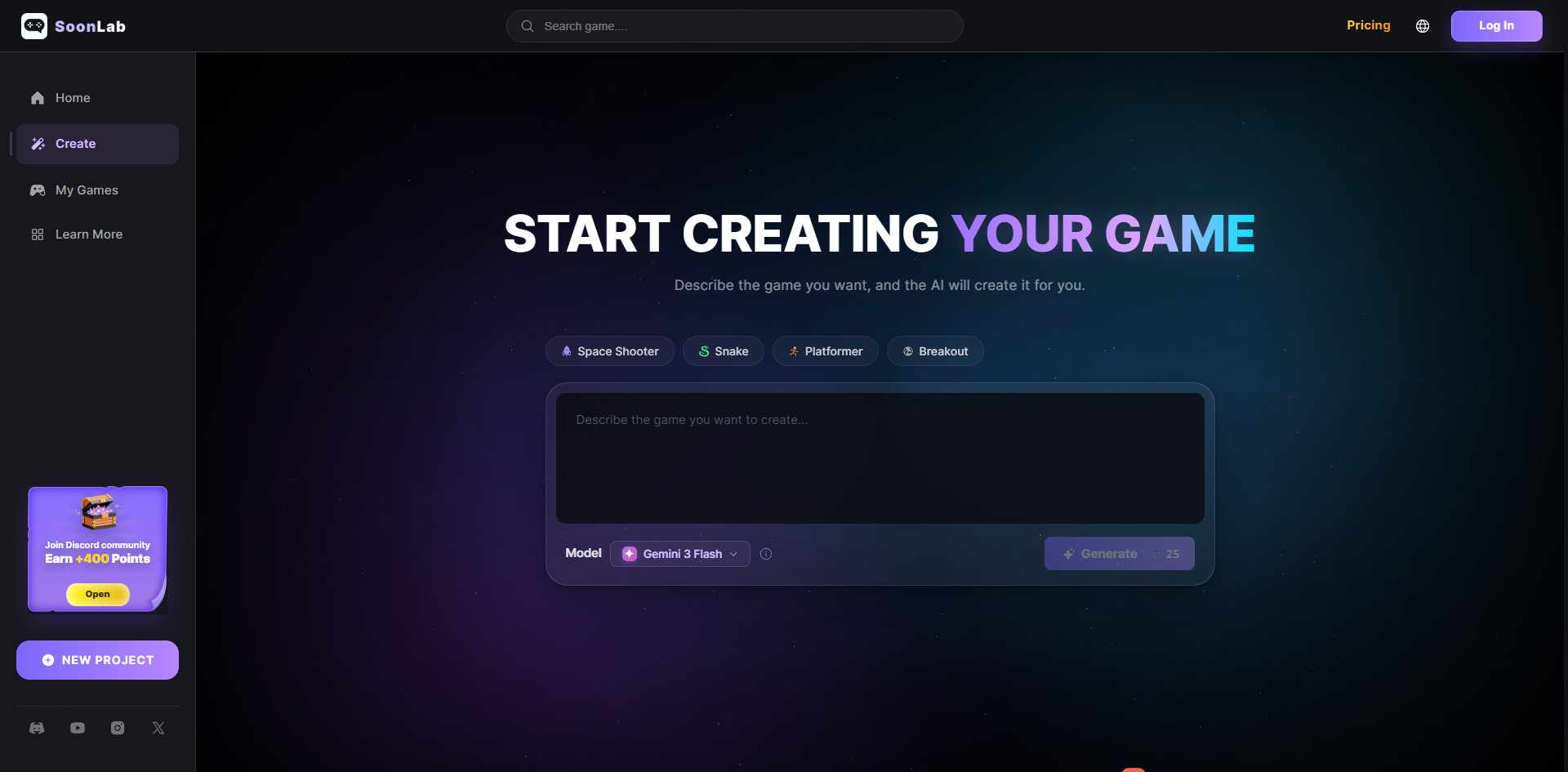
This makes it especially useful for:
- Testing game ideas instantly before learning Unity or Unreal
- Building early prototypes without technical barriers
- Turning creative concepts into something playable fast
For many new creators, this becomes the fastest way to go from "idea" to "first game."
FAQs
Is Unity easier than Unreal Engine?
Yes, Unity is generally easier to learn. The C# programming language is more intuitive, the interface is less overwhelming, and there's more beginner-focused content available. However, "easier" doesn't mean "better"—Unreal's power makes the learning worthwhile for certain projects.
Is Unreal Engine 5 better than Unity?
"Better" depends on your goals. For graphics quality and AAA-level visuals, Unreal Engine 5 is superior. For mobile games, 2D projects, and quick indie development, Unity is more practical. Neither engine is universally better.
Which engine is better for 2D games?
Unity is clearly better for 2D games. Its 2D toolset is mature, purpose-built, and well-documented. Unreal can handle 2D, but the engine is optimized for 3D development.
Is Unity or Unreal better for VR?
For standalone VR (Meta Quest): Unity is better due to lighter builds and easier optimization. For high-end PC VR: Unreal wins with superior graphics on powerful hardware. For console VR (PSVR2): Unreal has better built-in support.
Can AI replace game engines?
Not yet, and likely not soon. AI can assist development and generate prototypes, but traditional game engines like Unity and Unreal provide the control, customization, and professionalism that commercial games require. Think of AI as a powerful assistant, not a replacement.
Conclusion
Unity vs Unreal are both widely used game engines, but they are designed for different types of developers and projects. Unity is generally better suited for beginners, solo developers, and mobile or 2D game development due to its simpler workflow, lower hardware requirements, and faster learning curve. Unreal Engine, on the other hand, is more commonly chosen for high-end 3D games, AAA-quality visuals, and projects that require advanced rendering and cinematic production capabilities.
Both engines are capable of producing successful commercial games, and the final choice usually depends on a developer's goals, team size, and project scope rather than overall power or popularity. For beginners exploring ideas, some developers also use AI-assisted tools such as SoonLab to quickly prototype game concepts before committing to a full engine like Unity or Unreal.
Ultimately, Unity vs Unreal is not about which engine is better overall, but which one better matches the stage and needs of the developer.