
Prototyping video games is not about building a smaller version of your final game. It is about answering one important question as quickly as possible:
Is this game idea worth developing further?
Before you spend days writing code, choosing assets, designing levels, or learning a game engine, a prototype helps you test the core idea. Can players understand the goal? Do the controls feel right? Is the main mechanic interesting enough to try again?
In the past, making a video game prototype often required setting up an engine, importing assets, writing basic scripts, and fixing technical issues before the idea could even be tested. In 2026, AI game makers and browser-based creation tools are making that first test much faster. Instead of starting with code or a blank engine project, beginners can describe a game idea in a prompt and turn it into a playable browser prototype.
This guide explains how to make a video game prototype step by step. You will learn how to define a test question, choose a core mechanic, compare paper prototyping and playable prototyping, write a better AI game prompt, test your prototype, and improve it through iteration.
Turn your idea into aplayable game
Describe the game you want to make, and SoonLab will help you start building it.
What Is a Video Game Prototype?
A video game prototype is a small, rough, playable version of a game idea. It is not a finished game, a polished demo, a trailer, or a vertical slice. Its purpose is to test whether the core mechanic, controls, rules, and feedback loop make sense.
A simple definition:
Game prototyping is the process of building the smallest playable version of an idea so you can test it before investing in full development.
A prototype may include placeholder art, simple shapes, one level, temporary sounds, and basic UI. That is completely normal. The goal is not to impress players with polish. The goal is to learn.
For example, a video game prototype might test:
- whether a stealth maze feels readable
- whether a platformer jump feels responsive
- whether a puzzle rule is easy to understand
- whether a quiz battle feels fun instead of slow
- whether a survival timer creates pressure
- whether players want to retry after failing
If your prototype answers one of those questions clearly, it is doing its job.
Why Game Prototyping Matters
Many beginners make the same mistake: they start by planning the whole game.
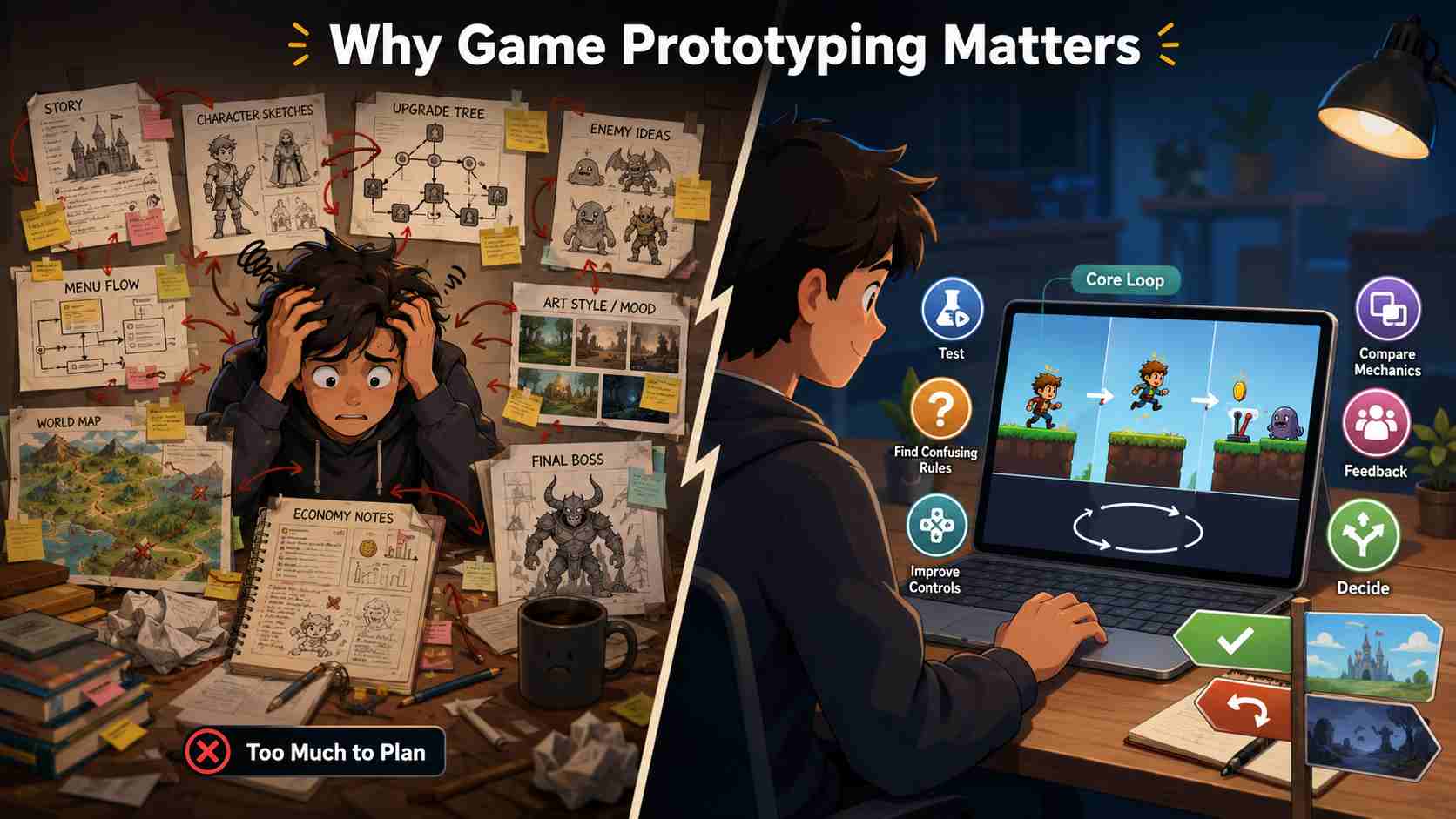
They imagine the full story, character system, upgrade tree, enemy types, menus, art style, levels, economy, and final boss. That can be exciting, but it also makes the project harder to test.
A game prototype keeps the idea small. Instead of asking, "Can I build this entire game?" you ask, "Does this core loop work?"
That shift matters because a weak mechanic does not become strong just because it has better art, more levels, or a bigger world. If the game is confusing or boring in its simplest form, it usually needs a design change before it needs more content.
Good prototyping helps you:
- test an idea before overbuilding it
- find confusing rules early
- improve controls before adding more systems
- compare different mechanics quickly
- get feedback from real players
- decide whether to continue, change direction, or stop
For beginners, this is especially important. A prototype makes game creation less overwhelming because you only need to build one small test at a time.
How to Make a Game Prototype With AI?
Step 1: Start With One Test Question
Before you build anything, write one test question.
A strong test question keeps your prototype focused. It tells you what you are trying to learn and prevents the project from growing too large too early.
Use this simple formula:
Can players enjoy [core action] when [main constraint] creates pressure?
Examples:
- Can players enjoy dodging guards when light and shadow affect visibility?
- Can players enjoy solving puzzles by swapping gravity every few seconds?
Each question focuses on one playable idea. That is much easier to test than a broad goal like "make a fun adventure game" or "create a cool RPG."
A good first prototype should usually test one of these things:
- movement
- timing
- puzzle logic
- enemy behavior
- scoring
- player feedback
- win and fail conditions
- replay motivation
If the test question is too broad, narrow it before you build.
Step 2: Choose the Core Mechanic
The core mechanic is the repeated action the player performs. In rapid game prototyping, this mechanic should be simple enough to explain in one sentence.
For example:
| Game Idea | Core Mechanic | Prototype Goal |
|---|---|---|
| Puzzle room | Push blocks onto switches | Test whether the puzzle feels fair |
| Stealth game | Avoid enemy vision cones | Test whether hiding and movement feel readable |
| Platformer | Jump between moving platforms | Test whether movement feels responsive |
| Quiz battle | Answer questions to attack | Test whether learning and combat work together |
| Survival game | Collect resources before time runs out | Test whether pressure creates replay value |
| Maze game | Find the exit while avoiding traps | Test whether navigation feels satisfying |
At this stage, avoid adding features that do not directly help you answer the test question. You probably do not need multiple characters, a full inventory, advanced upgrades, long dialogue, complex menus, or ten enemy types.
A strong first game prototype usually has:
- one player action
- one small level
- one challenge
- one win condition
- one fail condition
- clear feedback
That is enough to learn something useful.
Step 3: Choose Paper Prototyping or a Playable Prototype
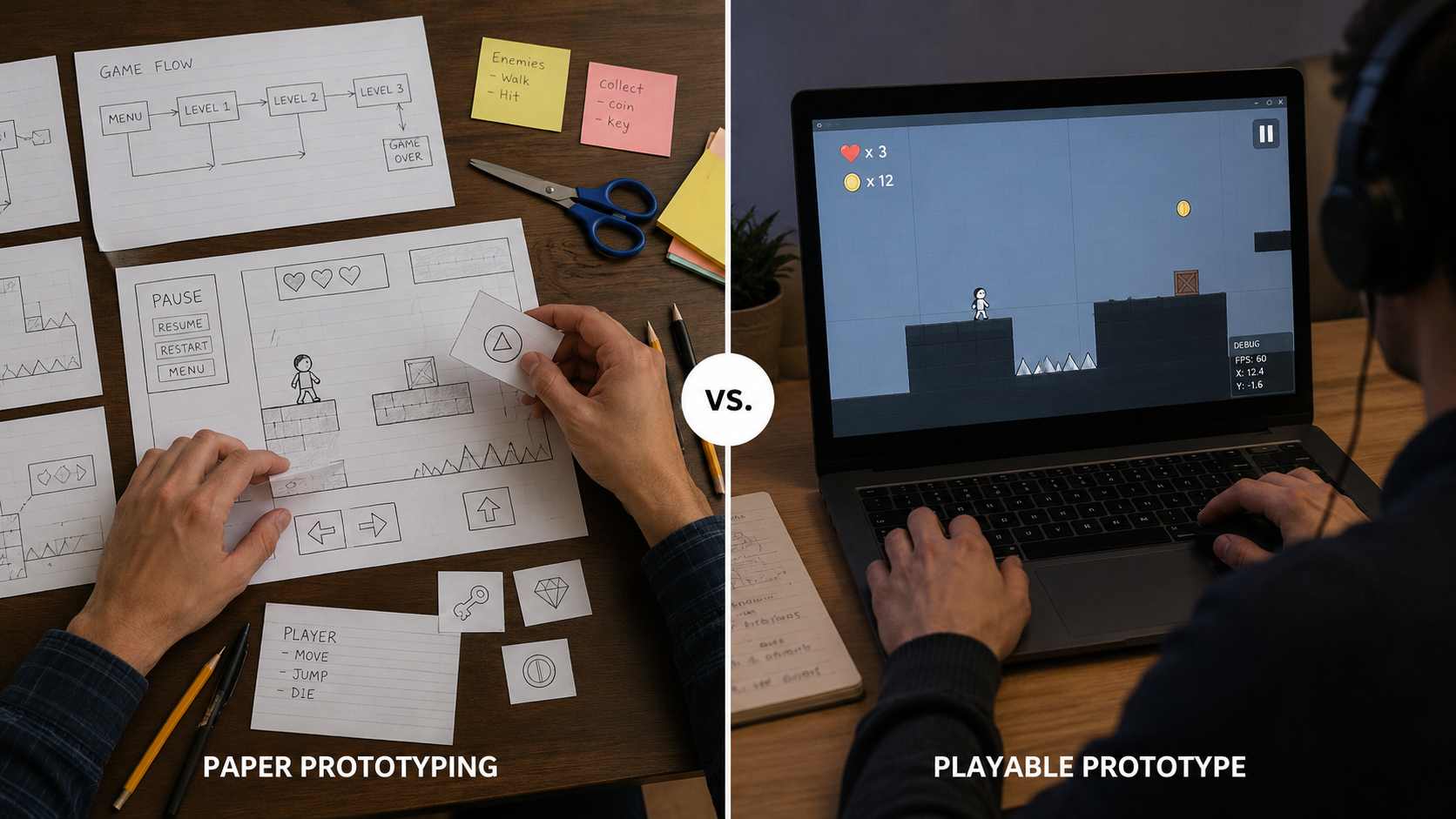
Not every game idea needs a digital prototype first. Sometimes, paper is faster.
Paper prototyping games is useful when you need to test rules, turn order, card logic, maps, choice flow, UI layout, or puzzle structure. You can sketch a level, move pieces around, write rules on cards, and quickly see whether the design makes sense.
Paper prototyping works well for: board-game-like systems, card mechanics, turn-based choices, map layouts, menu flow, puzzle rules, classroom or quiz games.
However, paper has limits. If your idea depends on timing, movement, physics, camera control, enemy AI, animation, collision, or input response, you need a playable prototype.
Players can imagine a menu on paper. They cannot accurately imagine whether a jump feels good, whether enemy movement is readable, or whether a timer creates the right pressure.
| Prototype Type | Best For | Move On When |
|---|---|---|
| Paper prototype | Rules, maps, turns, cards, UI sketches, puzzle logic | You need to test timing, motion, controls, or live feedback |
| Playable browser prototype | Movement, scoring, reactions, puzzle loops, simple levels | The core loop works and you need more content or polish |
| Engine prototype | Physics, 3D cameras, advanced systems, production planning | The idea is validated and needs deeper technical control |
If your idea depends on a 3D camera, character movement, collision, lighting, or physics, build a small playable version before committing to a larger production workflow. SoonLab can help you create a 3D game prototype from a prompt so you can test one camera view, one level, one core mechanic, and one clear win or fail condition.
For a practice project, choose one of these simple 3D game ideas to prototype. A star collection game can help you test movement and feedback, while a soup delivery challenge can help you explore route choices.
If you have not decided which format fits the idea, this guide to 2D vs 3D game development explains how each choice affects cameras, controls, collision, performance, asset production, and prototype complexity.
For many beginner creators, the best path is:
paper sketch → AI playable prototype → improved version → larger project
This keeps the process fast without skipping real playtesting.
Step 4: Write a Better Prompt for Your Game Prototype
AI game makers work best when your prompt reads like a short game design brief.
A vague prompt like this is not enough:
"Make a cool platformer game."
That gives the AI too much room to guess. It does not explain the player, controls, camera, goal, challenge, level, win condition, or feedback.
A better prompt should include:
- game type
- player character or object
- camera view
- controls
- core mechanic
- level structure
- rules
- win condition
- fail condition
- feedback
- visual style or placeholder direction
Use this prompt structure:
Create a playable browser game prototype.

Game type: [platformer, puzzle, stealth, quiz battle, survival, arcade].
Player: [character or object].
Camera/view: [top-down, side-view, fixed screen].
Core mechanic: [one repeated action].
Controls: [keyboard, mouse, touch, click].
Level: [one small test area].
Rules: [what happens when the player succeeds or fails].
Win condition: [how the test ends].
Feedback: [score, message, animation, sound, restart button].

Keep the visuals simple and focus on playability.
Here is a more complete example:
Create a top-down browser game prototype called Shadow Switch.

The player controls a small explorer with WASD or arrow keys.
The core mechanic is switching between light and shadow zones to avoid patrolling guards.
Use one compact maze with walls, three guards, safe shadow tiles, and one glowing exit.
If a guard sees the player, show a clear fail message and a restart button.
The player wins by reaching the exit without being seen.
Use simple placeholder visuals, readable colors, and a short instruction line.
Focus on clear movement, readable enemy vision, and fast replay.
This kind of prompt gives the AI enough information to build a testable game loop instead of guessing what the game should be.
If you want a deeper prompt-writing process, you can also read AI Game Prompts.
Step 5: Turn the Prompt Into a Playable Browser Prototype
Once your prompt is clear, the next step is to create a playable version.
This is where a game prototype maker such as SoonLab can help. Instead of setting up scenes, scripts, controls, collision, and basic UI before you know whether the idea works, you can start with a prompt and move toward a playable browser prototype first.
Turn your idea into aplayable game
Describe the game you want to make, and SoonLab will help you start building it.
SoonLab is especially useful when you want to test:
- a simple game loop
- a puzzle mechanic
- a browser-playable mini game
- a quiz or educational game
- a top-down or side-view prototype
- a small arcade concept
- a fast idea before using a larger engine
This does not mean AI replaces game design. The prompt is only the starting point. You still need to play the result, notice what feels confusing, adjust the idea, and test again.
A useful AI prototype workflow looks like this:
- Write one test question.
- Describe the game loop in a prompt.
- Generate a playable browser prototype.
- Play it for one minute.
- Identify the biggest issue.
- Revise the prompt or mechanics.
- Generate or edit the next version.
- Test again.
This is the real value of AI in game prototyping: not instant perfection, but faster learning.
For broader beginner-friendly creation steps, see How to Make Your Own Game With AI and How to Create a Game Without Coding.
Step 6: Test the Prototype Like a Designer
When you test your prototype, do not ask, "Is this finished?"
Ask, "What did this prototype teach me?"
Give the prototype to one person and watch silently for a few minutes. You will learn more from their behavior than from their polite opinion.
Look for these signals:
| What to Test | What to Watch For |
|---|---|
| Clarity | Does the player know what to do within 10 seconds? |
| Controls | Do movement, clicks, or actions feel natural? |
| Feedback | Does the game clearly show success, failure, and progress? |
| Fun signal | Does the player want another attempt? |
| Friction | Where do they hesitate, misread, or get stuck? |
| Scope | Is the idea asking for too many systems too early? |
After the test, ask simple questions:
- What did you think the goal was?
- What felt confusing?
- What made you want to continue or stop?
- What did you expect to happen?
- What would make you try again?
Avoid asking "Did you like it?" first. People often answer politely. Specific questions create more useful feedback.
Step 7: Iterate Before You Expand
Iteration is where game prototyping becomes valuable.
Do not add more levels, art, story, enemies, and menus immediately after the first playable version. First, fix the core loop.
Use this simple iteration process:
- Write the design question.
- Build the smallest playable test.
- Watch one player try it.
- Record the biggest confusion or strongest fun signal.
- Change one variable.
- Test again.
Change one thing at a time. If the player understands the goal but dislikes the controls, improve input. If the controls feel good but the challenge feels flat, adjust level design. If the mechanic is confusing, simplify the rule or improve feedback.
For example:
| Problem | Better Next Step |
|---|---|
| Player does not understand the goal | Add a short instruction, visual cue, or clearer win condition |
| Player fails without knowing why | Improve feedback for damage, collision, or enemy vision |
| Player wins too quickly | Add one obstacle or increase level complexity |
| Player feels bored | Add a choice, risk, timer, or scoring pressure |
| Player likes the loop | Build one more level that tests the same mechanic |
Only expand the game after the prototype proves that the loop works.
Paper Prototyping vs Game Engines vs No-Code Tools vs AI Game Makers
Different game prototyping tools are useful at different stages. The best choice depends on what you need to learn.
| Method | Best For | Strengths | Limits |
|---|---|---|---|
| Paper prototyping | Rules, layouts, choices, board-like mechanics | Fast, cheap, easy to change | Cannot test timing, physics, controls, or live feedback |
| Traditional engines | Unity, Unreal, Godot, custom systems | Deep control, strong production path, technical flexibility | Setup time and learning curve can slow early validation |
| No-code tools | Visual events, simple 2D games, browser exports | Lower barrier than coding, useful for non-programmers | Still requires manual logic building and tool learning |
| AI game makers | Prompt-led playable prototypes and early idea tests, such as Rosebud AI, SoonLab | Fast from idea to playable loop, beginner-friendly | Needs clear prompts, testing, and iteration |
SoonLab fits best in the early playable prototype stage. It is useful when you want to test whether an idea works before moving into a heavier toolchain.
For example, you might use SoonLab to test a puzzle room, quiz battle, survival challenge, or platformer mechanic. If the prototype works and you want deeper control later, you can continue refining the idea with more advanced tools.
Common Game Prototyping Mistakes
1. Trying to Build the Full Game First
A prototype should answer one question. If you are building menus, lore, inventory, achievements, economy, and ten enemy types before testing the core mechanic, the prototype is too large.
Start smaller.
2. Testing With Too Much Explanation
If you need to explain the controls, goal, and rules for five minutes, the design is not clear enough yet. A good prototype should teach the player quickly through layout, feedback, and simple instructions.
3. Confusing Polish With Progress
Better art can make a prototype nicer to look at, but it will not fix a boring game loop. Validate the mechanic first. Improve presentation later.
4. Ignoring Player Confusion
If a player misunderstands the goal, gets stuck, or fails without knowing why, that is valuable feedback. Do not defend the design immediately. Write down what happened and improve the next version.
5. Adding Features Instead of Improving the Loop
More systems do not always make a game better. Sometimes the best improvement is a clearer rule, faster restart, stronger feedback, or simpler level.
Game Prototype Ideas You Can Try With AI
Here are a few beginner-friendly prototype ideas you can test with an AI game maker:
| Prototype Idea | What It Tests |
|---|---|
| One-room escape puzzle | Clue logic, object interaction, player clarity |
| Tiny platformer level | Jump feel, timing, obstacle placement |
| Maze with moving guards | Stealth readability and movement pressure |
| Quiz battle game | Whether questions and combat fit together |
| Match-3 twist | Whether a small rule change creates replay value |
| Resource survival timer | Pressure, collection, and risk-reward balance |
| Gravity swap puzzle | Rule clarity and spatial thinking |
| Classroom review game | Educational flow, scoring, and engagement |
If you want more idea inspiration, you can read How to Make a Puzzle Game With AI, How to Make a Quiz Game, and Best Puzzle Adventure Games.
FAQs About Prototyping Video Games
What is the fastest way to make a game prototype?
The fastest way is to define one core mechanic, write a small design prompt, build a minimal playable version, and test it immediately. Paper is fastest for rules and layout. AI game makers are faster when you need real controls, scoring, feedback, and browser play.
How long should a video game prototype take?
A first prototype can take minutes, hours, or a few days depending on complexity. For beginners, the first playable test should be small enough to finish quickly and easy enough to change without regret.
What is the difference between a prototype and a demo?
A prototype is made to test an idea. It can be rough, unfinished, and visually simple. A demo is usually made to show the game to players, publishers, or the public. A demo needs more polish, clearer presentation, and a stronger sense of completion.
Should I use paper prototyping or an AI game maker?
Use paper prototyping when you are testing rules, maps, cards, menus, or turn-based choices. Use an AI game maker when you need to test movement, timing, scoring, feedback, or the feel of a playable loop.
Can SoonLab help me prototype without coding?
Yes. SoonLab can help beginners describe a game idea in a prompt and turn it into a playable browser prototype. It is best for fast idea validation, prompt iteration, and early playtests.
What should I do after the prototype works?
Write down what worked, what confused players, and what needs another test. Then improve one part at a time, such as controls, level design, feedback, difficulty, or replay value. Add more content only after the core loop feels clear and playable.
Conclusion
Prototyping video games is not about building a small version of everything. It is about finding the smallest playable test that proves whether your idea has potential.
Start with one question. Choose one core mechanic. Build one small playable version. Watch someone try it. Then improve the next version based on what you learned.
AI makes that first playable test easier to reach. With SoonLab, beginners can describe a rough game idea and create a browser game prototype without coding first. The real value comes after generation: playing, observing, adjusting, and learning whether the idea deserves the next step.