
If you want to make a quiz game, do not start by choosing a tool. Start with the player. A classroom quiz needs clear questions and helpful feedback. A trivia game needs pace and surprise. A math quiz needs accuracy and retry logic. A personality quiz needs results that feel specific. A Kahoot-style quiz needs timers, rounds, and a sense of live competition.
This guide gives you one complete process for building different quiz game types with AI. You will learn how to choose a format, write questions, define scoring, create a reusable quiz game template, generate a browser-playable game in SoonLab, and improve the game before sharing it.
For a broader no-code creation process, you can also read our guide on how to create a game without coding.
Turn your idea into aplayable game
Describe the game you want to make, and SoonLab will help you start building it.
What Do You Need to Make a Quiz Game?
To make a quiz game, you need six core parts: a topic, questions, answer options, rules for correct and incorrect answers, a scoring or outcome system, and feedback. Once those are clear, you can add timers, rounds, streak bonuses, lives, hints, leaderboards, animations, or a final results screen.
 Expert Tip
Build the first version with 5 to 10 questions. A short quiz is easier to test, balance, and improve than a 50-question game with unclear rules.
Choose the Right Quiz Game Format
Different quiz games solve different user needs. Before writing a prompt, choose the format that matches your audience and goal.
| Quiz Game Type | Best For | What to Include |
|---|---|---|
| Multiple choice quiz game | Beginners, trivia, general knowledge, classroom review | 3 or 4 answer buttons, one correct answer, score, feedback, restart button |
| Classroom quiz game | Teachers, tutors, students, lesson review | Grade level, clear wording, explanations, simple scoring, readable UI |
| Math quiz game | Practice drills, warm-ups, homework review | Correct calculations, difficulty levels, retry logic, step-by-step feedback |
| Flag or geography quiz game | Map learning, country practice, visual memory | Image placeholders, regions, hints, answer reveal, short facts |
| Trivia quiz game | Party games, fandom topics, social sharing | Categories, rounds, timers, streaks, surprising facts, final score |
| Quiz show game | Game-show style entertainment | Rounds, prize levels, lifelines, dramatic feedback, final challenge |
| Personality quiz game | Recommendations, social content, creator posts | No wrong answers, result tags, outcome descriptions, replay option |
| Kahoot-style quiz game | Live group energy and classroom competition | Timed questions, large answer buttons, speed points, scoreboard-style screens |
If your idea is a game-show format, you may also find our Jeopardy game maker useful for building round-based quiz structures.
How to Make a Quiz Game With AI: Step-by-Step Guide
Making a quiz game with AI works best when you treat the prompt like a small design plan: define the player, choose the quiz format, write the question logic, add game rules, generate a playable prototype, then test it with a real player.
Step 1: Define the Quiz Goal and Audience
A strong quiz game has a clear purpose. Are you helping students review a lesson, challenging friends with trivia, teaching flags, practicing multiplication, or giving players a fun personality result? The answer changes the questions, feedback, scoring, and visual style.
Use this simple sentence before you build:
This quiz game helps [audience] practice, test, or discover [topic] by answering [question type] questions with [score or result rule].Example: "This quiz game helps middle school students practice world capitals by answering timed multiple-choice geography questions with hints and a final score." That is much easier for AI to turn into a playable game than "make a fun quiz."
Step 2: Pick a Quiz Format
Choose one primary format for the first version. A multiple-choice quiz is the safest starting point because the rules are easy to understand. A quiz show adds more drama. A personality quiz changes the logic because answers lead to outcomes instead of right or wrong results.
Do not combine every format at once. If you want a classroom math quiz, start with math questions, scoring, explanations, and retry logic. Add speed bonuses or rounds after the basic loop works.
Step 3: Write Questions, Answers, and Feedback
The quality of a quiz game depends on the quality of the questions. Each question should be short, fair, and matched to the player level. For multiple-choice quizzes, use one correct answer and three plausible distractors. For math quizzes, check the calculations. For geography quizzes, verify place names and flags. For personality quizzes, map each answer to a result type.
A useful question record includes:
- Question text: the prompt shown to the player.
- Answer options: usually 3 or 4 choices.
- Correct answer or outcome tag: the logic behind the result.
- Feedback: a short explanation after the player answers.
- Difficulty: easy, medium, or hard.
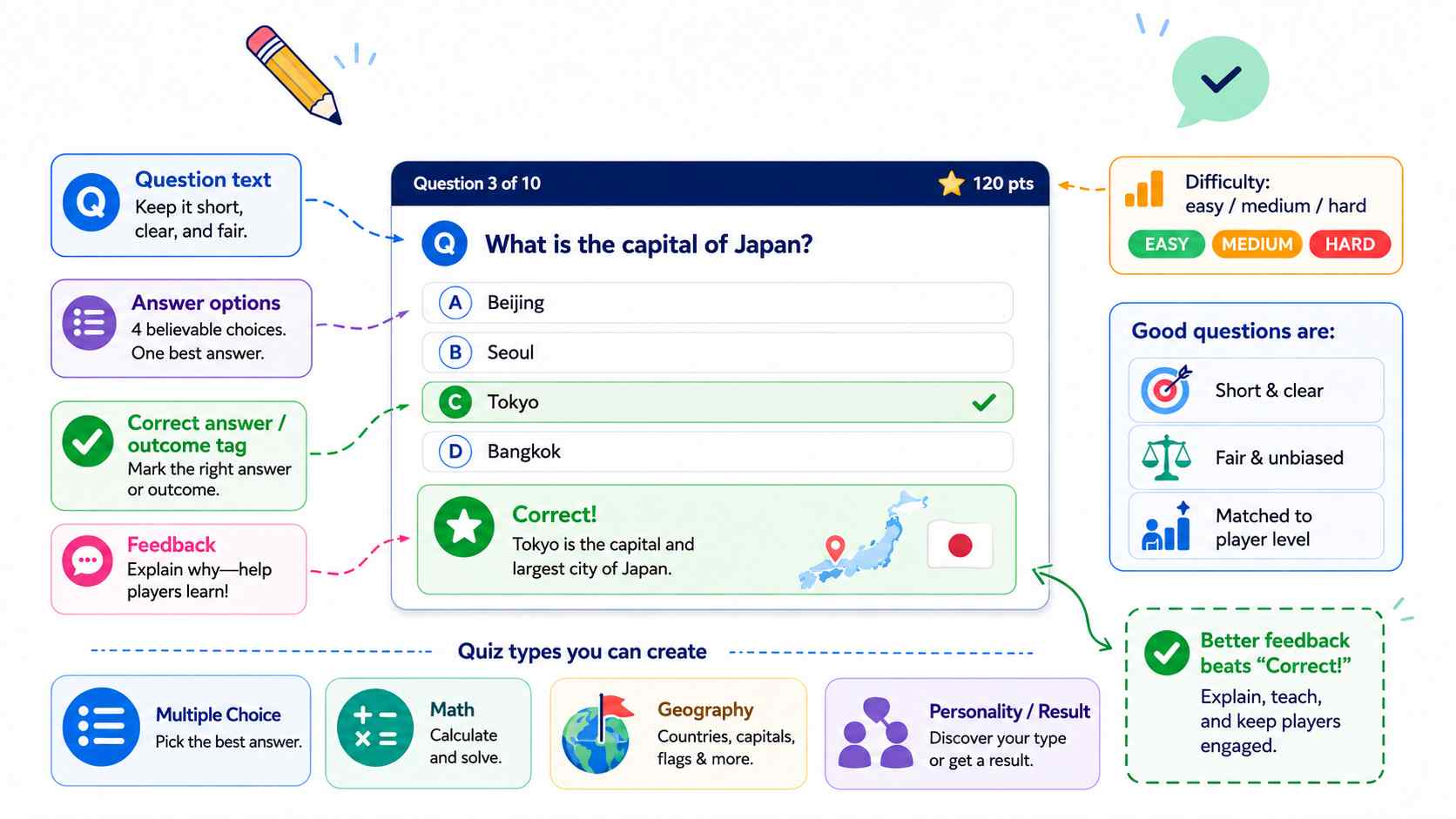
Feedback matters. "Correct!" is fine for a party quiz, but educational quiz games are stronger when they explain why the answer is correct.
Step 4: Define Score, Timer, Feedback, and Win Condition
A quiz becomes a quiz game when players have a reason to keep going. You do not need every mechanic at once. Choose one or two that support the experience.
| Mechanic | Use It When | Design Tip |
|---|---|---|
| Score | You want a clear performance result | Explain how points are earned. |
| Timer | You want urgency or a Kahoot-style feel | Give enough time for reading, especially on mobile. |
| Streak bonus | You want players to feel momentum | Keep the bonus easy to understand. |
| Lives | You want challenge and tension | Avoid ending too early in learning contexts. |
| Hints | You want learning support | Hints should guide, not reveal every answer. |
| Result screen | You want replayability or social sharing | Show score, result, accuracy, or a fun rank. |
Step 5: Generate a Playable Quiz Game With SoonLab
When your rules are clear, move from plan to prototype. SoonLab is useful for beginners because you can describe the quiz game in natural language and test a browser-playable version quickly. This helps you check the question flow, interface, scoring, feedback, and final results screen before spending time on a larger project.
Turn your idea into aplayable game
Describe the game you want to make, and SoonLab will help you start building it.
A strong SoonLab prompt should include the quiz type, audience, visual theme, number of questions, answer format, scoring rules, timer behavior, feedback behavior, and final screen. If your quiz needs images, such as flags or map shapes, describe the visual references and ask for placeholders if needed.
For more browser game planning tips, read our guide on how to make a web browser game.
Step 6: Test, Edit, and Share
Quiz games look simple, but small mistakes can break trust quickly. Test the game before sharing it with students, friends, or players. Verify every correct answer, check the reading time, make sure buttons are easy to tap, and confirm that feedback appears after each answer.
If you are making a classroom quiz, ask one student or colleague to play through it before the lesson. Watch where they hesitate. Their confusion will show you what to improve in the wording, timer, score, or UI.
You can try out the soccer quiz game I made using SoonLab.
 Testing Checklist Before You Share the Quiz
Use this checklist before publishing or sending the game to students, friends, or players.
Quiz Game Prompt Template and Ready-to-Use Prompts
You can use this template for almost any quiz game. Replace the brackets with your topic, audience, rules, and style. For more prompt inspiration, see our collection of AI game prompts.
Create a playable browser quiz game called [game title].
Audience: [students, friends, beginners, fans, general players].
Topic: [math, geography, history, science, video games, personality, etc.].
Quiz format: [multiple choice, true/false, quiz show, personality quiz, timed challenge].
Number of questions: [5 to 10 for the first version].
Question behavior: show one question at a time with [3 or 4] answer options.
Scoring rules: [points per correct answer, speed bonus, streak bonus, lives, or result tags].
Feedback: after each answer, show whether it was correct and include [a short explanation, fact, or result clue].
Progress: show question number, score, and remaining time if there is a timer.
Win or result condition: the game ends after all questions and shows [score, rank, result type, or winner screen].
Visual style: [clean classroom style, game-show stage, pixel art, colorful arcade UI, etc.].
Quality details: include short instructions, readable buttons, restart button, and mobile-friendly layout.
Use these prompts as starting points. Keep the first version small, then expand after the core quiz loop works.
1. Multiple Choice Trivia Quiz
Create a browser trivia quiz game with 12 multiple-choice questions about [topic]. Use 4 answer buttons, a 15-second timer, score tracking, instant feedback, and a final score screen. Make the game replayable and easy to understand.2. Classroom Review Quiz
Create a classroom quiz game for [grade level] students reviewing [lesson topic]. Include 10 multiple-choice questions, simple instructions, friendly feedback, and short explanations after each answer. Use a clean classroom-friendly visual style.3. Math Quiz Game
Create a math quiz game for [grade level]. Include 10 questions about [addition, multiplication, fractions, algebra, or geometry]. Show one question at a time, let players retry incorrect answers once, explain the correct answer, and show a final accuracy score.4. Flag and Geography Quiz
Create a playable browser quiz game called World Flag Sprint. Show 10 flag placeholders and ask the player to choose the correct country from 4 options. Give 100 points for each correct answer and a 20-point speed bonus if answered within 5 seconds. After each answer, show a short fact about the country. Add a progress indicator, score display, restart button, and final results screen.5. Quiz Show Game
Create a quiz show browser game with 3 rounds: easy, medium, and final challenge. Add dramatic score reveals, a timer, one hint button per game, and a final result screen. Use a colorful stage-style interface.6. Personality Quiz Game
Create a personality quiz called [title]. Ask 8 questions. Each answer maps to one of 4 result types. There are no wrong answers. At the end, show the player's result, a short description, and a restart button. Make the result screen fun and shareable.7. Kahoot-Style Classroom Quiz Prototype
Create a Kahoot-style quiz game prototype for a classroom review session. Show one timed question at a time, 4 large answer buttons, points for correct answers and speed, a scoreboard-style screen after each question, and a final winner screen. Keep the UI simple and mobile-friendly.8. Video Game Trivia Quiz
Create a video game trivia quiz with 10 beginner-friendly questions about classic game genres, characters, mechanics, and platforms. Use 4 choices per question, instant feedback, a score display, and a final rank such as New Player, Quest Solver, or Game Master.SoonLab vs Scratch, Kahoot, PowerPoint, and JavaScript
There is no single best quiz game maker for every situation. The right tool depends on whether you want a live classroom platform, a coding lesson, a slide-based activity, or a fast playable browser prototype.
| Tool | Best For | Strengths | Tradeoffs |
|---|---|---|---|
| SoonLab | No-code AI browser quiz prototypes | Prompt-based creation, fast iteration, useful for turning quiz ideas into playable mini games | Best for prototyping and early playable versions unless advanced classroom analytics are required |
| Scratch | Students learning logic and block coding | Good for teaching variables, events, sprites, and interactive thinking | Requires manual block-building and takes longer to polish |
| Kahoot | Live classroom quizzes and group competition | Strong for hosted classroom play, participation, and familiar quiz-show energy | Less focused on creating a custom standalone browser game |
| PowerPoint | Slide-based classroom quiz activities | Easy for teachers who already use slides | Interactivity is limited compared with a real browser game loop |
| JavaScript | Full control over web quiz behavior | Most flexible for custom logic, data storage, animation, and publishing | Requires coding, debugging, and web development knowledge |
Use SoonLab when you want to move quickly from idea to playable prototype. Use Kahoot when your priority is a live hosted classroom session. Use Scratch when teaching programming concepts matters. Use PowerPoint for simple slide-based activities. Use JavaScript when you need full technical control.
FAQs About Making a Quiz Game With AI
How do I make a quiz game?
Choose a topic and audience, pick a quiz format, write questions and answer options, define scoring and feedback, then build a playable version. For beginners, start with 5 to 10 questions and one clear mode before adding timers, rounds, or leaderboards.
Can AI create quiz questions for me?
Yes. AI can draft quiz questions, answer choices, explanations, and difficulty levels. You should still review the questions carefully because educational, math, geography, and history quizzes need factual accuracy.
What is the easiest quiz game to make?
A multiple-choice quiz is the easiest starting point. It needs a question, 3 or 4 answer options, one correct answer, feedback, score tracking, and a final result screen.
Can I make a quiz game without coding?
Yes. You can make a quiz game without coding by describing the topic, questions, answer choices, score rules, feedback, and visual style in an AI game maker. SoonLab can help turn that prompt into a browser-playable prototype.
Can I make a classroom quiz game?
Yes. A classroom quiz game should include a grade level, topic, clear wording, helpful explanations, readable buttons, and enough time for students to answer. For classroom use, always check answer accuracy before sharing.
Can I make a Kahoot-style quiz game with AI?
Yes. You can prototype a Kahoot-style quiz by describing timed questions, large answer buttons, speed-based scoring, round summaries, and a leaderboard-style screen. This is useful for testing the game flow, though a full classroom platform may offer additional hosting and analytics features.
What should I include in a SoonLab quiz game prompt?
Include the quiz topic, audience, question count, answer format, scoring rules, timer behavior, feedback style, visual theme, restart button, and final results screen. The clearer the rules, the better the prototype.
Conclusion
The best way to make a quiz game is to start with the player. A teacher needs clarity and review value. A trivia fan needs speed and surprise. A student needs feedback. A personality quiz player needs a result that feels specific. Once you know the audience, the design choices become much easier.
SoonLab gives beginners a practical way to turn those choices into a playable browser quiz game prototype. Write the rules, describe the questions, choose the scoring system, generate the first version, and test the result. From there, you can refine the quiz into a classroom activity, a trivia challenge, a geography game, a math drill, or a game-show style experience.