
Learning how to make a horror game can sound intimidating, especially if you picture a huge 3D mansion, realistic monsters, and complex enemy AI. But a good first horror game does not need to be massive. Many memorable horror games are built around one simple idea: a dark hallway, a strange sound, a locked room, a creature you cannot fight, or a rule the player slowly learns to fear.
If you are a beginner, the best way to make a horror game is to start small, focus on one scary loop, and build a playable version quickly. You can use a free engine, a no-code tool, or an AI game maker like SoonLab to turn a simple idea into a browser-playable prototype.
This guide walks through the practical process: choosing an idea, designing the fear, picking tools, building the first version, testing it, and publishing it.
Turn your idea into aplayable horror game
Describe the horror game you want to make, and SoonLab will help you start building it.
Start With a Small Horror Game Idea
Before choosing a good horror game maker, decide what kind of horror experience you want to make. The biggest beginner mistake is starting with a game that is too large: a full haunted school, branching story, advanced monster AI, inventory system, multiplayer mode, and cutscenes.
Start with one strong idea instead.

A useful first idea has five parts: a small setting, a clear goal, one threat or mystery, a simple way to lose, and a restart button so players can try again.
Example: The player is trapped in a dark basement and must collect three fuses to restore power while avoiding a shadow creature. That is enough for a first horror game.
If you need more inspiration before you start, you can study some of the scariest Roblox games and look at how they use simple settings, limited visibility, sound cues, and clear threats to create tension.
What Makes a Horror Game Scary?
Horror games work because the player feels responsible. Unlike a movie, the player must open the door, walk down the hallway, or decide whether to turn around. Your job is to create tension around those choices.
You do not need constant jump scares. In fact, too many jump scares make a game predictable. Horror usually works better when the player expects something bad before it happens.
Limited Information
Players should not know everything. Darkness, fog, narrow vision, locked rooms, strange sounds, and partial clues all create uncertainty. A flashlight cone is one of the simplest ways to make a game feel scary because it limits what the player can see.
Sound and Silence
Sound is one of the strongest horror tools. Footsteps, distant knocking, radio static, breathing, whispers, or a low drone can make an empty room feel dangerous. Silence is just as important. If the game is loud all the time, players stop listening.
If you want to design better audio for your own game, this guide on how to make video game music explains how mood, loops, pacing, and background tracks can support gameplay.
Clear Monster Rules
The threat should feel mysterious, but not random. Players need to learn rules such as the monster hears running, the creature appears when the lights flicker, or the hallway changes only after the player turns back. Readable rules make fear more satisfying because players feel they can survive if they pay attention.
Pacing
A horror game needs quiet moments. Give players time to explore, breathe, and feel safe before raising the pressure again. A short scary game can follow a simple rhythm: calm task, strange clue, warning sound, danger, escape, brief safety.
If you need references before planning your mechanics, study how the best survival horror games use limited supplies, clear threats, sound, and difficult choices.
Choose a Tool to Make Your Horror Game
If you are wondering how to make a horror game for free, you have several options. The best tool depends on how much control you want and how much time you are willing to spend learning.
| Tool | Best For | Beginner Tradeoff |
|---|---|---|
| Scratch | Learning game logic with simple 2D projects | Limited polish and atmosphere |
| GDevelop | No-code 2D games with web export | You still need to learn scenes, objects, and events |
| Godot | Free open-source 2D or 3D development | Requires scripting and engine setup |
| Unity or Unreal | Advanced 3D horror projects | Powerful, but slower for first-time creators |
| SoonLab | Prompt-to-play browser game creation | Best for fast first versions, not deep engine control |
1. Scratch
Scratch is good for students and absolute beginners. You can make simple 2D horror games with sprites, sounds, mazes, and basic logic. If you are still learning Scratch basics, start with this guide on how to make a platformer on Scratch to understand movement, platforms, and simple game logic. Scratch is approachable, but limited if you want a polished browser horror experience.
If Scratch feels too limited for your next project, compare more Scratch alternatives for kids, beginners, and game creators before choosing a new tool.
Best for: learning game logic.
GDevelop
GDevelop is a no-code game engine that uses events instead of traditional programming. It can create 2D games and export to the web. It gives more control than Scratch, but still requires learning scenes, objects, behaviors, and event logic.
Best for: no-code creators who want manual control.
Godot
Godot is free and open source. It is powerful for 2D and 3D games, but you will likely need to learn scripting and engine workflows.
Best for: beginners who want to grow into real game development.
Unity or Unreal Engine
Unity and Unreal are common choices for 3D horror games. They are powerful, but they come with a bigger learning curve. If your dream is a first-person horror game with realistic lighting, these engines can do it, but they are not the fastest beginner path.
Best for: serious long-term game projects.
SoonLab
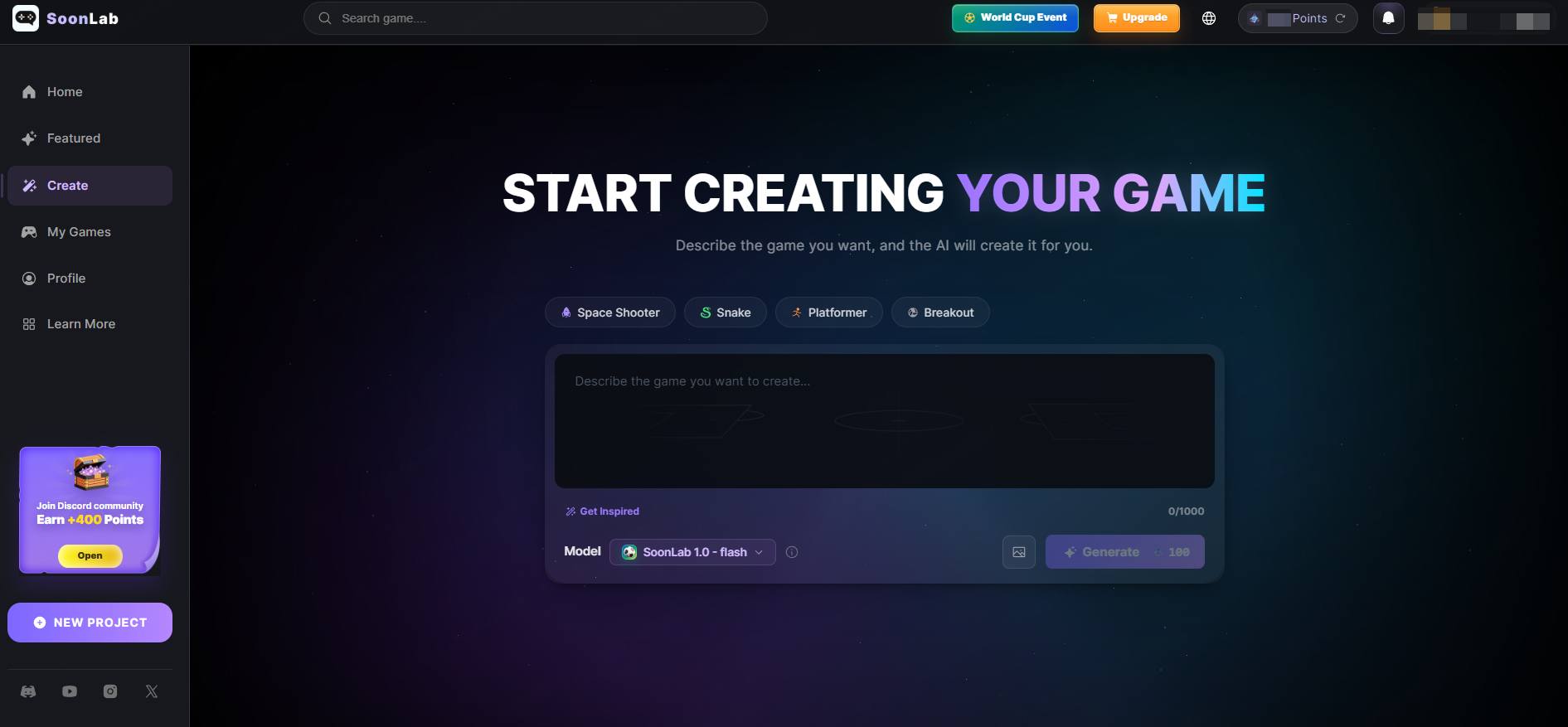
SoonLab is an AI game maker that helps users create playable browser games from text prompts. Instead of setting up an engine manually, you describe the game you want, generate a game, test it, and improve it with prompts.
For a first-person horror idea, use SoonLab's AI 3D game maker to define the camera, dark environment, limited lighting, locked areas, hidden clues, enemy behavior, and escape goal. Start with one small location and one threat before adding a larger map or more complex systems.
Best for: beginners who want to make a horror game quickly without coding.
You do not have to choose one tool forever. A smart approach is to prototype the idea quickly in a no-code or AI tool, then move to a more advanced engine later if you want deeper control.
How to Make a Horror Game Step by Step
Step 1: Turn Your Horror Idea Into a Clear Prompt
Before you start making the game, write down the basic idea in a simple prompt. A good horror game prompt should include the setting, player goal, main threat, controls, win condition, loss condition, and a few atmosphere details.
Keep the scope small. For your first horror game, one dark hallway, one monster, one objective, and one clear rule are enough. The goal is not to build a huge world. The goal is to create a short, playable horror experience.
This prompt works because it gives the AI enough direction: where the game happens, what the player does, what creates danger, how the player wins or loses, and what kind of horror atmosphere the game should have.
Step 2: Copy the Prompt Into SoonLab
After writing your prompt, paste it into SoonLab and generate the first playable version. SoonLab can turn your text description into a browser game, so you can quickly test whether your horror idea actually works as a game.
Turn your idea into aplayable game
Describe the game you want to make, and SoonLab will help you start building it.
At this stage, do not expect the first result to be perfect. Treat it as a prototype. The most important thing is that the player can move, understand the goal, face a threat, win, lose, and restart the game.
Step 3: Play the First Version Like a Real Player
Once the game is generated, play it from the beginning without giving yourself extra explanations. Ask yourself whether the goal is clear, whether the threat feels scary, whether the map is readable, and whether the player has enough time to react.
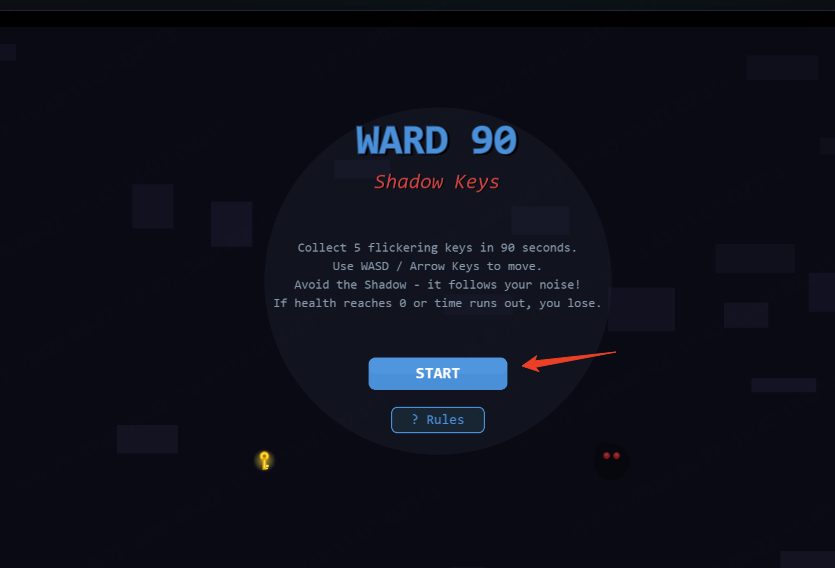
If the game is confusing in the first 10 seconds, simplify the instructions or make the goal more obvious. If the game is too dark, make important objects easier to see. If the monster is annoying instead of scary, adjust its speed, sound cues, or behavior.
Step 4: Improve the Game With Follow-Up Prompts
Improve one thing at a time instead of rewriting the whole game. Focused follow-up prompts usually work better because they tell the AI exactly what needs to change.
- Make the flashlight battery drain slowly and add one battery pickup.
- Add distant footsteps that get louder when the monster is close.
- Make the map darker, but keep keys and exits easy to see.
- Add one false alarm before the real chase starts.
- Make the monster slower at first, then faster after 60 seconds.
- Add a short win screen and a clear restart button.
- Add mobile touch controls so the game is easier to play on phones.
Repeat this process until the game feels complete. For a beginner horror game, two to five minutes of tension is enough. A short, finished game is better than a large unfinished one.
Step 5: Publish and Share Your Horror Game
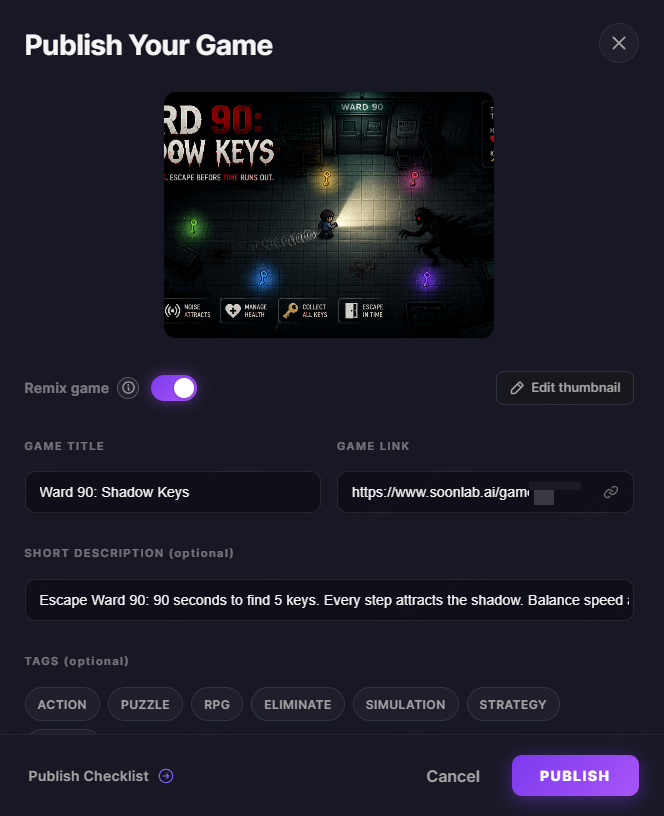
When the game works, publish it and let other people play. Before sharing, check that the title is clear, the instructions are easy to understand, the restart button works, the sound is not too loud, and the game can actually be completed.
Browser horror games are easy to share because players do not need to install anything. You can send the game link to friends, post it in a community, add it to your portfolio, or use it as the first version of a bigger horror project.
Common Beginner Mistakes When Making a Horror Game
When beginners first learn how to make a horror game, they often focus on making everything dark, loud, or shocking. But a good horror game is not only about jump scares. It needs clear rules, readable gameplay, fair tension, and a reason for the player to keep moving forward. Avoiding the mistakes below will help you make a horror game that feels scary, playable, and complete.
Starting With a Map That Is Too Big
A huge map sounds exciting, but it is usually too much for a first horror game. Large spaces take longer to design, test, and balance. They can also make the game feel empty if there are not enough meaningful details. For a beginner horror game, a small hallway, one basement, a single cabin, or a few connected rooms is often enough. A compact space makes it easier to control tension and guide the player.
Making the Game Too Dark to Play
Darkness is useful in horror game design, but the player still needs to understand what is happening. If the screen is too dark, players may feel frustrated instead of scared. Important objects, exits, enemies, and interactive items should still be readable. Use darkness to hide danger, not to hide the entire game.
Adding Jump Scares Without Buildup
Jump scares work better when the player already feels nervous. If a monster suddenly appears with no warning, it may surprise the player once, but it will not create lasting fear. Build tension first with small details: strange sounds, flickering lights, moving objects, locked doors, or a shadow that appears for a second. The best horror moments usually come after the player expects something bad to happen.
Making the Monster Feel Unfair
A horror game threat should be dangerous, but it should not feel random. If the monster catches the player without warning, moves too fast, or ignores the rules of the game, players may stop trying. Give the threat a simple rule the player can learn. For example, the monster follows sound, appears when the lights go out, or becomes faster after the timer reaches a certain point. Fair rules make the fear stronger because the player knows they could survive if they react well.
Forgetting Basic Game Functions
Many beginners focus on atmosphere and forget simple but important features. A playable horror game should have clear controls, a visible goal, a win condition, a loss condition, and a restart button. These details may not sound scary, but they make the game easier to test and share. If players cannot restart after losing, they may leave before seeing the best part of the game.
Writing Too Much Story Before Building Gameplay
Story can make a horror game more memorable, but it should not replace gameplay. Before writing pages of backstory, make sure the player can move, explore, avoid danger, and complete the main objective. A short story told through the environment is often stronger than long text. Let the player understand the horror through what they see, hear, and do.
Adding Too Many Features Too Early
Multiplayer, inventory systems, complex puzzles, multiple endings, and large enemy AI can all be interesting, but they are difficult to manage in a first project. Start with one strong idea first. For example, make a horror game where the player collects five items while avoiding one creature. Once that works, you can add more details step by step.
Using Vague Prompts Like “Make It Scary”
If you are using an AI game maker, the quality of your prompt matters. A vague prompt such as “make a scary game” does not give enough direction. A better prompt explains the setting, player goal, threat, controls, atmosphere, and win or loss conditions. For example, instead of saying “make it scary,” describe what should create fear: limited flashlight battery, footsteps behind the player, a locked exit, or a creature that reacts to sound.
Ignoring Sound Design
Sound is one of the most important parts of a horror game. Even a simple browser horror game can feel more intense with footsteps, distant knocking, radio static, low background noise, or a sudden silence before danger appears. You do not need many sounds. A few well-placed audio cues can make the player feel watched, chased, or unsafe.
In most cases, a simple horror game with one clear rule is stronger than an ambitious idea that never becomes playable. Start small, test often, and improve the parts that make the player feel tense, curious, and slightly unsafe.
FAQs
How do you make a horror game scary?
To make a horror game scary, focus on tension before surprise. Use limited visibility, unsettling sound cues, simple danger rules, and moments of silence to make the player feel unsafe. Jump scares can work, but they are stronger when they come after buildup, not when they appear randomly.
Can I make a horror game for free?
Yes. If you want to make a horror game for free, you can start with tools like Scratch, Godot, GDevelop, or free browser-based game makers. You may need to spend more time learning the tool, but a small horror game does not require a large budget. A simple room, one threat, and a clear objective are enough for a first version.
Can I make a horror game without coding?
Yes. No-code tools and AI game makers can help beginners create playable horror game prototypes without writing code. Instead of building every system manually, you can describe the setting, player goal, monster behavior, win condition, and atmosphere in a prompt, then test and improve the result step by step.
What is the easiest horror game to make?
The easiest horror game to make is usually a small, rule-based game. Good beginner ideas include a flashlight maze, one-room escape game, simple chase game, night shift survival game, or anomaly-spotting loop. These ideas work well because they do not need a huge map or complex systems to feel tense.
How long should my first horror game be?
Your first horror game does not need to be long. Aim for two to five minutes of playable tension. A short horror game with a clear goal, fair threat, and complete ending is much better than a large project that never becomes playable.
What should I include in a horror game prompt?
A good horror game prompt should include the setting, controls, player goal, main threat, atmosphere, win condition, loss condition, and any important gameplay rules. For example, instead of writing “make it scary,” describe what creates fear: a dark hallway, limited flashlight battery, footsteps getting closer, or a creature that reacts to sound.
Conclusion
The best way to learn how to make a horror game is to start with a small playable idea. You do not need a huge map, complicated lore, or advanced enemy AI. A compact setting, one clear goal, one readable threat, and a few strong atmosphere details can already create a tense beginner horror game.
If you want to make a horror game for free, tools like Scratch, GDevelop, Godot, Unity, and Unreal all offer different paths. If you want a faster no-code workflow, an AI game maker SoonLab can help you turn a plain-English prompt into a playable browser prototype, then refine the game through testing and follow-up prompts.
Start simple: one room, one rule, one danger, and one ending. Once that version works, you can improve the lighting, sound, pacing, monster behavior, and story details. A small horror game that people can actually finish will teach you much more than a big idea that never becomes playable.