
![Vibe Coding Games: Build Your First AI Game [2026]](https://ssr.iappsign.com/soonlab/admin/images/8f178d248a4fb1922c541a8f827c1ee5.png)
Vibe coding games are games created when a user describes gameplay in natural language, an AI generates game logic, assets, or playable prototypes, and the creator improves it through playtests and follow-up prompts. It is useful for prototypes, not a one-prompt path to a commercial game.
The biggest misconception is that one sentence creates a finished Steam-ready release. Games are harder than simple pages because they need a game loop, input, collisions, scoring, assets, difficulty, testing, store materials, and a platform-specific release process. This guide explains the vibe coding workflow, tool choices, prompt structure, realistic limits, and a practical path for building your first playable browser game.
Vibe coding games are playable projects made through natural-language direction rather than traditional line-by-line programming. The creator describes the experience, rules, controls, obstacles, and win condition; the AI system translates that intent into code, scenes, assets, or a browser-playable build.
Turn your idea into aplayable game
Describe the game you want to make, and SoonLab will help you start building it.
What Are Vibe Coding Games?
Vibe coding games are playable projects made through natural-language direction rather than traditional line-by-line programming. The creator describes the experience, rules, controls, obstacles, and win condition; the AI system translates that intent into code, scenes, assets, or a browser-playable build.
This is different from ordinary AI-assisted coding. In AI-assisted coding, a developer usually asks for code snippets, reviews the implementation, and controls the architecture. In vibe coding, the user acts more like a director: describe the desired result, play what appears, then guide the next change.
For games, that director role still needs structure. A game loop is the repeated action players perform. Input covers controls, a collision system decides what happens when objects touch, and a win condition defines success.
The more clearly you describe those systems, the more useful the AI output becomes.
How Vibe Coding for Games Works
Vibe coding for games turns a natural-language idea into rules and playable feedback.
A good workflow is: Idea -> Structured Prompt -> Generate -> Play -> Diagnose -> Refine.
A general AI coding tool can write scripts. An AI game maker usually gives a guided prompt-to-game workflow. A full game engine gives deeper control, but requires more setup, debugging, assets, and architecture decisions.
Games need more feedback than static apps because the first version may technically run but still feel wrong. Movement may be too fast, collisions may feel unfair, enemies may spawn in impossible places, or the player may not understand the goal. That is why iterative testing matters more than a perfect first prompt.
Vibe Coding Game Development: A 6-Step Workflow
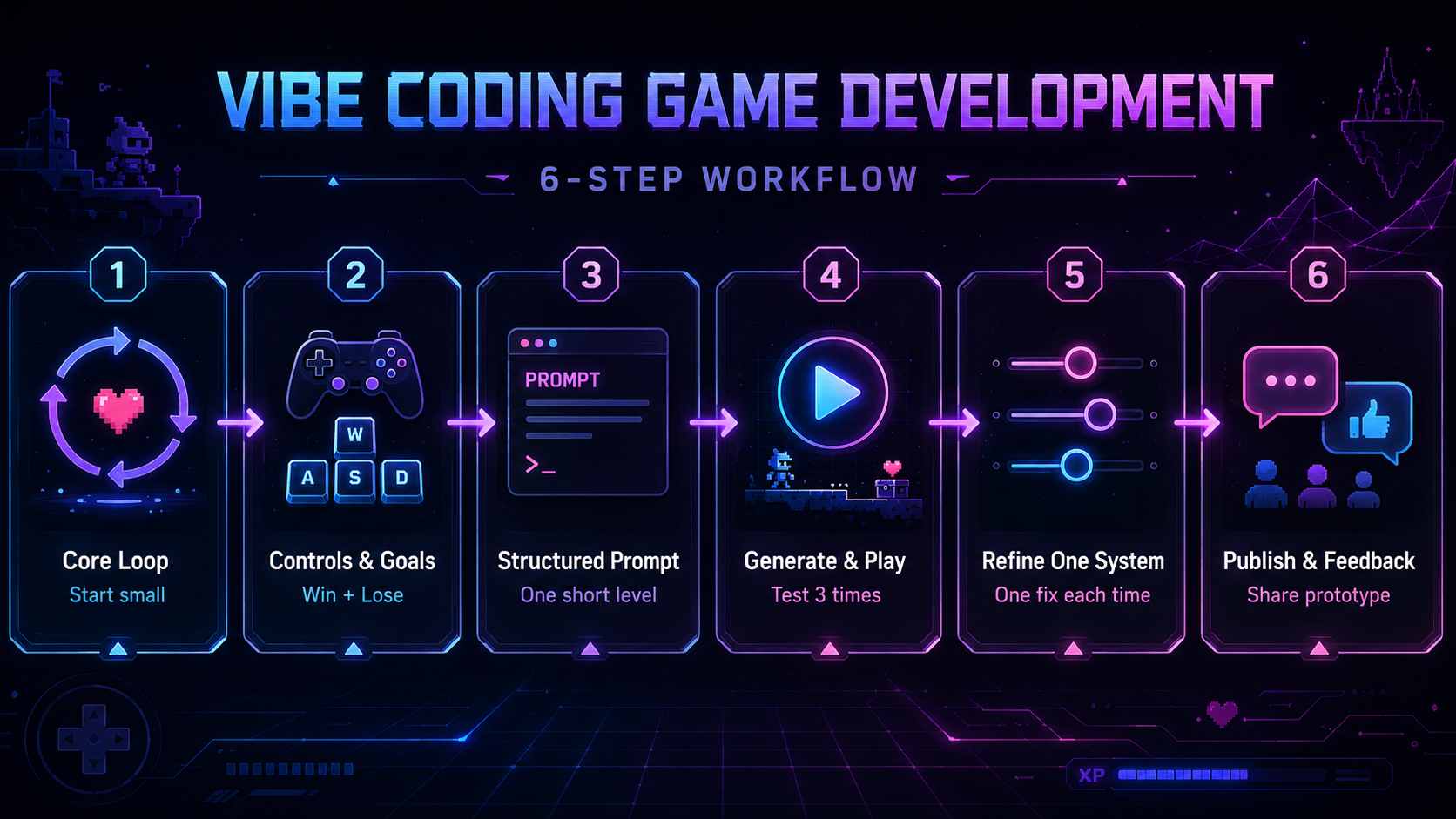
- Choose a small core loop. Start with one repeated action, such as collect three batteries while avoiding one enemy. Use an AI game maker or lightweight browser game tool. Common mistake: starting with an open-world game. Action note: write the loop in one sentence before describing art.
- Define controls, goals and failure conditions. Say how the player moves, what they need, what blocks them, and how they lose. Use keyboard controls for a first 2D game. Common mistake: asking for "fun gameplay" without a fail state. Action note: include one win condition and one lose condition.
- Write a structured game prompt. Treat prompt engineering as game design, not decoration. Include mechanics, UI, obstacles, and difficulty progression. Common mistake: mixing five genres in one prompt. Action note: keep the first build to one screen or one short level.
- Generate and play the first build. Run the output immediately. Check movement, collision, scoring, and restart behavior. Common mistake: judging the game by the screenshot only. Action note: play three times before editing the prompt.
- Refine one system at a time. Change movement speed, enemy behavior, UI, or difficulty, but not all at once. This human-in-the-loop process prevents confusion. Common mistake: asking the AI to redesign everything after one bad playtest. Action note: use one follow-up prompt per issue.
- Publish, share and collect feedback. Share a playable browser game when the loop is understandable. Use feedback from friends, students, or game jam testers. Common mistake: calling a prototype finished too early. Action note: ask testers where they got confused, not whether they liked it.
Copy this prompt template:
Genre: [2D maze / platformer / quiz / idle game]
Player character: [who the player controls]
Controls: [arrow keys, WASD, mouse, touch]
Core mechanic: [the repeated action]
Objective: [what the player is trying to do]
Obstacles: [enemy, timer, traps, locked doors]
Win condition: [how the player wins]
Lose condition: [how the player fails]
Art style: [simple pixel art, flat vector, retro arcade]
UI requirements: [score, timer, health, restart button]
Difficulty progression: [what becomes harder over time]
What Makes a Good Vibe Coding Game Engine?
A good vibe coding game engine should create something you can actually play, not just a block of code. For beginners, the fastest learning happens when they can run the game, feel the controls, and describe what needs to change.
Evaluate tools by practical criteria. Can the system generate game rules, not just text? Can you test inside the browser or editor? Can you keep iterating after the first build? Are assets visually consistent? Does it support 2D, 3D, or both? Can you publish, export, or share a link?
Also check control and cost. Does the tool expose source code or project files? Does it use credits, subscriptions, or free tiers? How much beginner knowledge is needed before you can fix a broken mechanic? Summer Engine argues that games need physics, rendering, scene graphs, collisions, animation, audio, and input handling rather than simple app code generation; that is a useful standard for evaluating any tool.
Best Game Engine for Vibe Coding: Tool Comparison
The best game engine for vibe coding depends on what you want to create. Some tools focus on turning a text prompt into a playable browser game, while others provide a complete game engine with AI-assisted coding, asset creation, and publishing controls.
The table below compares four different approaches to vibe coding games.
| Tool | Best For | Core Workflow | Publishing / Access | Main Limitation |
|---|---|---|---|---|
| SoonLab | Fast browser-playable prototypes from a prompt | Describe a game idea, generate a playable result, test it, then refine with follow-up prompts. | Browser-based creation and sharing; free and paid plans available. | Best for small prototypes, not a full replacement for a production game engine. |
| Rosebud AI | AI-assisted game concepts, templates, characters, and visual ideas | Start from a prompt or template, then use AI tools for game creation and asset direction. | Browser-based workflow; free and paid plans available. | Export and production workflow details should be verified before choosing it for a serious project. |
| Summer Engine | Creators who want AI assistance inside a fuller game engine | Use conversational AI to create scenes, systems, assets, and game logic inside an engine-style editor. | Desktop engine; pricing page lists Free App, Pro, Pro+, and Ultra plans. | More powerful, but also more complex than a lightweight browser prototyping tool. |
| VibeGame | Technical users exploring AI-friendly web game architecture | Use an open-source, declarative web game engine designed to give AI tools clearer project context. | Web/local development; demo and technical write-up available on Hugging Face. | Experimental and better suited to developers than non-technical beginners. |
No tool here is a magic production pipeline. For a classroom maze or game prototype, a browser-first workflow may be enough. Deep customization, native performance, multiplayer, or commercial release still need more engineering.
1. SoonLab: Best for Fast Browser Game Prototypes
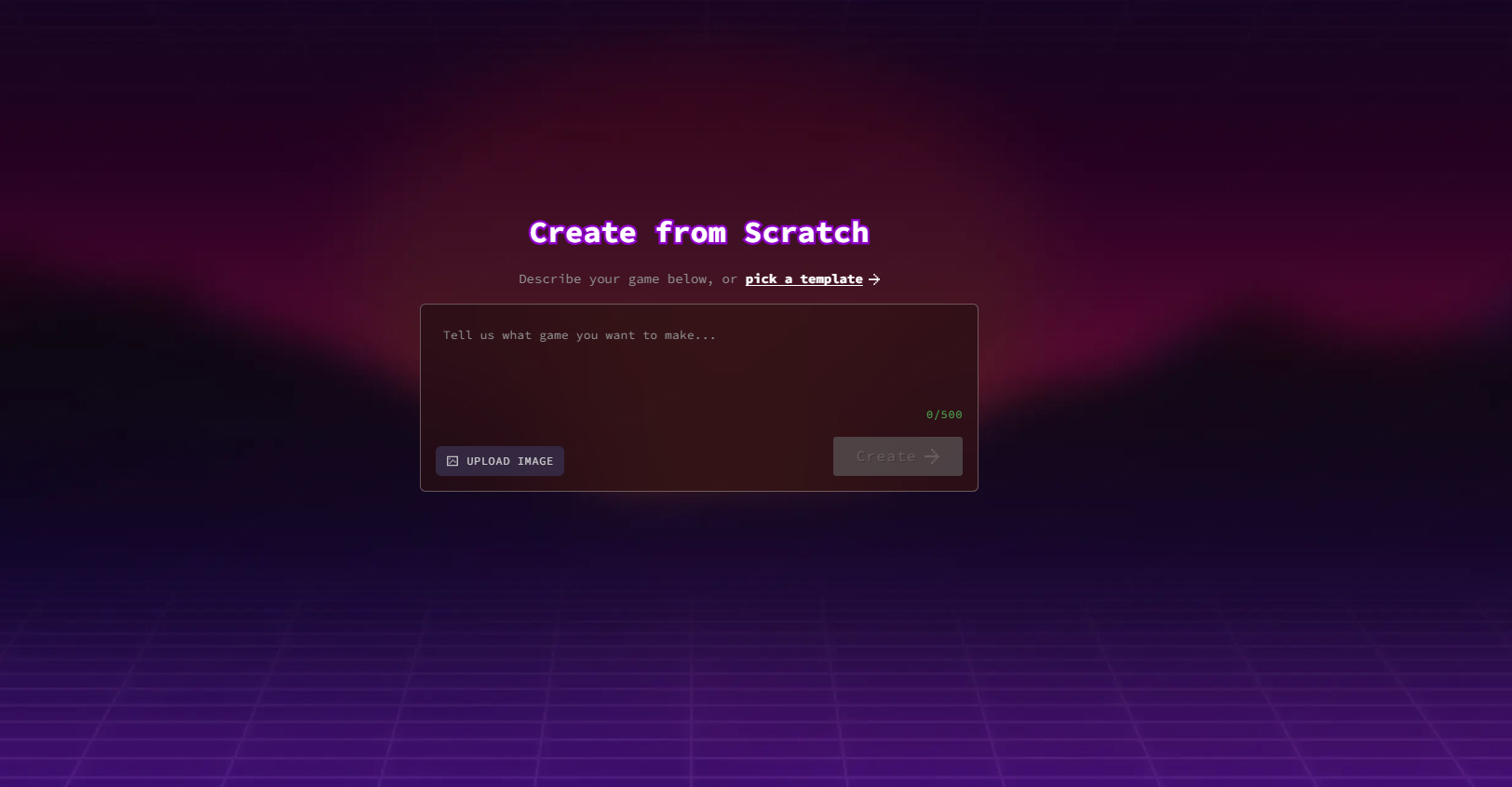
SoonLab is designed for people who want to turn a written idea into a playable browser game without setting up a traditional development environment.
You begin by describing the game you want to make. The platform generates a playable version that you can test directly in the browser. You can then revise the idea, adjust the prompt, generate another version, and share the result.
Turn your idea into aplayable game
Describe the game you want to make, and SoonLab will help you start building it.
This workflow is useful for beginners, teachers, marketers, and creators who want to test whether a game idea is interesting before spending time on detailed development.
- Write a brief description of the game.
- Click "Generate" to create the first version of your game.
- Test the game, and use prompts to make edits. When you feel it's ready to play, share and publish it.
I tested a prompt and used it to create a game in just a few minutes. It surprised me a lot!
2. Rosebud AI: Best for Game Concepts and AI Assets
Rosebud AI is a browser-based tool that helps creators build games from prompts and templates. It also includes tools for creating characters, visual assets, NPCs, and interactive stories.
You can begin with a simple game idea, generate the first version, and then use prompts to change the gameplay, story, scenes, or visual style. This makes it useful for exploring different ideas before committing to a larger project.
Rosebud is suitable for creators who want to experiment with game concepts and AI-generated assets. Before publishing a commercial project, check its latest pricing, export options, and usage terms.
- Start with a prompt or choose a game template.
- Generate the first version, including its characters, scenes, and basic gameplay.
- Play the game and use prompts to improve the story, controls, visuals, or game rules.
3. Summer Engine: Best for AI and Full-Engine Control
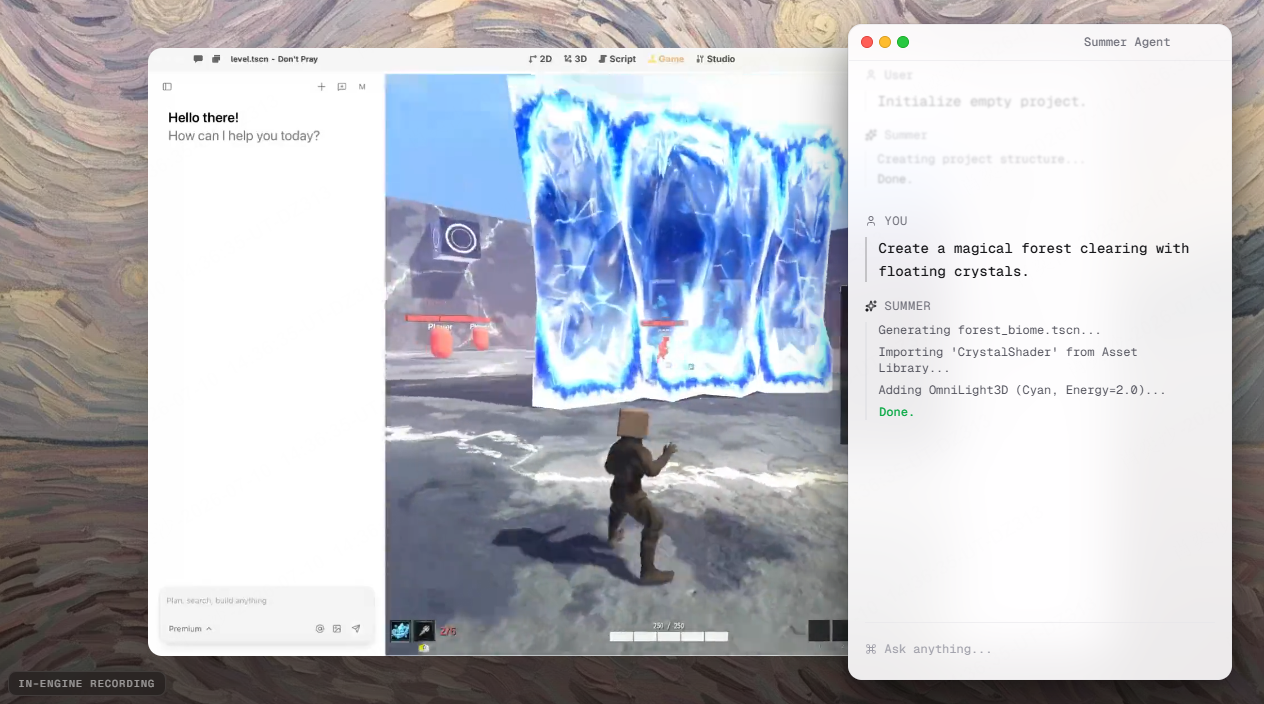
Summer Engine combines conversational AI with a more complete game development environment. It supports 2D and 3D projects and gives creators access to scenes, assets, scripts, and an editor.
You can ask the AI to create a scene, write a gameplay system, or fix a problem. You can then test the result inside the engine and manually edit the generated code or project files when more control is needed.
This workflow is better suited to creators who want AI assistance without giving up access to the underlying game engine. However, it may take longer to learn than a simple browser-based game generator.
- Describe the game, scene, or gameplay mechanic you want to create.
- Ask the AI to generate the first scene, scripts, and playable systems.
- Test the game, report problems to the AI, and edit the code or scenes when needed.
4. VibeGame: Best for Technical AI Coding Experiments
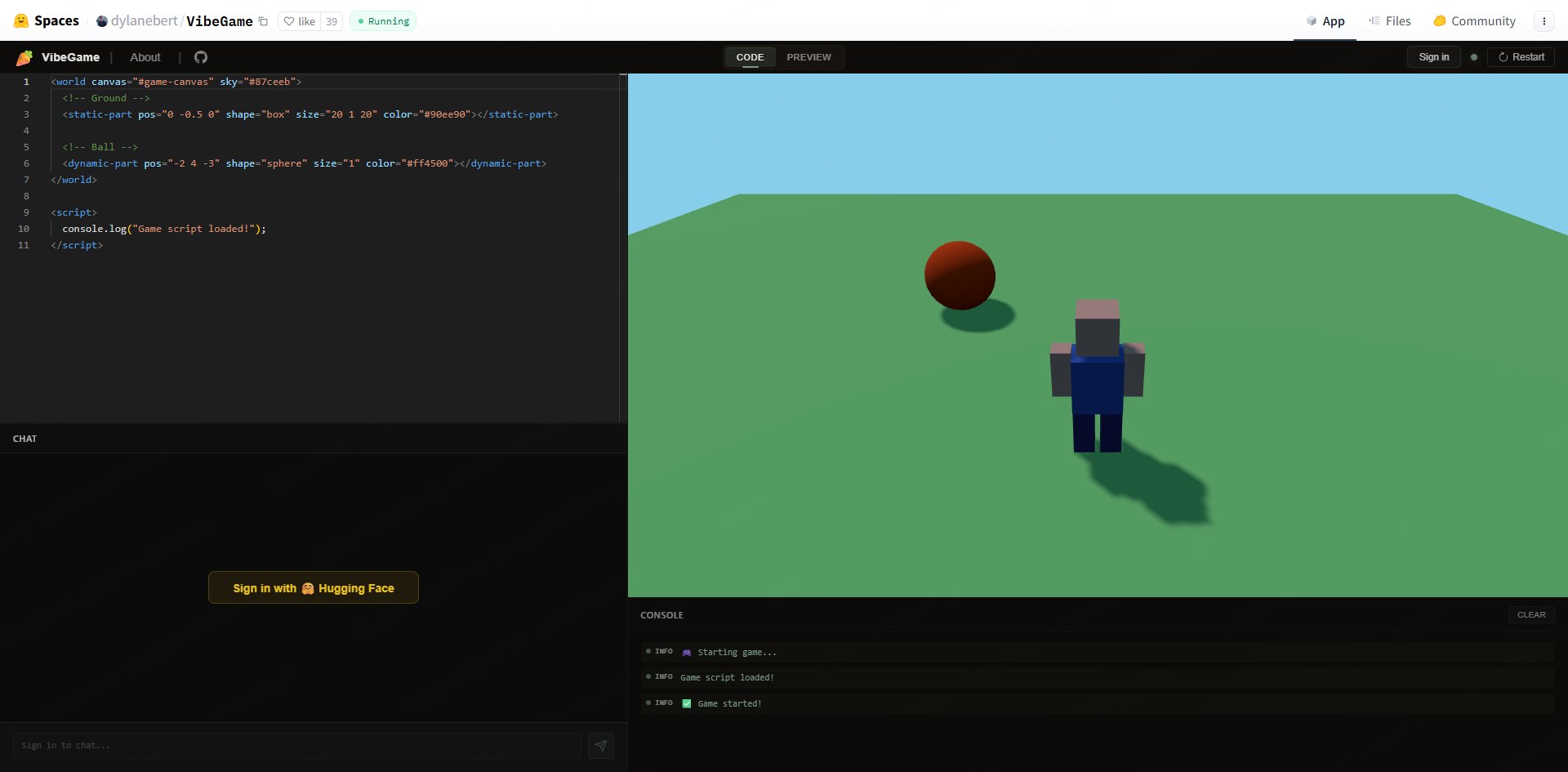
VibeGame is an open-source web game engine designed for developers who want to build games with AI coding tools. It uses web technologies such as Three.js and provides documentation that an AI assistant can read as project context.
Unlike a hosted prompt-to-game platform, VibeGame normally requires a local development setup. You describe the feature you want, let an AI coding assistant create or update the project files, and then run the game in a browser.
VibeGame is useful for developers testing AI-friendly game architecture and simple 3D web experiences. It is still a lightweight engine, so complex mechanics may require manual coding and debugging.
- Set up the VibeGame project and give its documentation to your AI coding tool.
- Describe the game mechanic and ask the AI to create or update the project files.
- Run the game in a browser, test the result, and ask the AI to fix bugs or improve the code.
How to Fix Common Vibe Coding Game Problems
1. Scope creep
Problem: The project grows from a maze into RPG quests, inventory, pets, and multiplayer. Why it happens: prompting is easy, so adding ideas feels free. Practical fix: freeze the first loop until it works.
2. Vague prompts
Problem: The AI creates something playable but not what you imagined. Why it happens: "make it fun" is not a rule. Practical fix: specify controls, objective, obstacles, win condition, and lose condition.
3. Broken or inconsistent controls
Problem: movement changes after a later prompt. Why it happens: broad edits overwrite existing mechanics. Practical fix: say what must stay unchanged.
4. Visual inconsistency
Problem: the player, enemy, UI, and background look unrelated. Why it happens: visual style was not constrained. Practical fix: choose one art style and repeat it in follow-up prompts.
5. Context loss
Problem: the tool forgets earlier rules. Why it happens: long sessions exceed useful context. Practical fix: restate the current rules before important changes.
6. Changes that break existing mechanics
Problem: fixing the enemy breaks scoring. Why it happens: systems are connected. Practical fix: test after every change and edit one system at a time.
7. Missing edge-case testing
Problem: the game works once but fails when players retry, lose, or skip items. Why it happens: the happy path was the only path tested. Practical fix: test win, lose, restart, and unusual player behavior.
8. Assuming the AI has played the game
Problem: the tool claims a fix but the game still feels wrong. Why it happens: generated code is not the same as human play. Practical fix: you must play it yourself or have testers try it.
Are Vibe-Coded Games Worth Trying in 2026?
Yes, if your goal is learning, prototyping, teaching, game jam experimentation, or fast validation of simple mechanics. The trend is moving from general software into games, but games need playable testing, asset consistency, rules, and iteration more than many simple apps.
It is not a direct replacement for commercial teams, complex systems, native performance work, cross-platform release pipelines, or long-term codebases. Recent vibe coding research also emphasizes that AI-assisted workflows still require evaluation, context management, and human judgment.
The practical answer: use vibe coding to make something small enough to play today, then decide whether it deserves deeper development tomorrow. For broader tool research, compare beginner-friendly AI game maker options before committing to one workflow.
FAQs
What are vibe coding games?
They are games created through natural-language prompts where AI helps generate game logic, assets, or a playable prototype. The creator still tests and refines the result. It is best understood as prompt-driven prototyping, not automatic commercial game production.
How do I vibe code a game?
Start with a small game loop, define controls and win/loss rules, write a structured prompt, generate a first build, playtest it, and fix one system at a time. The key is to describe game mechanics clearly and verify the result through actual play.
Do I need coding skills to make a vibe-coded game?
You do not need traditional coding skills for simple prototypes if the tool handles generation and playtesting. However, basic game design knowledge helps. You should understand controls, collisions, scoring, difficulty, and feedback so you can judge whether the generated game works.
How much does vibe coding a game cost?
Cost depends on the tool. Summer Engine listed a free app and paid plans from $20/month to $200/month on July 10, 2026. The Create page showed point-based generation. Rosebud pricing was not publicly displayed on the crawled homepage. Always check official pricing before publishing.
Can vibe coding create a commercial-quality game?
It can help prototype a commercial idea, but it should not be treated as a guaranteed production pipeline. Commercial-quality games usually need manual design judgment, testing, optimization, source control, asset direction, performance work, and sometimes traditional engineering beyond the initial AI-generated build.
Final Takeaway
Vibe coding games are worth trying when you treat them as a fast, human-in-the-loop prototyping workflow. Start small, write structured prompts, play every build, and change one system at a time. If you want to begin now, try SoonLab and turn one simple idea into your first playable browser game.