
If you want to make a game without learning a programming language first, Flowlab game creator is worth considering. You build levels in your browser and connect visual blocks to control movement, scoring, enemies, and other rules.
I would recommend it if you want to understand how your game works and build those systems yourself. This guide covers what Flowlab can do, examples of games made with it, free-plan limits, and a simple way to start your first project.
What Is Flowlab Game Creator?
Flowlab is a browser-based game engine and editor for 2D games. You place objects in a level, create or import their artwork, and connect behaviors that tell them what to do.
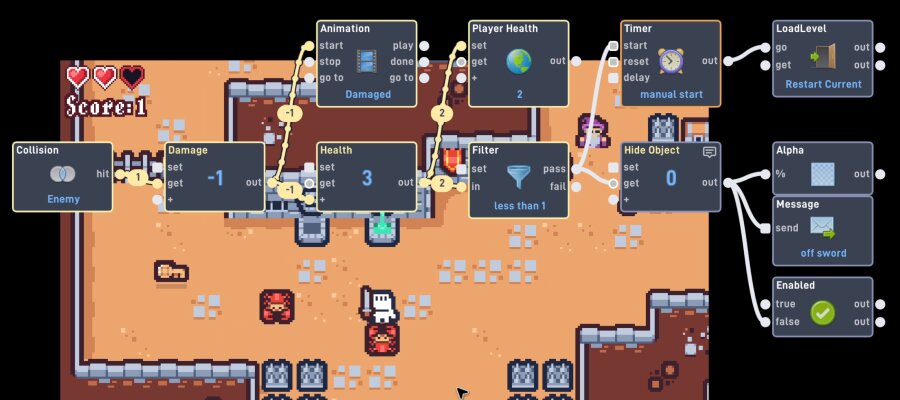
A behavior can detect an event, process a value, or perform an action. For example, touching a coin can increase the score, play a sound, and remove the coin. You connect these actions visually instead of writing them as code.
The Flowlab game engine includes tools for sprites, animation, physics, and game logic. Its official feature guide explains the available tools and which features require a paid plan.
If you are still choosing a tool, compare the game engines for beginners and indie developers by project type and how you want to build your game.
Flowlab for Beginners: Benefits and Limitations
The main benefit is being able to build and inspect game rules without writing code. I would choose Flowlab when learning visual logic is part of the goal.
- Browser-based editing: Start without installing a desktop editor. Flowlab also works on Chromebooks.
- Visible game logic: Follow the connections between events and actions to understand how a mechanic works.
- Built-in creative tools: Work on sprites, animations, levels, and behaviors within the editor.
The main trade-off is that you still need to design and troubleshoot the rules. “No-code” does not mean the game builds itself. As you add more systems, keeping the behavior connections organized becomes more important.
Flowlab is also a 2D engine. I would choose a dedicated 3D engine for a project that needs a true 3D environment, rather than rely on visual tricks to suggest depth.
Flowlab Games: Examples and Ideas for Your Own Project
You can use Flowlab to build platformers, arcade games, puzzles, and top-down adventures. The most useful question is whether it supports the mechanics your idea needs.
These three games show different directions creators have taken:
| Game | What it demonstrates | Design idea to study |
|---|---|---|
| Bun’s Bizzaaare Bakery Brawl!! | A wave-based roguelite with limited supplies and a final boss. | Use resource limits and stronger enemy waves to increase pressure. |
| Parse-O-Rhythm | A commercial rhythm game controlled with a mouse and two buttons. | Build a distinctive experience around a small set of actions. |
| Misty Hollow | An online multiplayer race to collect candy. | Give players a simple shared goal that encourages competition. |
I would take one design lesson from these games rather than try to match their full scope. For a first project, a coin collector, short platformer, or one-room puzzle is easier to finish. Our list of easy games to make can help you choose an idea with a manageable set of rules.
Is Flowlab Free? Free Plan and Export Limits
Yes. Flowlab has a free plan for getting started, but it limits project size and excludes exporting. The official pricing page lists the following limits:
| Feature | Free plan | Indie plan |
|---|---|---|
| Games | 3 | Unlimited |
| Levels per game | 5 | Unlimited |
| Object types per game | 50 | Unlimited |
| Exporting | Not included | Included |
The 50-object limit refers to object types, not every copy placed in a level. Repeating the same floor tile does not use a new type each time.
I would start free with one level and a few reusable objects. Consider upgrading when you need more room or exports, rather than paying before you know whether you like the workflow.
Flowlab Tutorial: Planning and Building Your First Game
For a first project, I would make a one-screen platformer: collect five coins, avoid one hazard, and reach an exit. It teaches movement, collisions, scoring, and restarting within a small level.
The official Flowlab tutorials demonstrate the editor and behavior connections. Use the steps below to keep your project focused as you follow them.
1. Define the Goal and Controls
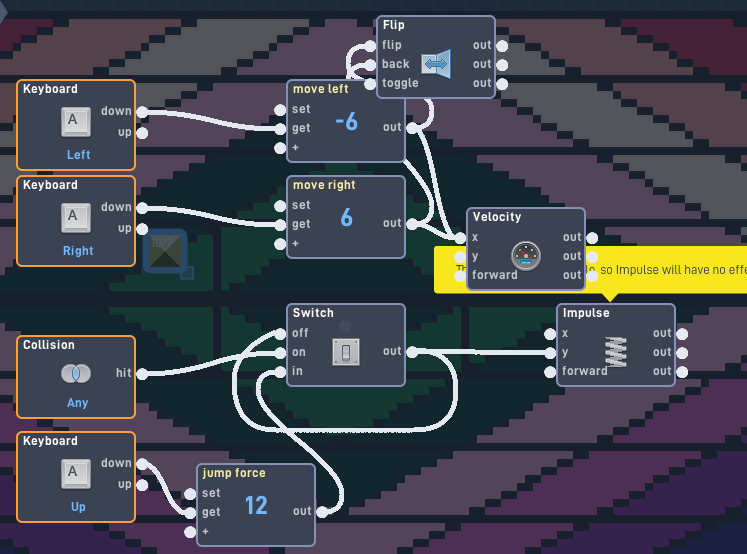
Write down what the player does and how the round ends. For the coin game, use these rules:
- Move left and right, and jump.
- Collect five coins to unlock the exit.
- Touching the hazard restarts the level.
- Show the coin count and a completion message.
2. Create the Level and Game Objects
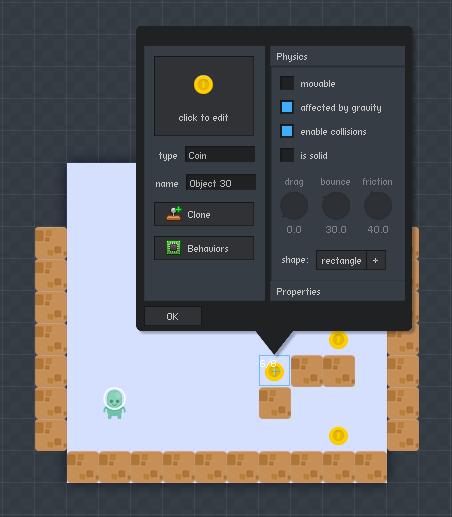
Add the player, floor, coins, hazard, and exit. Use simple shapes while testing. Save detailed artwork for after the player can move through the level and reach the goal.
For more help with jumps, platforms, and level layout, follow our guide to making a platformer game.
3. Connect and Test the Behaviors
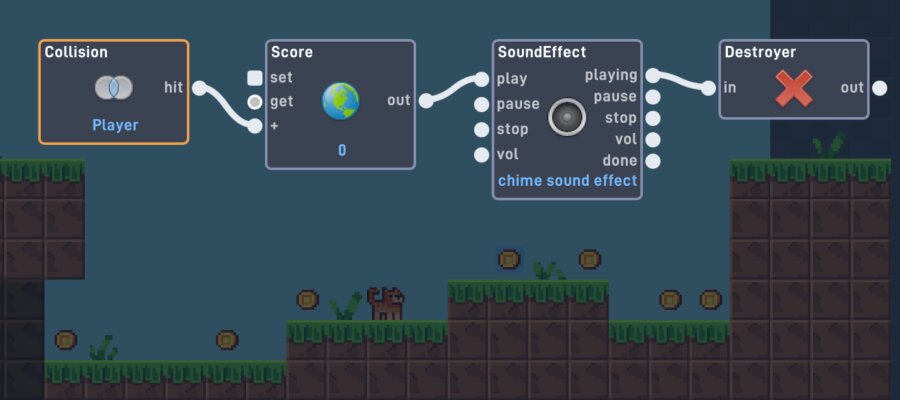
Make movement work first, then add jumping and coin collection. Test after each addition. When a coin is collected, check that the count increases once and the coin disappears.
For the exit, check whether the required coin count has been reached before allowing the player to finish. Building one rule at a time makes problems easier to find.
4. Playtest the Complete Level
Win the game, lose on purpose, and restart. Check that the score resets correctly and that the player cannot finish before collecting every coin.
Then ask someone else to play without your explanation. Watch where they hesitate. Improve the instructions, controls, or feedback before adding another level.
Common Flowlab Problems and Troubleshooting Tips
When something fails, I would check the event and its connected action before changing several settings. These checks can help narrow down the cause:
| Problem | First check |
|---|---|
| The player will not move. | Check the input, connected movement action, and object settings. |
| The score increases more than once. | Check whether the collection event repeats and whether the item is removed. |
| The player catches on the floor. | Inspect collision shapes and the physical settings of the floor objects. |
| Restarting keeps the old score. | Check which values reset when the level restarts. |
Flowlab’s Live Mode lets you watch behaviors activate and values move through connections. Slow down the game to find the first point where the result differs from your rule.
Publishing and Exporting Flowlab Games
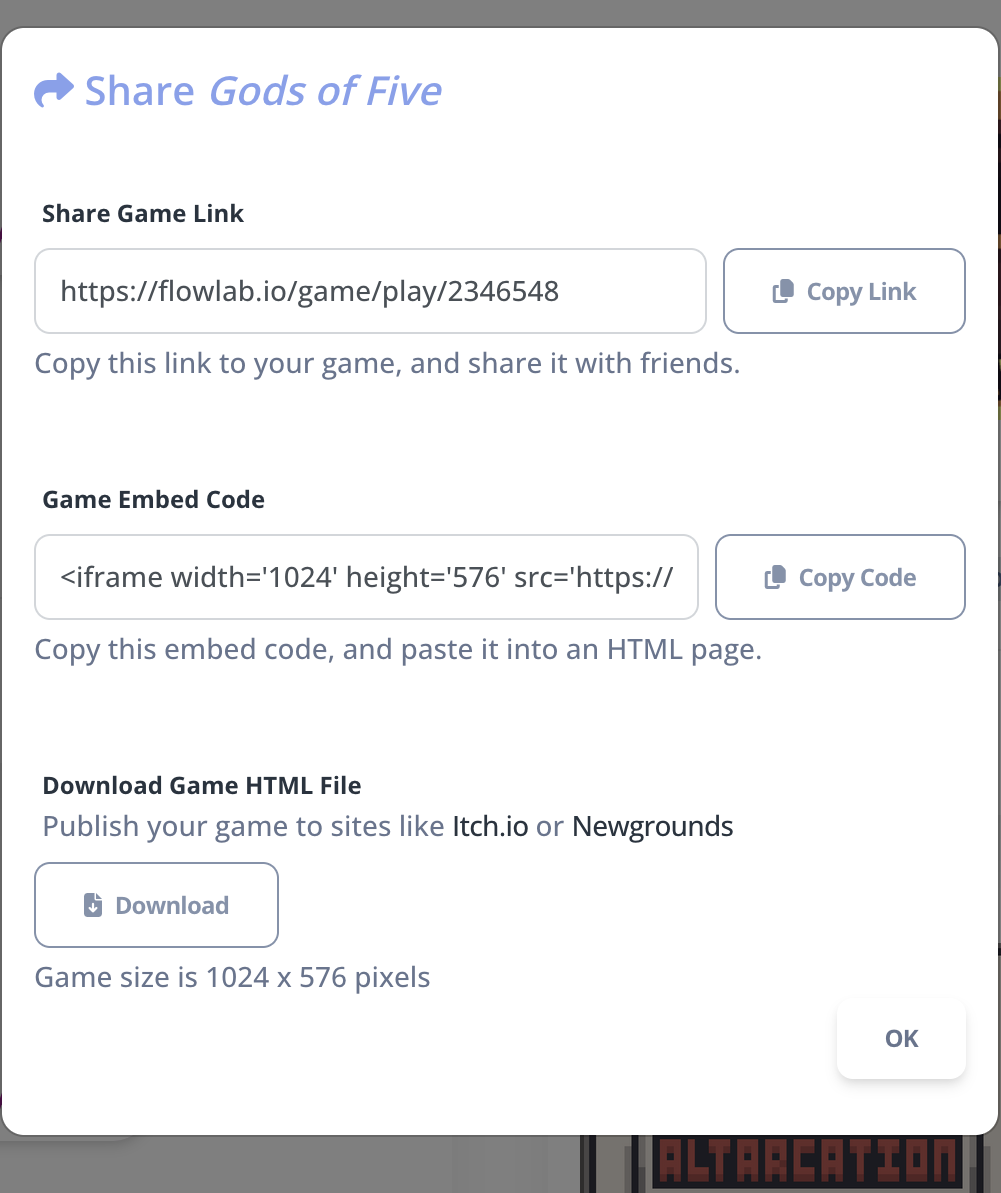
Sharing a hosted game page lets people play on Flowlab. Exporting creates a build for another destination. Paid exports include HTML5, Windows, Mac, Android, and iOS.
If your goal is to share a small game with friends, begin with the hosted page. For a downloadable or app-store release, check the plan and platform requirements first.
Test on the device your players will use. Keyboard controls alone will not suit a phone. Our guide to making a web browser game covers the wider process of creating, testing, and sharing a browser experience.
Flowlab vs SoonLab: Visual Logic or AI Game Creation?
I would choose Flowlab if I wanted to build the behavior connections myself. I would consider SoonLab if I wanted to describe an idea, generate a first version, and focus on testing and refining it.
With SoonLab’s idea-to-game AI, you describe the gameplay, controls, goal, and visual style. After generation, you can play the result and request changes with follow-up instructions.
Turn your idea into aplayable game
Describe the game you want to make, and SoonLab will help you start building it.
For the coin game, I would request one screen, five coins, one hazard, an exit that unlocks after collecting all coins, and a restart button. I would then test the movement, scoring, and ending before expanding the game.
Both approaches need clear rules and playtesting. The choice is whether you prefer connecting visual behaviors or describing the changes you want.
FAQs About Flowlab Game Creator
Do I need to download Flowlab?
No. The editor runs in your browser. Downloading an exported game is separate from using the editor.
Does Flowlab require coding?
You can create games with visual behaviors instead of written code. You still need to design the rules and connect the behaviors correctly.
Can I make an RPG with Flowlab?
Yes. You can build a 2D adventure with movement, dialogue, health, and inventory systems. I would begin with one short quest before adding more locations and character progression.
Can Flowlab make 3D games?
Flowlab is a 2D engine. Visual techniques can suggest depth, but a project that needs a true 3D world is better suited to a dedicated 3D engine.
Can I sell games made with Flowlab?
Yes. Paid exports support commercial publishing, and Flowlab states that it does not charge royalties. You still need to meet the store’s requirements and have permission to use your game’s assets.
Conclusion
Flowlab game creator is a useful option if you want to make 2D games and learn visual logic. Try the free plan with one small project, then decide whether its workflow and limits fit your next idea.
If you prefer starting with a written description, you can create your game with SoonLab. Whichever tool you choose, I would finish a clear, enjoyable first level before building a bigger world.