
GPT-6 Astra can help create playable games, but its biggest advance is not simply writing better code. In OpenAI's published examples, it works through connected development tools, uses visual and spatial information, runs games, checks results, and makes further changes. Its stronger results on 3D reconstruction and spatial tasks could be useful for scenes, cameras, object placement, movement, and level layouts.
I see this as a shift from AI-generated code to a broader AI-assisted production workflow. In this article, I will examine GPT-6's official game development case, what its 3D results do and do not prove, how it was used with Unity and Godot, and where its current limits remain. I will also explain how the SoonLab AI game agent offers a more accessible way to build, play, and refine 2D and 3D game ideas.
What Is GPT-6 Astra?
GPT-6 Astra is OpenAI's new flagship model for coding, computer use, visual work, and complex tasks across professional software. OpenAI announced it on September 3, 2026. Access began with a limited group of organizations, with wider ChatGPT and API availability planned over the following days.
According to the official OpenAI model documentation, Astra supports text and image input, a 1.05 million-token context window, and computer-use tools. That matters because a game project spreads information across scripts, scenes, models, screenshots, error logs, and engine settings.
Create your game with GPT-6 Astra
Describe the game you want to make, and SoonLab 2.0 - GPT 6 Astra will help you start building it.
How Strong Is GPT-6 at Game Development?
My short assessment is that GPT-6 looks strongest as a game development agent for prototyping, spatial work, visual matching, and repeated testing. The available evidence is much narrower for complete game architecture, optimization, multiplayer systems, and long-term production. It is a meaningful step forward, but the development environment around the model still shapes the result.
The strongest early evidence comes from Playco's Playbot, an AI-powered development environment connected to Unity and Godot. It lets models edit scenes, play and test games, validate changes, and work inside tools used by professional developers.
In the official Playco case study, GPT-6 Astra turned one grey-box foundation into three themed prototypes. Playco reported that all three were produced in one pass, most worked on the first attempt, and the team made 50% fewer manual fixes than with the previous model. Its lead product engineer also reported improvements in spatial reasoning, reference-image recreation, responsive UI, and game feel.
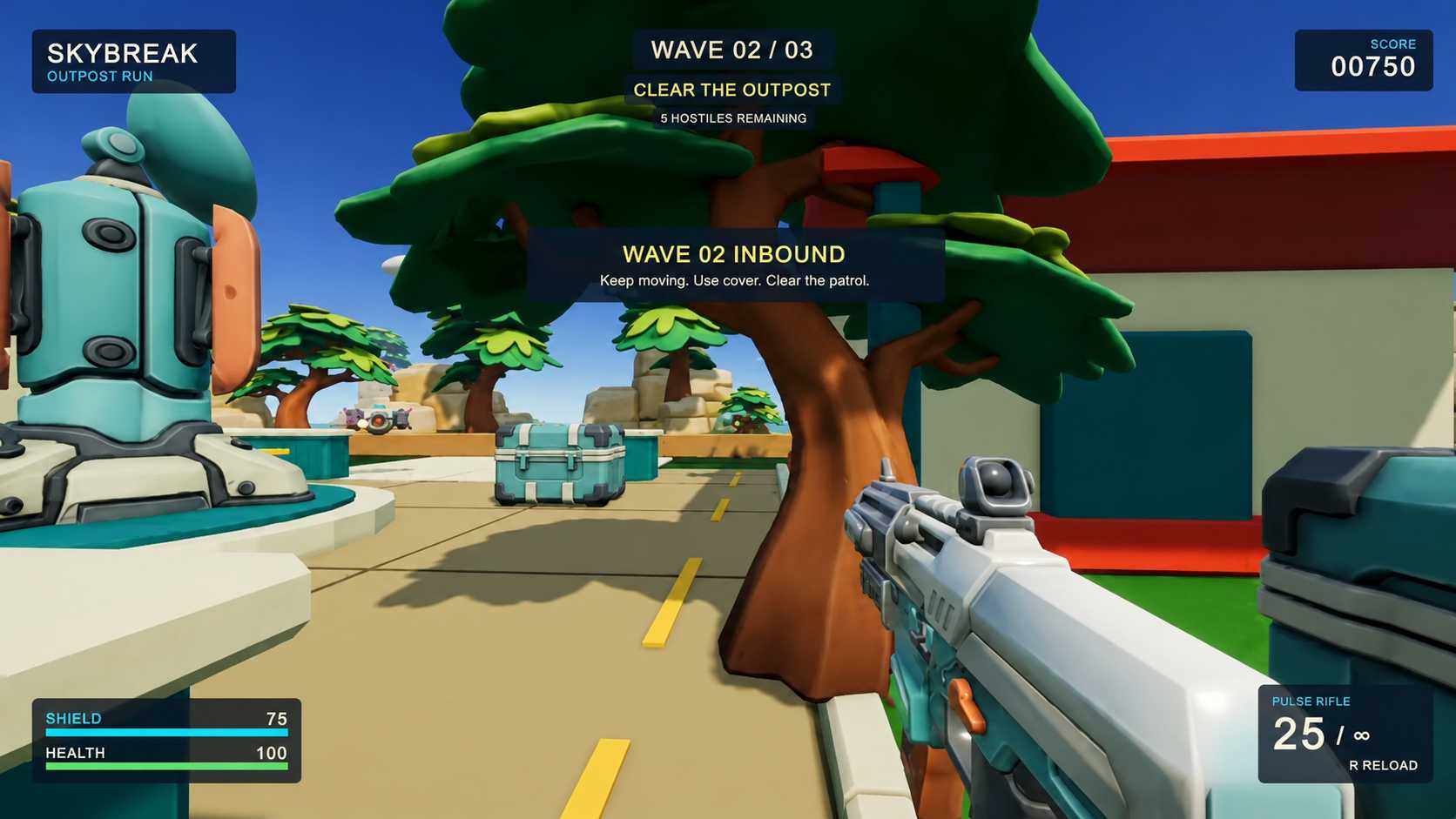
One cyberpunk version still needed a performance fix, so “first attempt” did not mean “production-ready.” My conclusion is that GPT-6 can reduce some iteration work when it has the right tools, but this result should not be treated as a general success rate for every engine or project. Earlier GPT-5.6 Sol game development examples also show why feedback from a running game matters more than untested code alone.
To see how Astra compares with Claude Opus 5.5 on playable prototypes, build time, and cost, read our Opus 5.5 vs GPT-6 Astra game development comparison.
Why GPT-6's 3D Ability Matters for Game Development
Strong 3D game development requires more than generating a mesh or writing a movement script. An AI agent needs to work with depth, scale, position, camera direction, collisions, navigation, and relationships between objects. OpenAI's published examples show progress on some of these spatial tasks, but not all of them.
On OpenAI's official GPT-6 evaluations, Astra scored 95.9% on BenchCAD with tools, compared with 83.3% for GPT-5.6 Sol. BenchCAD measures how well a model can reconstruct a 3D object from several rendered views by generating CAD code. OpenAI also demonstrated Astra building a house in Blender and turning it into a walkable Unreal Engine 5 scene.
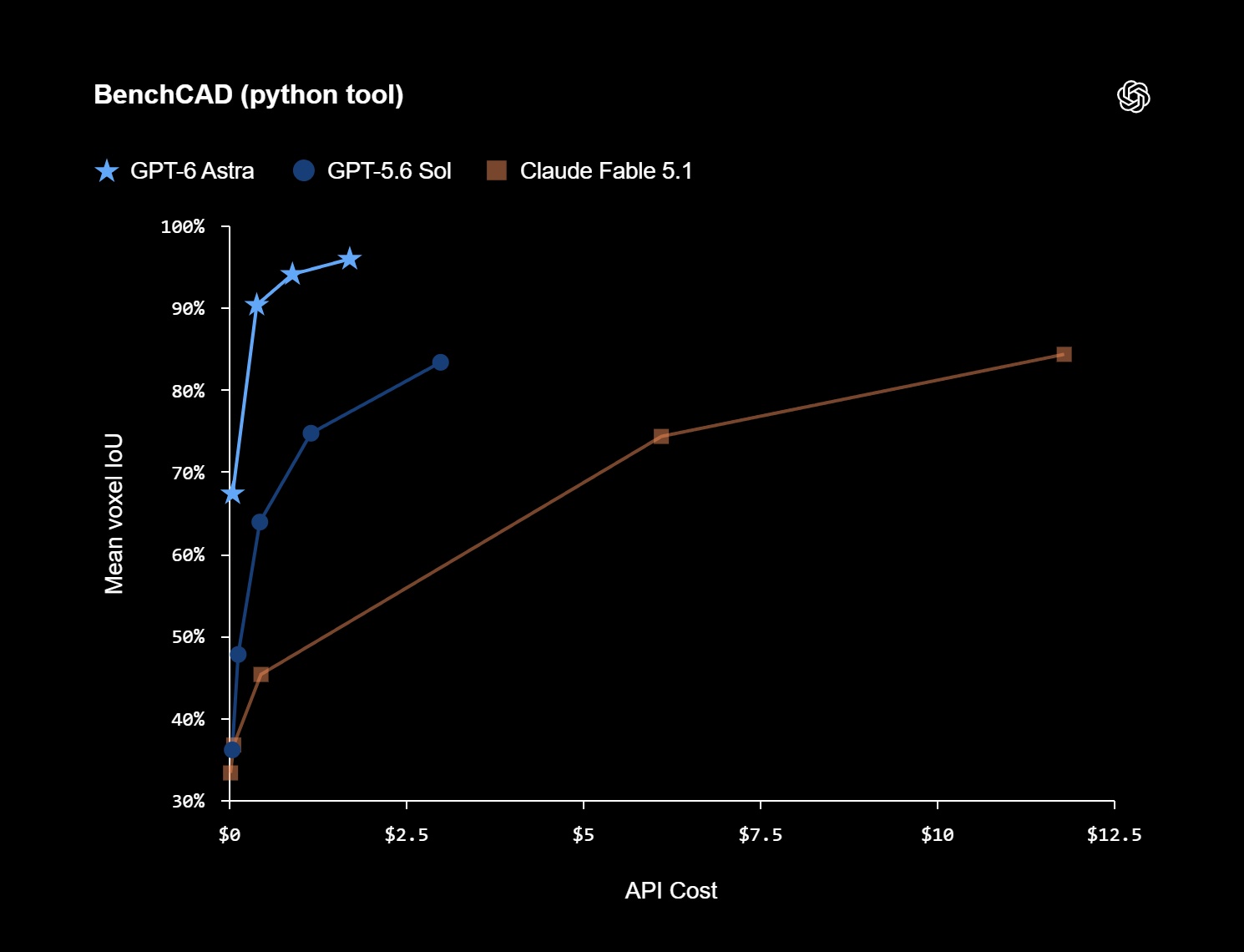
These results do not prove that GPT-6 can independently make a polished 3D game. CAD geometry is different from gameplay, and an architectural walkthrough does not test combat, animation, or frame rate. Based on the abilities shown, possible game-development uses include:
- Grey-box level design: Placing rooms, platforms, paths, cover, hazards, and goals at more sensible distances.
- Camera setup: Adjusting position, field of view, follow behavior, and collision so the camera supports play.
- Reference-based scene building: Recreating the structure and visual direction of sketches, screenshots, or multi-view references.
- Object scale and placement: Reducing obvious errors such as floating props, blocked routes, or inconsistent proportions.
- Navigation and collision checks: Testing whether players can move through a space and whether scene boundaries work.
- Fast visual variations: Applying different themes to one stable gameplay layout before the team commits to an art direction.
For me, the most promising benefit is faster spatial iteration. A developer could use an engine-connected agent to help assemble a small 3D scene, then judge it by moving through the result. Creators can also use an AI 3D game maker to test a compact browser-based idea before moving into a full production project.
Why GPT-6 Is More Than a Game Code Generator
A game can compile and still feel wrong. A jump may work but feel too slow. A menu may respond while covering the action. An enemy may follow its logic but create a dull encounter. Code generation alone cannot judge the complete result.
The official examples show GPT-6 working through tools connected to the running game. In my view, the practical value comes from a workflow like this:
- Read the brief, project structure, assets, and constraints.
- Edit code, scenes, objects, UI, and engine settings.
- Launch the game and use real controls.
- Inspect visuals, errors, collisions, performance, and player feedback.
- Repair the failed parts and run the same checks again.
OpenAI's browser game development workflow follows the same approach: plan the game, build it, test the live result, and improve controls and UI through repeated play. I would judge GPT-6 game creation by the quality of this loop, not by the most impressive one-prompt demo.
GPT-6's Best Game Development Uses
1. Rapid Prototyping
I would use GPT-6 first to turn a focused mechanic into a playable prototype. A team can begin with one stable grey box, explore different themes, and compare real builds instead of choosing from design documents alone.
This matters because a design document cannot show whether movement feels satisfying or whether a loop stays interesting. A playable game prototype gives the team evidence before it spends more time on art, content, and complex systems.
2. Engine-Aware Testing and Repair
Many game bugs appear only after a certain sequence of actions. A platform may fail near its edge. A menu may break after a resolution change. An enemy may stop after the player leaves and returns to a room.
Playco reports that its setup allowed Astra to play the game, validate changes, find bugs, and identify possible improvements to the player experience. This suggests a path toward repeated bug checks, although the published case does not provide a full independent QA benchmark. Human playtesting is still needed to judge whether the result is genuinely fun.
3. 3D Exploration and Art Direction
I also see value in separating stable mechanics from presentation. GPT-6 can help apply different visual directions to a shared grey-box foundation, making early art choices more concrete. A team can move through each version and see how the theme affects readability, atmosphere, and play.
This also connects with the rise of world models in game development. Game creation tools are starting to work with explorable space rather than only producing text, code, or flat images.
What GPT-6 Still Does Not Prove
- A prototype is not a shipped game. The Playco example covers three prototypes, not console certification, live multiplayer, years of content, or post-launch support.
- One early case is not a broad benchmark. Independent teams still need to test Astra across more engines, genres, and project sizes.
- Performance work remains difficult. One official prototype needed a performance repair. Larger scenes, physics, networking, and platform limits create harder problems.
- 3D benchmarks have boundaries. Reconstructing geometry does not measure level design, animation quality, combat, or game feel.
- Long agent runs have a real cost. OpenAI lists standard API pricing at $10 per million input tokens and $50 per million output tokens. Teams should measure the cost of a tested task, not only one prompt.
How to Use GPT-6 for Game Development
1. Start With One Testable Loop
Define the player action, response, goal, and failure state. “Build an open-world RPG” is too broad. “Build one small arena where the player dodges three attacks and breaks a shield with timed counters” gives the agent something it can build and test.
2. Define Checks Before Building
List visible results: controls work, attacks have readable warnings, damage updates the HUD, the fight restarts cleanly, and performance stays above the chosen target. Clear checks help GPT-6 verify its own work.
3. Use a Safe Engine Workspace
Give the agent a separate branch, clear project instructions, and a limited task. State which files it may change, how to run the game, which tests must pass, and when it should stop for review.
4. Require It to Play and Repair
Do not accept generated code as the final result. Require GPT-6 to launch the game, use the controls, inspect errors and screenshots, compare the build with the brief, and rerun every failed check after a fix.
How SoonLab AI Game Agent Fits Into This Shift
These results also show why game creation needs more than a general chat interface. A model needs a system that connects it with game-specific planning, building, playtesting, visual checks, and revision tools.
SoonLab 2.0 applies this agent-based approach to a simpler prompt-to-play workflow. You describe the game, and the SoonLab AI game agent helps turn the idea into a playable 2D or 3D browser game. It can clarify important choices before generation, build the first version, let you play it immediately, and respond to follow-up requests for changes to controls, difficulty, UI, visuals, levels, or rules.
The difference is the amount of setup. A GPT-6 engine workflow may require API access, project instructions, version control, editor integration, and custom tests. SoonLab is designed for creators who want the AI agent to handle that structure. You still direct the idea and judge the result, but you do not need to connect the model to Unity or Godot before seeing something playable.
I would use SoonLab first when the main question is whether an idea can become a fun game loop. Start with the idea-to-game AI workflow, play the result, and refine it through clear follow-up instructions. A professional team can then carry a validated idea into a full engine when it needs deeper control, custom systems, or platform-specific production.
Turn your idea into aplayable game
Describe the game you want to make, and SoonLab will help you start building it.
FAQs
Can GPT-6 create 3D games?
Official examples show GPT-6 working on a Blender model, an Unreal Engine walkthrough, and prototypes through Playbot's Unity and Godot connections. These examples support 3D reconstruction and spatial work, but do not prove complete 3D game production.
Does GPT-6 work with Unity and Godot?
Yes, through a connected agent environment such as Playco's Playbot. GPT-6 is a model rather than a built-in game engine plugin, so it needs controlled access to project files, the editor, gameplay, and tests.
Is GPT-6 better than GPT-5.6 for game development?
In Playco's early test, Astra required fewer manual fixes than the previous model and showed improvements in spatial reasoning, visual matching, UI responsiveness, and game feel. This is one company case, so broader independent testing is still needed.
Final Verdict
GPT-6 game development matters because the official examples connect coding, visual understanding, 3D tasks, engine actions, and gameplay testing. The evidence currently includes Astra's 95.9% BenchCAD score, an Unreal Engine walkthrough, and Playco's report of 50% fewer manual fixes. Each result measures a limited task rather than complete game production.
I would use GPT-6 for grey-box exploration, 3D scene setup, reference-based building, contained features, gameplay tests, and bug repair. The best workflow is still simple: define one idea, build it, play it, inspect what failed, and improve the next version. Tools such as the SoonLab AI game agent make that loop accessible without requiring creators to assemble the full technical environment themselves.