
If you are considering Tesana AI, my short answer is this: it is worth exploring if you want to build a real Godot project through natural-language prompts, not just generate a disposable browser demo. Tesana can create playable 2D and 3D games, refine them through conversation, and provide complete source-code exports on paid plans. Its value, however, depends on whether you need that Godot foundation enough to accept usage-based credits and higher plan requirements for some advanced features.
In this Tesana AI review, you will learn how the platform works, what its most useful features cost, what current users like and dislike, and who should consider paying for it. I will also compare Tesana with SoonLab and explain when a fast browser-game workflow may be more useful than a native Godot export.
Tesana AI Review: The Quick Verdict
| Best for | Strongest feature | Main limitation | My verdict |
|---|---|---|---|
| Creators who want an AI-assisted path into Godot | Complete Godot source export on paid plans | Prompt costs become less predictable as projects grow | Promising for focused 2D and 3D projects; test the workflow before subscribing |
Tesana AI is most convincing when you want one workspace for planning, generating, previewing, debugging, and exporting a game. Its biggest advantage is portability: the exported source project can open in the standard Godot editor and continue running without Tesana.
I would be more cautious if you only need to test a mechanic, publish a browser game quickly, or work within a predictable generation budget. In that situation, a focused text-to-game tool may get the idea in front of players with fewer production decisions.
What Is Tesana AI?
Tesana is an AI game maker that turns plain-language instructions into playable games. You describe the genre, mechanics, controls, visual direction, and win or lose conditions. Tesana then builds the project while its Studio places the conversation beside a live game preview.
The important difference is what happens underneath. According to Tesana, its games run on Godot 4, with real project files and source code behind them. This gives the platform a clearer route from AI-generated build to conventional engine development than tools that provide only a hosted game or a static concept.
How Tesana Turns a Prompt Into a Game
1. Describe the Game You Want
You start with an AI game prompt. Include the genre, core action, controls, art style, progression, and success or failure conditions. Reference images can help guide the palette, mood, character design, and interface, although they do not reproduce an existing asset exactly.
A small, focused request usually gives the AI a better target. One level with one complete game loop is more useful for evaluation than an ambitious request for a large open world with several unfinished systems.
2. Review the Plan Before Building
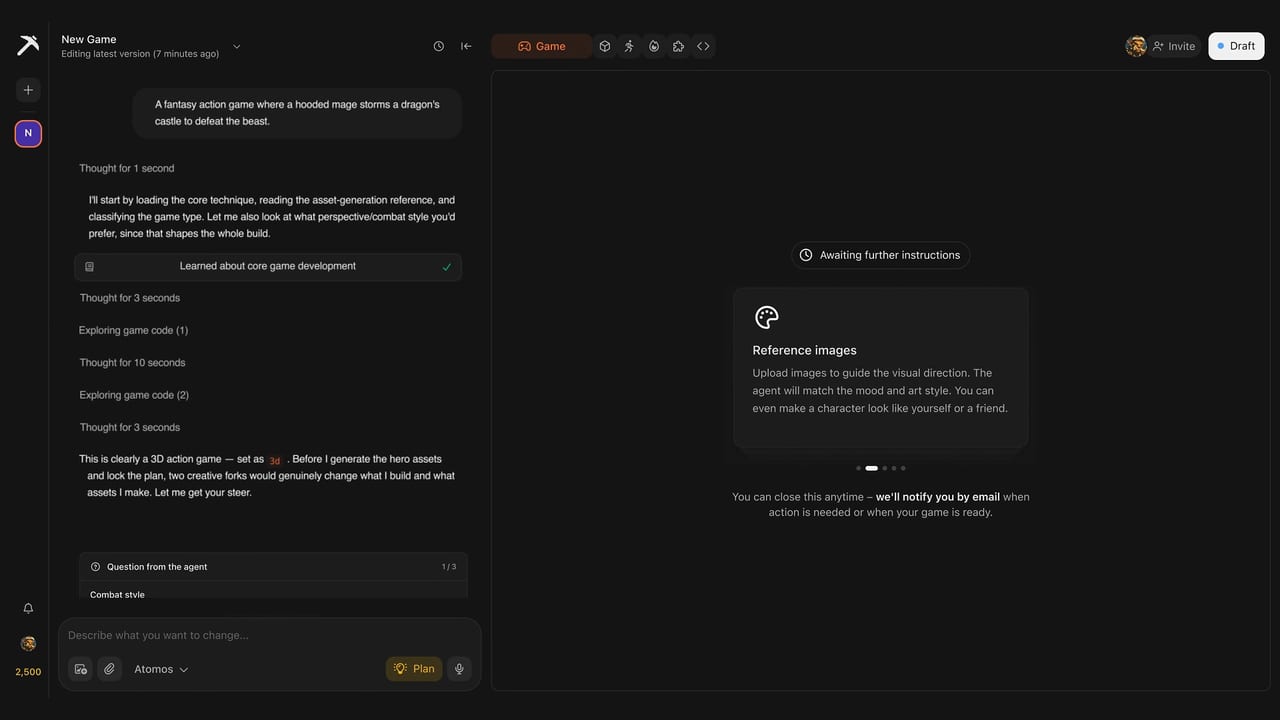
Plan mode adds a checkpoint before the main build. Tesana outlines the mechanics, structure, and art direction, and you can revise that proposal before approving it. Free accounts can preview a limited number of plans without spending credits, but building an approved plan still requires sufficient credits.
This is one of Tesana’s most useful ideas. Correcting a bad assumption in an outline is easier than correcting it after the AI has generated scenes, code, and assets.
3. Play, Prompt, and Refine
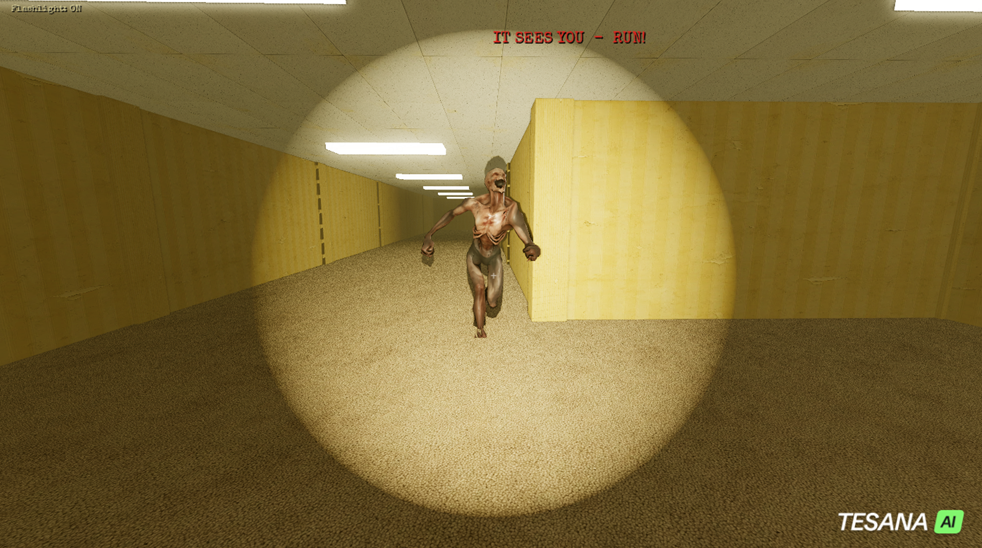
Once the build is ready, you can play it inside the Studio and request changes through chat. Tesana also provides version history and reverts, so you can restore an earlier state if a later revision makes the game worse. Screenshots and runtime logs can give the AI more context when you report visual or technical problems.
This workflow reduces manual setup, but it does not remove game development decisions. You still need to test the controls, find broken states, judge the pacing, and decide whether the game is enjoyable.
Tesana AI Features That Matter Most
Godot Source-Code Export
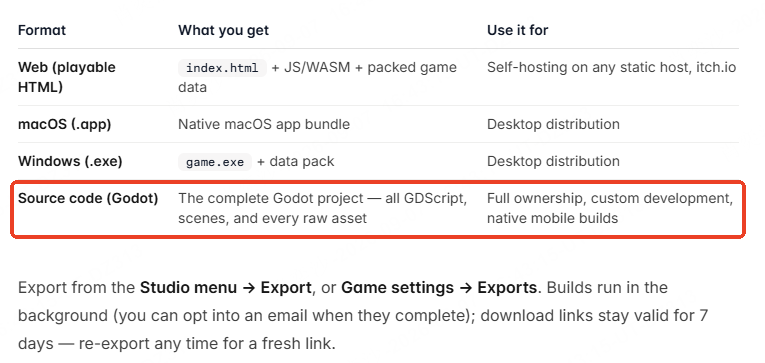
Tesana’s strongest differentiator is its paid source export. Original projects can be downloaded with their GDScript files, Godot scenes, and raw assets. The exported project can then be opened and developed further in a compatible version of Godot.
This reduces platform lock-in and gives a developer somewhere to continue when prompting is no longer the best way to make a change. It does not guarantee that every generated script will be clean, efficient, or easy to maintain, so technical review is still important before treating the output as production-ready code.
2D and 3D Game Generation
Tesana supports projects including 2D pixel games, top-down games, first-person experiences, and 3D worlds. It can generate code alongside models, textures, audio, animations, effects, terrain, lighting, and materials.
I would still keep the first build small. A visually impressive 3D environment also needs reliable movement, cameras, collisions, enemy behavior, interface states, progression, and performance. If you have not decided which format fits the idea, SoonLab’s guide to 2D versus 3D games can help you choose a manageable starting point.
Reference Images and Custom Assets
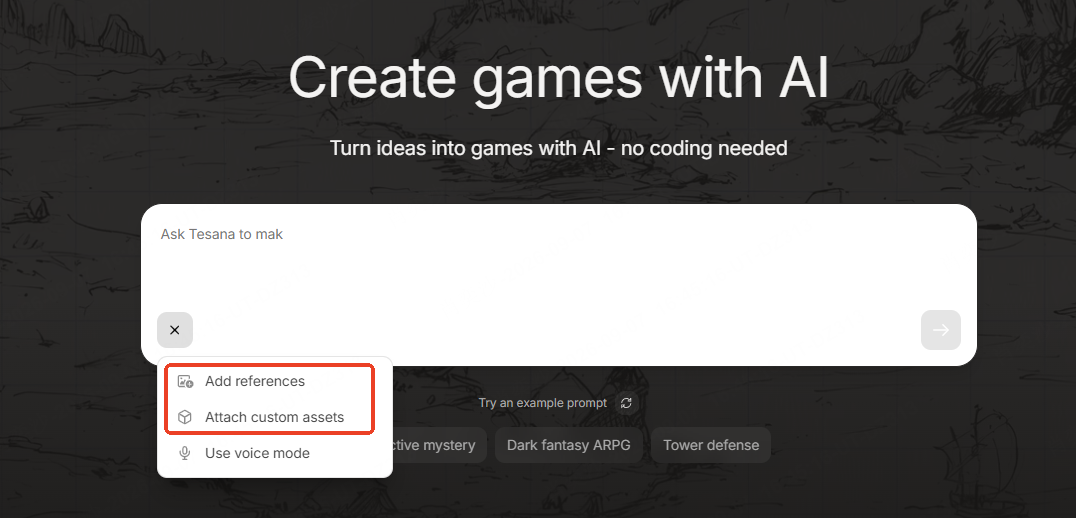
Reference images can guide the visual direction of a Tesana game. Importing finished production assets is different: custom asset uploads require the Max plan or above and support formats such as images, sprites, 3D models, audio, video, fonts, data files, and ZIP archives. Uploaded assets are also included in source exports.
This is useful when you already have a character, soundtrack, model, or brand identity. The tradeoff is that custom imports begin at the $50-per-month Max tier rather than Pro.
Publishing, Multiplayer, and Monetization
Tesana includes public game pages and marketplace discovery. Paid creators can sell games through the Tesana store, where Tesana documents a 70/30 revenue split. Games exported and sold elsewhere do not carry a Tesana platform fee.
Hosted multiplayer limits depend on the subscription. The current pricing page lists 10 concurrent players for Pro, 100 for Max, and unlimited concurrent players for Ultra. Those limits are useful for comparing plans, but a serious multiplayer project still requires decisions about networking, moderation, scaling, and ongoing operations.
What Tesana Users Like and Where They Struggle
Public feedback is mixed. In a Reddit discussion about whether Tesana is worth paying for, one user praised the interface and output after creating four games. The same user also mentioned occasional errors and delays before credits were refunded.
Other commenters questioned whether Tesana adds enough value for developers who can already use a coding agent directly inside Godot. One person also assumed that projects remained locked inside Tesana, but the current documentation says paid users can export standalone builds and the complete Godot source for original games.
Tesana’s App Store reviews show a similarly uneven experience. Some reviewers praise the generated games and recurring credits, while others report failed builds, missing elements, long processing times, or weak adherence to prompts. Developer responses on several critical reviews acknowledge bugs and direct users to support for investigation or credit refunds.
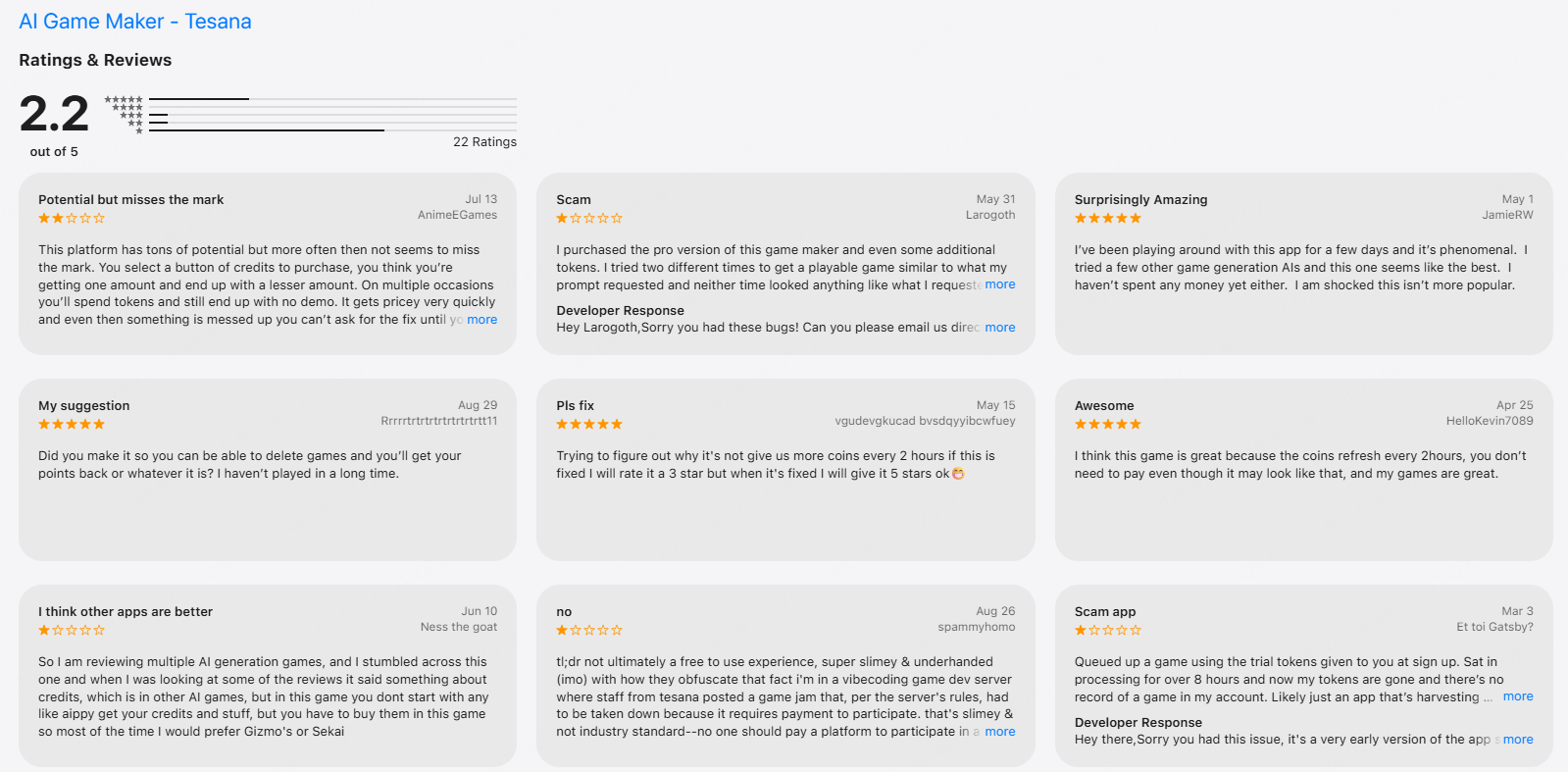
These reports do not predict every user’s experience, but they suggest a sensible test: begin with a compact project, review the credit usage after each meaningful change, and confirm that the workflow is reliable for you before buying a larger plan or credit package.
Tesana AI Pricing and Credits
Tesana charges credits for the AI work completed during a build, edit, or fix. The cost changes with the model, project context, and scope of the request. According to Tesana, one focused change per prompt generally costs less and produces a clearer result than combining several large changes.
| Plan | Monthly price | Key access | Best fit |
|---|---|---|---|
| Free | $0 | Daily credits that vary by country; personal, non-commercial use | Testing the workflow |
| Pro | $25 | 2,500 monthly credits, 250 daily bonus credits, commercial rights, source export, and desktop export | Creators who need ownership and Godot source |
| Max | $50 | 5,250 monthly credits, Atomos, Loop, custom assets, and faster generation | Frequent creators working on more demanding projects |
| Ultra | $200 | 22,000 monthly credits, fastest generation, priority support, and unlimited concurrent players | Studios and high-volume users |
These are the monthly prices listed on the Tesana pricing page at the time of review. Prices, annual discounts, plan features, and regional free allowances can change, so confirm the current terms before subscribing.
The free tier is suitable for evaluating the interface, but it does not include the same usage rights as a subscription. Tesana’s ownership policy says paid users own their original games, generated source, and project assets with commercial rights that survive cancellation. Free-plan creations are limited to personal, non-commercial use, while assets you upload remain yours on every plan.
Tesana AI Pros and Cons
| Pros | Cons |
|---|---|
| Creates real Godot projects instead of only static concepts | Prompt costs vary with project size, model, and requested work |
| Combines planning, generation, preview, debugging, and revision | Public reviews report occasional errors and failed builds |
| Offers source-code and standalone exports on paid plans | Source export and commercial ownership require payment |
| Supports both 2D and 3D projects | The most capable model and custom assets require Max or Ultra |
| Includes version history, publishing, and multiplayer options | Generated projects still need careful testing and technical review |
Who Should Use Tesana AI?
Tesana is a strong candidate for beginners who want help with Godot setup, indie developers exploring a 2D or 3D concept, and small teams that value access to the underlying source. It is most useful when you want generation, live preview, debugging, assets, publishing, and export inside one workflow.
It may offer less value if you already work efficiently in Godot with a coding assistant and prefer direct control over project architecture, plugins, version control, and model usage. It is also a weaker fit when predictable generation costs matter more than the convenience of an integrated workspace.
Whichever tool you choose, start with one level, one central mechanic, and one complete win-or-lose loop. An AI game prototype maker is most useful when it gives you something focused enough to test before extra systems hide the real design problems.
Tesana AI vs SoonLab: Which AI Game Maker Fits Your Workflow?
Tesana AI and SoonLab both turn written ideas into playable 2D and 3D games. SoonLab is approachable for beginners, but it is not limited to first-time creators. Professional developers can use it to test mechanics, compare creative directions, create playable concepts, and share a build before committing more production time.
| Comparison | SoonLab | Tesana AI |
|---|---|---|
| Main strength | Fast creation of playable 2D and 3D browser games | AI-generated Godot projects with native source export |
| Best for | Creators and developers who want to build, test, and share quickly | Creators who specifically want to continue in Godot |
| Workflow | Describe, generate, play, revise, publish, share, or download | Plan, generate in Godot, refine, publish, or export |
| Downloaded project | Editable HTML game with web code and assets | Godot source project on eligible paid plans |
| Ideal use | Browser games, 2D and 3D prototypes, mechanic testing, and concept validation | Projects that need a direct path into continued Godot development |
SoonLab’s advantage is the speed of the complete creation loop. You can define the gameplay, controls, level structure, characters, visual style, and difficulty in plain language, then play the result in your browser and request changes. This helps a beginner avoid engine setup while giving an experienced developer a fast way to explore a 2D or 3D idea before beginning a larger production build.
SoonLab also lets you download the game as an editable HTML project. You can continue working with its HTML, CSS, JavaScript, and assets, or use the playable version as a reference when rebuilding the project in Unity, Unreal Engine, or another professional engine. The HTML does not convert directly into a native Unity or Unreal project, so Tesana remains the better option when Godot source is essential. For fast browser creation, testing, publishing, and sharing, SoonLab offers the more direct workflow.
Turn your idea into aplayable game
Describe the game you want to make, and SoonLab will help you start building it.
Tesana AI FAQs
Is Tesana AI free?
Tesana offers free daily credits, although the allowance varies by country and does not roll over. Free-plan creations are limited to personal, non-commercial use. Source export, commercial rights, and several advanced features require a paid subscription.
Does Tesana require coding?
No coding is required to generate and revise a game through prompts. Game design knowledge and basic familiarity with Godot are still useful when diagnosing problems or continuing development from exported source.
Does Tesana use Godot?
Yes. Tesana builds games on Godot 4 and writes real project files and GDScript. Paid users can export eligible original projects and open them in the standard Godot editor.
Can you export games from Tesana?
Paid plans can export standalone web, macOS, and Windows builds, as well as the complete Godot source project for eligible original games. The exact export options depend on the plan and project.
Who owns games made with Tesana?
Tesana says users on paid plans own their original games, generated source, and project assets, with commercial rights that survive cancellation. Free-plan creations are for personal, non-commercial use. Assets uploaded by the user remain theirs on every plan.
Is Tesana AI worth paying for?
Tesana is worth considering if you need Godot source export, integrated 2D or 3D generation, or hosted multiplayer. Test a small project first so you can judge generation quality and credit use before committing to a subscription.
Final Verdict
Tesana AI is worth trying if you want an AI-assisted route into Godot. Plan mode, live preview, version history, AI debugging, asset generation, publishing, and paid source export give it a stronger path beyond the initial prompt than many closed browser tools.
The main tradeoff is cost predictability. Larger projects require more context, the most capable model and custom assets sit behind higher plans, and public feedback shows that generation reliability is not consistent for every user. I would use the free allowance to build one compact game, review the cost of each revision, and upgrade only after Tesana produces a result you want to continue developing.
Choose Tesana when a native Godot project is central to your plan. Choose SoonLab for fast 2D and 3D game creation when you want to move from an idea to a playable browser game, refine it through prompts, download the HTML, and share it with players quickly. The better choice depends less on which platform lists more features and more on what you need after the first playable build.