
Combos AI is worth trying if you want to turn a short prompt into a playable browser game without writing code. In my test, it generated a working 2D platformer in about 10 minutes, offered separate options for desktop and mobile, and let me publish and share the result directly. However, the game felt more like a rough prototype than a finished experience, with basic visuals, low-quality character assets, and no music.
That does not make Combos a poor tool. It is useful for getting an idea onto the screen quickly, testing a simple mechanic, or creating a small game to share. The limitation is that a playable first version may still need considerable work before it has distinctive characters, polished assets, balanced gameplay, or a clear visual identity.
In this Combos AI review, I will look at how the platform works, what it generated from my prompt, its most useful features, 2D and 3D support, free credit system, and the strengths and limitations reported by other users. I will also compare Combos with SoonLab using the same platformer prompt, so you can see which tool is faster and which produces the stronger first result.
Turn your idea into aplayable game
Describe the game you want to make, and SoonLab will help you start building it.
Combos AI Review: My Quick Verdict
| Category | Verdict |
|---|---|
| Ease of use | Easy for beginners who can describe a basic game idea |
| Generation speed | About 10 minutes in my 2D platformer test |
| Playability | The generated game worked and included a clear objective and controls |
| Visual quality | Functional, but the character and environment assets were basic |
| Audio | No music was included in my test result |
| Platform support | Useful desktop or mobile choice before generation |
| Publishing | Games can be published and shared online |
| Best for | Fast prototypes, simple browser games, and early idea testing |
Best reason to try it: Combos removes most of the setup between having an idea and playing a first version.
Main limitation: a playable result is not the same as a polished one. The first version may still need substantial work on art, audio, level design, balance, and personality.
What Is Combos AI?
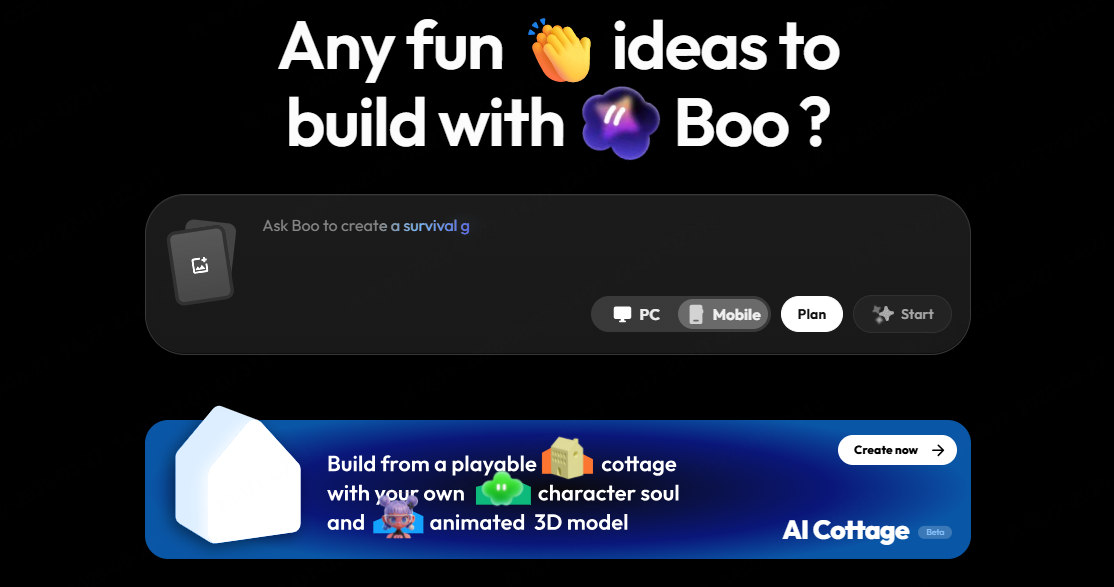
Combos AI, also called Combos Fun, is a browser-based AI game maker from Converge AI. You describe the game you want, let the system generate it, test the result, and continue editing through prompts or visual tools. The platform is designed for people who want to create without starting in a traditional engine or writing the full game code themselves.
The product goes beyond static game concepts. It aims to generate playable projects with rules, controls, scenes, characters, and assets. Once the game works, you can publish it and send other people a link. This makes Combos closer to a prompt-to-game platform than an AI tool that only writes a design document or generates artwork.
New registered users receive free credits to try creation, although credit amounts and subscription rules can change. Check the current pricing screen before choosing a paid plan or planning a large project.
How I Tested Combos AI
I used the following short prompt:
Create a 2D platformer game about Super Mario.
This was deliberately simple. It gave the AI the genre and a familiar reference, but it did not specify the character design, number of levels, enemies, music, art style, difficulty, or win condition. That makes it useful for seeing what the platform chooses on its own, although a more detailed prompt would probably produce a more controlled result.
Before generation, Combos asked me to select a target platform. This is one of its most practical ideas. Choosing mobile or PC at the start gives the system a clearer basis for controls, layout, and screen adaptation instead of treating mobile support as an afterthought.
The game took about 10 minutes to generate. Timing can vary with the prompt, selected features, model availability, and server demand, so this should be treated as one observed test rather than a guaranteed generation time.
What Combos Generated from the Prompt
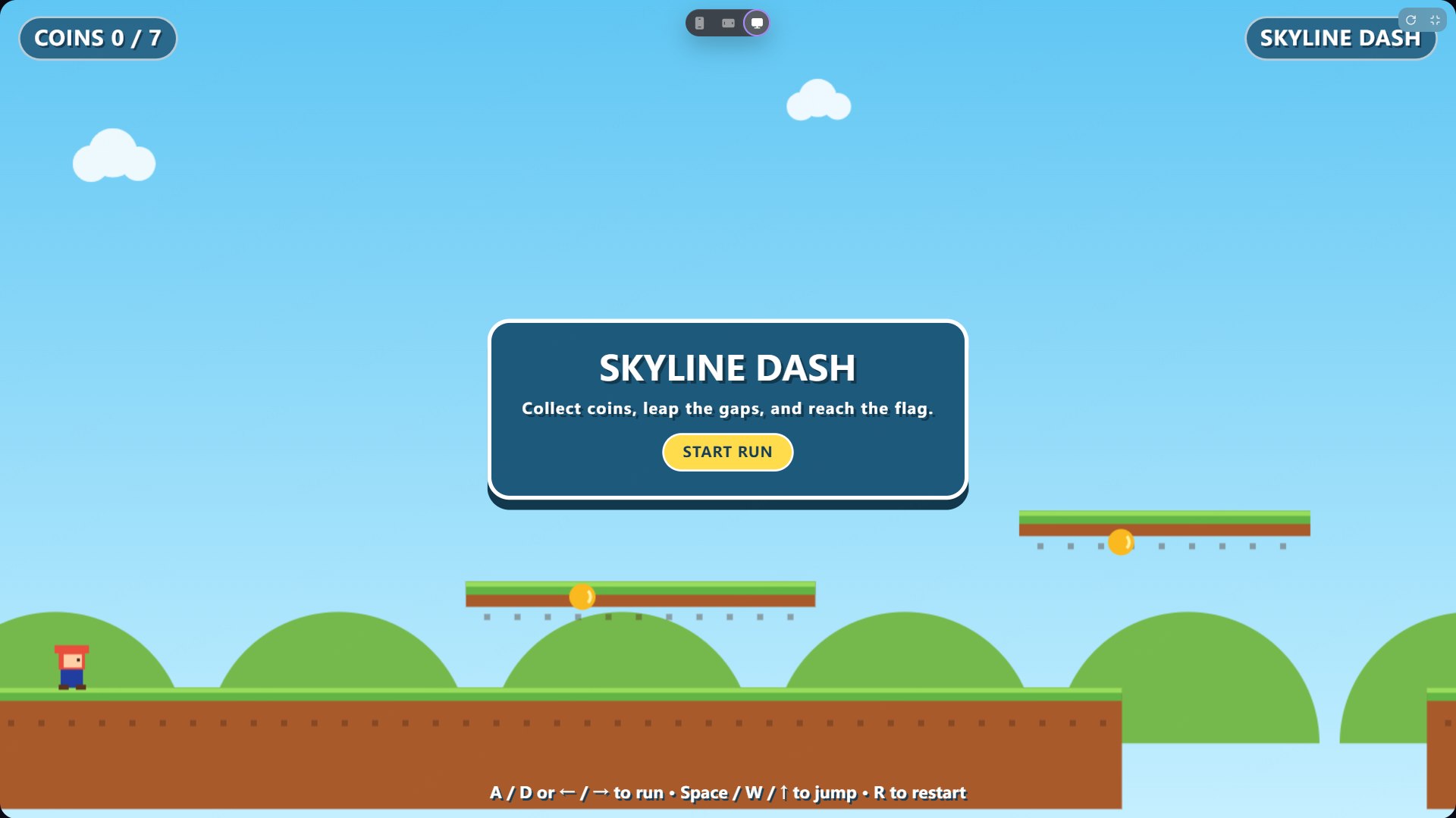
A 2D game generated by Combos AI
The result was a game called Skyline Dash. It had a clear objective: collect seven coins, jump across gaps, and reach the flag. The interface showed the coin count, the game title, a start button, keyboard controls, and a restart shortcut. Most importantly, I could actually play it.
The game also avoided copying Mario directly. It used a small generic platform character, green platforms, hills, clouds, and collectible coins. That made the output feel recognizable as a classic platformer without reproducing Nintendo's exact character art.
However, the visual result was very basic. The character was tiny and minimally detailed. The platforms and background used simple shapes, and the scene had little depth or visual personality. There was also no music in the generated version. The mechanics were enough to demonstrate the idea, but the presentation did not create the feeling of a distinctive game world.
This is the central result of my Combos AI review: it succeeded at making the prompt playable, but not at turning such a short prompt into a polished game. That is still useful if your goal is to test movement, collectibles, gaps, and a win condition. It is less useful if your priority is immediately producing attractive footage, a memorable character, or a game that feels ready for an audience.
Combos AI Features That Matter Most
Prompt-to-Playable Game Generation
Combos does not stop at code suggestions or design ideas. The main workflow produces a game you can open and play in the browser. For a beginner, this shortens the distance between an idea and the first useful test.
The trade-off is control. A short prompt leaves many decisions to the AI, and the system may choose a generic art direction or shallow version of the mechanic. Clear prompts should define the player action, obstacles, progression, fail state, win condition, and anything that must not be added.
Desktop and Mobile Selection
Choosing the platform before creation is one of Combos' clearest advantages. A desktop platformer can prioritize keyboard controls and a wide layout, while a mobile game needs touch input, larger interface elements, and a different use of screen space.
This early choice does not guarantee perfect mobile performance, but it gives the AI useful context before the game is built. You should still test the published game on a real phone rather than trusting the preview alone.
Publishing and Sharing
Combos lets you publish a generated game and share it through a link. That is valuable for showing a prototype to friends, collecting early feedback, or checking whether players understand the controls without a long explanation.
Fast sharing is also where tools like Combos make more sense than a traditional engine for very early ideas. You are not configuring hosting or packaging a build just to find out whether one jump, puzzle, or progression loop is interesting.
2D and 3D Game Creation
Combos is not limited to 2D. Its official 3D game maker documentation says users can start with templates such as a 3D platformer, generate a world from text, adjust terrain and objects in a visual editor, and publish the result as a shareable game.
I did not test a 3D project for this review, so I cannot say that its 3D output reaches the same quality or reliability as its marketing examples. The support is real at the product level, but the practical quality of a generated 3D game still needs a separate hands-on test.
Free Credits for New Users
You can register and receive free credits to try Combos before paying. That lowers the risk for someone who only wants to test one idea. Combos has changed its credit and subscription system before, so I would avoid choosing it based on an old article that lists a fixed number of daily credits.
What Users Say About the Real Experience of Using Combos Fun
The most useful community feedback is not that Combos can produce a playable prototype; that part is easy to demonstrate. The more difficult question is what happens after the first version.
In the Combos-focused Reddit community, one creator said a rough idle-game prototype became playable quickly, but its upgrade costs, prestige loop, and offline progression still required manual balancing. Another user described a workflow built around getting something rough but playable before deciding whether to rebuild it in a traditional engine. These are individual reports from a small product-focused community, not independent large-scale satisfaction data, but they match the limitation visible in my own test: speed is strongest at the prototype stage.
A separate Combos community discussion warned that AI-generated prototypes can look complete because they already have sprites, menus, collectibles, and a win condition, while still lacking tension, progression, or meaningful choices. The surface may arrive before the deeper game design.
This does not make Combos unsuccessful. A rough prototype has done its job if it exposes a weak jump, dull level, confusing rule, or empty progression loop before you spend weeks developing it. The problem begins when creators mistake a generated first version for a finished game.
Combos AI Pros and Cons
 What I Like
 Where It Falls Short
Combos AI vs SoonLab of Game Creation
Combos and SoonLab solve the same basic problem: both let registered users spend free starting credits to turn a text prompt into a playable game, then publish and share the result online. The difference became clearer when I gave both tools the same short 2D platformer prompt.
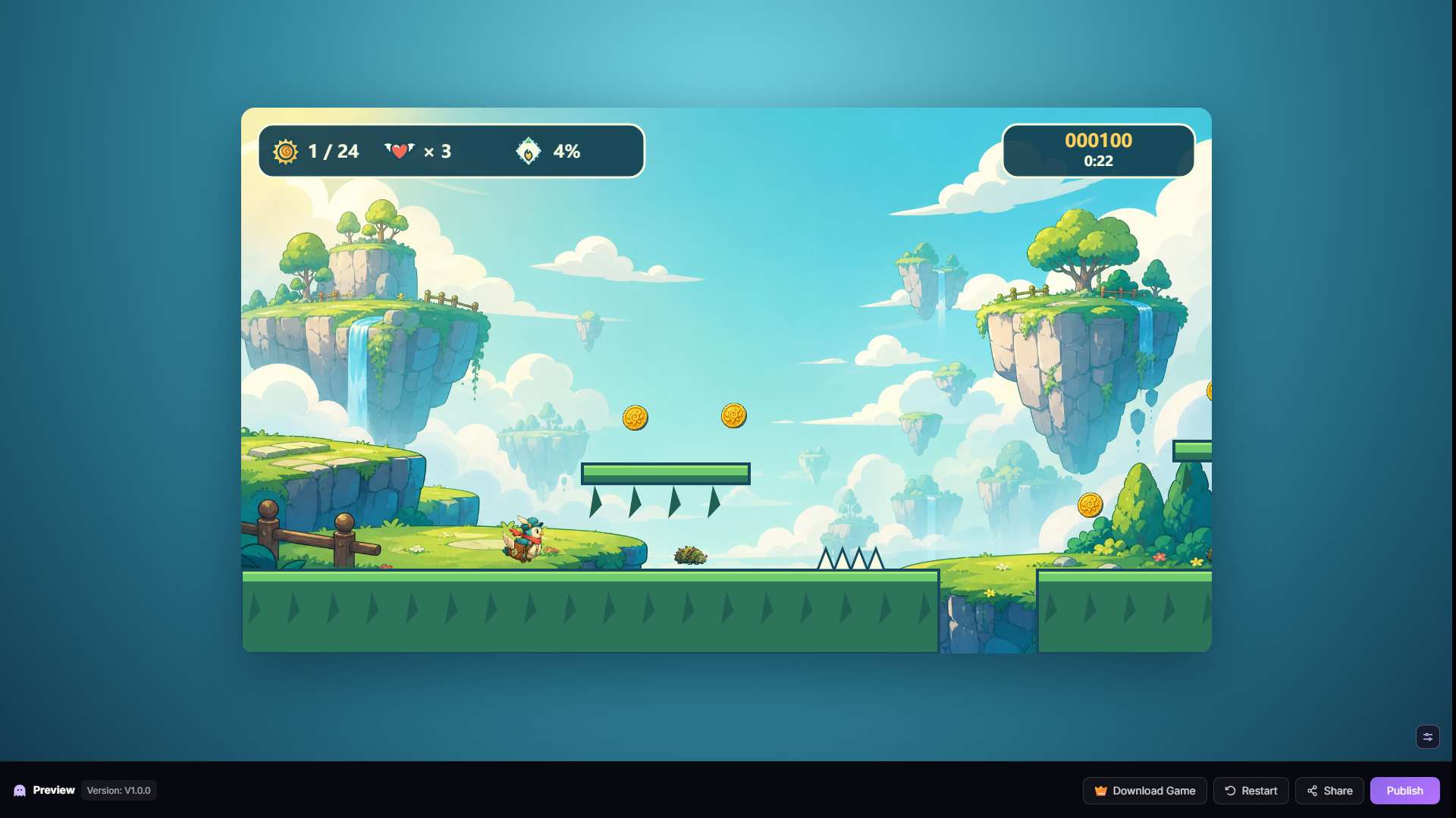
A 2D game generated by SoonLab
| Comparison | Combos AI | SoonLab |
|---|---|---|
| Test prompt | Create a 2D platformer game about Super Mario | The same prompt |
| Observed generation time | About 10 minutes | About 15 minutes |
| Playable result | Yes | Yes |
| Visual result in this test | Simple character, platforms, and background | More detailed character, layered environment, richer HUD, and stronger visual consistency |
| Platform planning | Choose mobile or PC before creation | Supports browser games with mobile optimization |
| 2D and 3D | Officially supports both; only 2D tested here | Supports both 2D and 3D |
| Publish and share | Yes | Yes |
| Free trial access | Yes | Yes |
Combos was faster in this single test. SoonLab took about five minutes longer, but the visual difference was substantial. The SoonLab version had a more detailed playable character, a layered fantasy environment, decorative scenery, more developed interface elements, and a clearer sense of art direction. It looked closer to a game someone might want to keep refining rather than a temporary mechanics demo.
This does not mean SoonLab will always take 15 minutes or always produce the better result. AI generation varies, and neither platform should be judged from one prompt alone. But if your priority is the fastest possible first prototype, Combos made the stronger case here. If you care more about the visual quality of the first playable build, SoonLab produced the better result in this comparison.
You can use SoonLab's 2D game maker to test a similar platformer idea, or start with the AI platformer game maker if you want more guidance on controls, goals, obstacles, and level structure.
Who Should Use Combos AI?
Combos is a good fit for beginners who want the satisfaction of playing an idea without first learning an engine. It also makes sense for creators who need a rough prototype for a pitch, a classroom exercise, a small social game, or an early mechanics test.
I would be more cautious if your main goal is a visually distinctive game, deep progression, carefully tuned difficulty, or a commercial project that needs reliable control over every system. Combos may help you discover the shape of that project, but the generated version should be treated as a beginning rather than the final production workflow.
How to Get a Better Result from Combos Fun
Do not rely on a broad reference such as “make a Mario game.” Describe what actually creates the experience. For a platformer, define the movement, jump behavior, collectibles, hazards, camera, level length, visual style, sound, win condition, and target device.
A better starting prompt would be:
Create a colorful 2D side-scrolling platformer for desktop. The player controls an original fox adventurer who can run and jump. Build one short level with moving platforms, spike hazards, three enemy types, 20 collectible coins, checkpoints, and a goal portal. Use a hand-painted fantasy style with layered backgrounds, clear animations, sound effects, and upbeat background music. The player wins by reaching the portal and loses after three hits. Do not use copyrighted characters, logos, or level designs.
After generation, test one full run before asking for more features. Fix the largest problem first: unclear controls, a bad jump, an impossible gap, missing feedback, or a weak objective. Small, focused revisions are easier to judge than asking the AI to redesign the entire game in one follow-up prompt. If you need more starting points, these AI game prompt examples show how to describe mechanics and win conditions more clearly.
FAQs About Combos Fun
Is Combos AI free?
Combos gives registered users free credits to try game creation. Continued generation and editing may require more credits or a paid plan. Check the live pricing page because its credit system has changed over time.
Can Combos AI create 3D games?
Yes. Combos officially supports 3D game creation from text, 3D templates, visual scene editing, and online publishing. This review tested its 2D platformer workflow, not the quality of its 3D output.
Do I need coding experience to use Combos?
No. You can generate and revise a game through prompts and visual tools. Game design decisions still matter, especially when you need to improve balance, progression, controls, and player feedback.
Can I publish and share a Combos game?
Yes. After creating a game, you can publish it online and share the playable result with other people.
Is Combos better than SoonLab?
Combos generated the tested 2D platformer faster, while SoonLab produced a much more detailed and visually polished result from the same prompt. Choose Combos when rapid prototyping matters most. Choose SoonLab when you want the first playable version to have stronger artwork and presentation.
Conclusion
Combos AI is worth trying as a fast, low-barrier prototype tool. It did what the core product promise suggests in my test: a short sentence became a working game that I could play, publish, and share. The platform choice before generation is thoughtful, and official 2D and 3D support gives creators room to experiment.
The limitation is quality, not basic functionality. My platformer worked, but its art was generic and it had no music. Community experiences point to the same broader lesson: AI can expose whether a game idea has potential, but it does not automatically understand balance, progression, depth, or polish.
Try Combos if you want the quickest route to a rough playable idea. If you are willing to wait a little longer for a more visually developed first result, you can create a playable game with SoonLab and compare the experience for yourself.