
Claude Opus 5 arrived with some of the most impressive AI-generated game demos I have seen so far: a custom-coded browser FPS, a Godot photography sandbox built largely in one day, and a short 3D horror experience.
Opus 5 is worth using as a game-development agent, especially for prototypes, difficult mechanics, debugging, and multi-file implementation. It is not yet a reliable one-prompt game studio. Its biggest improvement is not that it writes more code. It is that it can keep working: inspect a project, implement a feature, run it, observe the result, fix problems, and continue with less human guidance.
That difference makes Opus 5 genuinely useful to game developers.
What Makes Opus 5 Different for Game Development?
Most coding models can generate a player controller or simple JavaScript game. Opus 5 becomes more useful when one feature crosses input, animation, UI, enemy logic, saved data, and scene files. Its official documentation emphasizes long-running, multi-file work completed without placeholders.
Four features matter most for game development:
- Agentic tool use: In Claude Code, Opus 5 can read the repository, edit files, run the project, inspect errors, and iterate instead of only returning code for you to paste.
- Visual verification: It can analyze screenshots and compare the result with a reference or design requirement. This is useful for UI, camera position, layout, effects, and scene composition.
- A 1M-token context window: It can keep more scripts, scenes, and project rules in context.
- Adjustable effort: Developers can use lower effort for routine work and higher effort for architecture, difficult bugs, or multi-system features.
Visual verification is the most important. Game code can run correctly while the result looks broken. An agent that can see an off-screen HUD, bad camera angle, or missing effect has a better chance of delivering a usable feature.
In an official FreeCAD task, Opus 5 lacked a normal way to inspect a reference drawing, so it built a computer-vision workflow and reconstructed the object. This was not a game test, but it demonstrates useful visual problem-solving.
How Good Are the Opus 5 Game Demos?
The launch-week demos show better first-pass quality, but not finished games.
The One-Shot Browser FPS
Matt Shumer shared a first-person shooter generated by Opus 5 and said that everything in the demo was custom code with no external assets. He later linked the repository.
Movement, weapons, enemies, UI, procedural visuals, and effects work together, making it a strong browser prototype. However, community developers noted glitches and questioned how its architecture, balance, and controls would survive expansion. It proves that Opus 5 can create a rich starting point, not a shippable FPS.
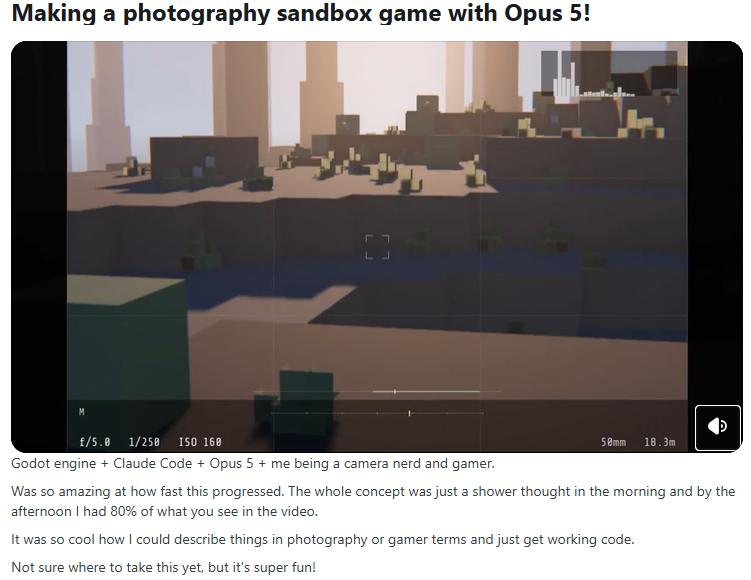
The Godot Photography Sandbox
A developer used Godot, Claude Code, and Opus 5 to build a photography sandbox. The creator said roughly 80% of the shown result was built between the morning idea and that afternoon.
This is more useful than a pure one-shot claim. The creator supplied photography knowledge and design direction; Opus 5 translated them into working systems. The voxel style also exposed a limitation: Opus 5 accelerated implementation but did not solve the custom 3D asset pipeline.
The Small Horror Game
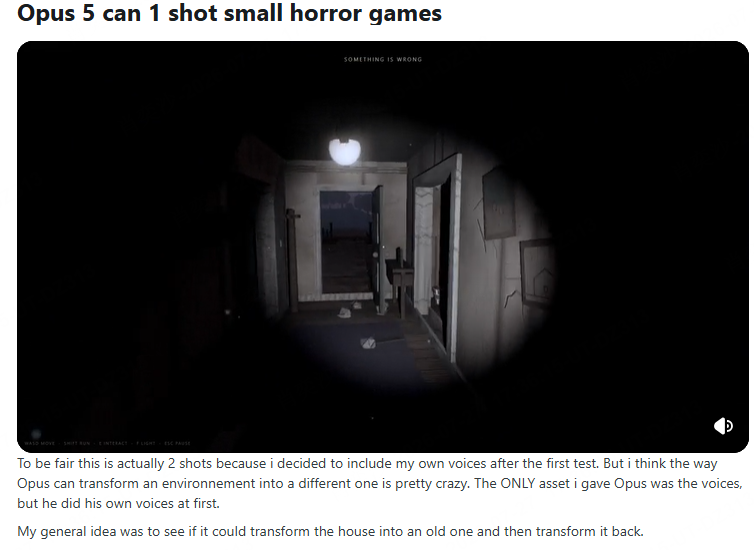
A detailed prompt produced a short horror experience with an explorable house, dialogue, two world states, timed events, and a demon chase.
It coordinated triggers, environmental changes, dialogue, and a complete short sequence. The creator disclosed that ElevenLabs generated the voices—a reminder that strong AI game workflows often combine separate coding, image, audio, and 3D tools.
Where Opus 5 Can Actually Help Game Developers
1. Building a Playable Prototype
Give Opus 5 a small loop—move, fight, collect, survive, restart—and it can build enough to test whether the idea deserves more development. Browser games are its strongest showcase because gameplay and procedural visuals can both be generated in code.
2. Implementing Features Across a Real Project
More valuable than one-shot generation is adding an inventory, enemy state machine, upgrade screen, save system, or quest flow across an existing project. The large context helps only when the developer provides clear rules and boundaries.
3. Debugging Difficult Interactions
Because it can inspect code, logs, tests, and screenshots together, I would use it for state bugs, scene transitions, UI and gameplay conflicts, save-data problems, and restart failures.
4. Recreating UI or Visual References
Vision and screenshot feedback can help reproduce a HUD, menu, camera composition, lighting direction, or effect. Its value drops sharply if it cannot run and inspect the game.
Where I Would Not Rely on Opus 5
I would not let it decide whether a game is fun. Opus 5 can implement movement, combat, or enemies, but game feel depends on timing, responsiveness, feedback, difficulty, and repeated human playtesting.
I would not treat its first architecture as production-ready. Expanding one-shot code may expose tightly coupled systems and performance problems.
Procedural geometry and effects can look impressive in a video, but consistent characters, environments, rigging, audio, and visual identity still need other tools and human direction.
Finally, Opus 5 can be overly proactive. Some early users reported that it read unrelated files or made more changes than requested. In a game repository, that means every task should define allowed files, forbidden changes, and when the model must stop for approval.
Is Claude Opus 5 Worth the Cost?
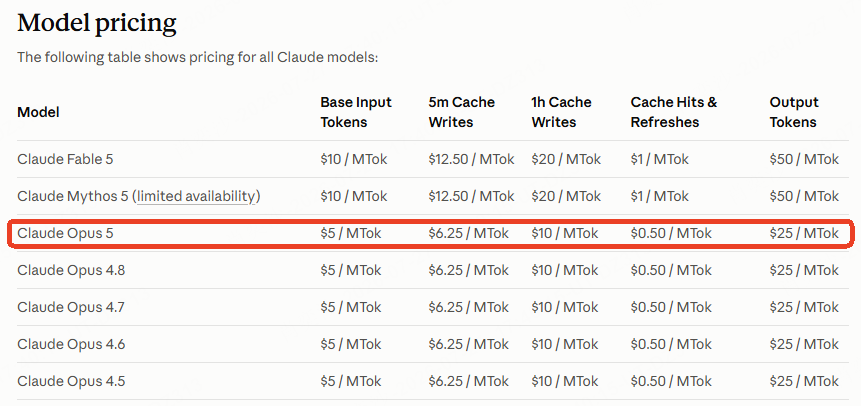
Opus 5 costs $5 per million input tokens and $25 per million output tokens—half the standard Fable 5 price, but more than Sonnet 5.
I would use it when failure is expensive: the first vertical slice, system design, difficult debugging, or a feature spanning several systems. A cheaper model is enough for repetitive edits after the solution is clear.
For an indie developer with an existing project, it offers a strong balance of capability and cost. Beginners should remember that Claude Code still requires a repository, engine, and development environment.
How I Would Use Opus 5 to Build a Game
I would not start with “make me a complete RPG.” I would use this workflow:
- Define one vertical slice. Specify the controls, core loop, win condition, failure condition, and expected play time.
- Provide the engine context. Include the exact engine version, project structure, coding rules, run command, and target platform.
- Set strict boundaries. List the files it may change and require approval before adding dependencies or changing architecture.
- Give testable requirements. Describe observable behavior instead of asking it to make the game “fun” or “polished.”
- Require a build–run–inspect–fix loop. Let it run the game, read errors, capture screenshots, and correct the largest problems.
- Playtest the result yourself. Use Opus 5 to implement the changes, but keep decisions about controls, difficulty, pacing, and style with the developer.
A useful instruction to add is:
Build the smallest complete version first. Run it, test every win, loss, and restart state, inspect screenshots for visual problems, and fix failures before adding more content. Stop and ask before changing dependencies or project-wide architecture.
Final Verdict
Claude Opus 5 is not valuable because it can produce another small game from one prompt. It is valuable because it can take more responsibility for the development loop.
It can understand a larger project, work across files, inspect visual output, find bugs, and continue until a scoped feature works. It is worth trying if you use Godot, Unity, Unreal, or a web stack and can review what it builds. It does not replace game design, playtesting, original art, or production engineering.
My practical verdict is simple: use Opus 5 to reach a strong playable first version faster, then treat that version as the beginning of development—not the end.
If you want to compare it with other models, read our guide to the best LLMs for game development. If you prefer a simpler prompt-to-play workflow without setting up a repository or engine, you can create a browser game directly with AI game maker SoonLab.